Start by choosing the quietest recording space you can, and consistently place the microphone close to each performer. RØDE recommends close-miking, but a lavalier microphone won’t treat room reverberation. A wired lavalier suits performers who stay in one place and have a compatible recording input. Wireless gives you more freedom to move, but you’ll need to check the complete system and frequency variant. If performers remain still, a microphone on a stand is also worth comparing.
Who is this option for?
Creator recording in a reverberant room
You want to record clear dialogue without an acoustically treated room. So, consider more than just the microphone: think about its placement, where you record and simple ways to reduce reflections. RØDE offers advice on positioning lavaliers and includes reducing reflections as part of recording preparation.
Director working with several performers
You want to be able to control voices individually during scenes. Check whether the complete recording chain provides enough microphones, inputs and separate recording tracks; the number of lavalier microphones alone doesn’t tell you how many tracks you can record.
Performer moving around during a scene
You want the freedom to move, without clothing or a cable rubbing audibly against the microphone. Shure explains that contact between clothing and the capsule or cable can cause handling noise. For wireless recording, you’ll also need to check that the frequency variant is suitable for your location.
What should you look for when buying?
Wired lavalier microphone
Suitable when: performers stay in one place and you can route the cable safely.
Consider: check your recorder’s input and power requirements; the cable may restrict movement or pick up handling noise.
Wireless lavalier system
Suitable when: performers move around the room and a visible or long cable would be impractical.
Consider: a standalone lavalier isn’t a complete wireless system; check that the components work together and that the frequency conditions are right for your recording location.
Microphone on a stand
Suitable when: performers stay in place and you want to avoid attaching a microphone to their clothing.
Consider: performers need to maintain a consistent speaking position; compare a short test recording with one made using a lavalier.
| What to consider |
What should you check? |
Who is this important for? |
| Clarity and reverberation |
Make a test recording in the same spot; compare the voice, reflections and background noise. Test the microphone placement for each performer. |
If I’m recording dialogue in an untreated room, I want to hear how the placement and the room affect the voice. Around 33% of consumers say clarity is their main concern. |
| Separate voices |
Count the performers speaking at the same time and check how many separate tracks the recorder or receiver can record. |
If I want to adjust each voice separately when editing scenes with several performers, I’ll check the whole recording chain. Around 27% of consumers prioritise being able to record voices separately. |
| Movement and clothing noise |
Test the attachment with the costume during a scene; for wireless systems, also check the exact system variant and location. |
If performers move during a scene, I want freedom of movement without audible rubbing or connection problems. Around 20% of consumers say freedom of movement is their main concern. |
| Connection and complete system |
Check the model, connector, compatible input and power requirements; confirm whether the transmitter and receiver are included in the system. |
If I want to use my existing equipment, I want to know in advance whether the microphone will connect to it and which components I’ll need. Around 20% of consumers give connection and the complete recording chain top priority. |
Common pitfalls
-
Mistaking a lavalier for acoustic treatment
Recording close to the source can help, but it won’t replace reducing distracting background noise and reflections. RØDE highlights both as considerations for recording speech.
Improve your recording space first and compare short test recordings before choosing a microphone based on promises of clear sound.
Allow extra time for test recordings and adjusting your recording space.
-
Buying a standalone microphone as if it were a complete system
Microphones can have different connectors and power requirements. A plug that physically fits doesn’t guarantee that the input is compatible.
Write down the exact models of your recorder, interface or bodypack, then check the full connection and power requirements before choosing.
Depending on the microphone you choose, your recording chain may also need a compatible input, interface, transmitter, receiver or power supply.
-
Checking only the frequency band for a wireless system
The Dutch Authority for Digital Infrastructure (RDI) lists both licence-exempt frequency bands and bands that require a licence. The available UHF frequency range can also vary by location.
Check the exact frequency variant and the applicable conditions for the place where you’re recording.
Allow time to check the frequency variant and location; some bands may require a licence.
-
Hiding a microphone under a costume without testing movement
According to Shure, contact between clothing and the capsule or cable can cause audible handling noise.
Test the attachment during a costume rehearsal, then listen back while the performer moves through the scene.
An unsuitable attachment may mean you need extra test recordings or different mounting materials.
Brands to consider
RØDE
The Lavalier GO and Lavalier II are wired models for recording setups with compatible 3.5 mm connections.
- RØDE specifies a 3.5 mm TRS connector and plug-in power for the Lavalier GO. The Lavalier II has a locking 3.5 mm connector and comes with mounting accessories.
- Check that the connection and power requirements of each model match your recording equipment; the specifications don’t tell you how a model will sound in every reverberant room.
Shure
The MX183, MX184 and MX185 range offers wired lavaliers with different polar patterns.
- According to Shure’s specifications, the supercardioid MX184 has a narrower pickup angle and rejects more ambient noise than the MX183.
- That doesn’t prove that every Shure model or microphone placement will sound better; also check the connection and power requirements of the version you’re considering.
Sennheiser
The ME 2 is designed for specified bodypacks, while the EW-D ME2 is an example of a complete wireless system.
- Sennheiser describes the ME 2 as an omnidirectional lavalier microphone for compatible bodypacks.
- For a wireless system, check the frequency variant and the conditions for use at your recording location in the Netherlands.
AKG
The C417 PP and C417 L are wired versions with different connectors.
- AKG specifies a standard XLR connector for the C417 PP and a three-pin mini XLR connector for the C417 L, which is designed for compatible bodypacks.
- Check which version suits your existing recording setup; the product’s intended use isn’t an independent assessment of room reverberation.
Deity
The W.Lav Pro is a wired lavalier with a locking 3.5 mm connector.
- Deity specifies an omnidirectional capsule and a 1.8 m cable for this version.
- A matching plug shape alone doesn’t prove that the power and wiring will work with every transmitter or recorder.
Joybuy products
These wireless clip-on microphones are options if you want to record performers without long microphone cables. Before use, check that the connection is compatible with your recording equipment. For wireless recording, also check the frequency variant and the conditions for your recording location in the Netherlands.
 No image available
DJI Mic 3 (1 TX + 1 RX)
An option if you’re looking for a wireless microphone system for a phone, camera or Android device; the product name specifies one transmitter and one receiver.
Check that the receiver connection is compatible with your recorder and that the system offers enough separate recording tracks for your scene.
View at Joybuy
 No image available
Verbex K31Pro-Black Dual Microphone
An option if you’re looking for a wireless clip-on system with two microphones for several performers.
The product name lists compatibility with iOS and Type-C interfaces. Check your recording device’s connection and whether the complete system can record the voices separately.
View at Joybuy
 No image available
Verbex K9-Black Type-C
An option if you’re looking for a wireless clip-on microphone with a Type-C interface.
Check that the Type-C connection is compatible with your recording device and that your recorder can capture the separate voices you want.
View at Joybuy
 No image available
Verbex K9-Black Single Mic iOS
An option if you’re looking for a single wireless clip-on microphone with an iOS interface.
Check that the interface is compatible with your recording device and that one microphone suits the number of performers speaking at the same time.
View at Joybuy
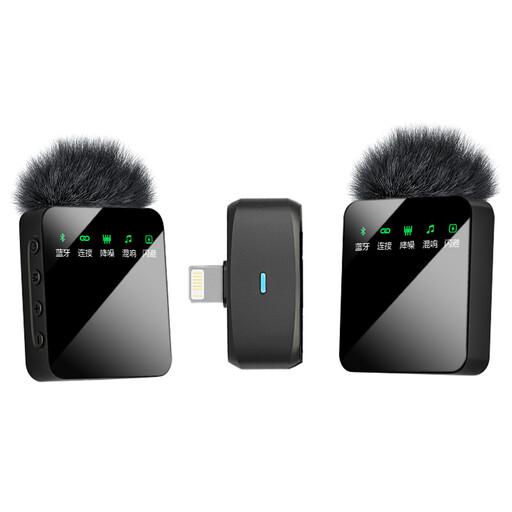 No image available
Verbex ST5 Dual Mic iOS Interface
An option if you’re looking for a wireless system with two microphones for recording.
The product name lists an iOS interface. Check that it’s compatible with your recorder and that the system provides separate recording tracks for the voices.
View at Joybuy
Frequently asked questions
Is an omnidirectional lavalier always the best choice in a reverberant room?
No. The polar pattern alone doesn’t determine whether a microphone is right for your room and placement. Shure describes the supercardioid MX184 as having a narrower pickup angle and rejecting more ambient noise than the MX183. Also test how the recording sounds when a performer turns their head. Where possible, reduce distracting noise and reflections too.
How can you attach a lavalier to reduce clothing noise?
Test the attachment while the performer moves around in costume, then listen back for handling noise. Shure explains that friction between clothing and the capsule or cable can cause audible interference. The best cable routing and attachment can vary depending on the garment.
Do you need a licence for a wireless lavalier microphone in the Netherlands?
Not for every frequency band. The Dutch Authority for Digital Infrastructure lists licence-exempt bands with conditions, as well as bands that require a licence. The available UHF frequency range can vary by location, so check the exact system and recording location.
What should you check before buying a standalone lavalier?
Check whether you’re buying a standalone microphone or a complete system, and whether its connection and power requirements are compatible with your recorder, interface or bodypack. For wireless systems, the microphone, transmitter and receiver must also work together; a matching plug alone doesn’t guarantee compatibility.


