Start with a lavalier microphone that you can position close to your mouth and that is confirmed to work with your recording device. This can help your voice stand out more clearly from sounds further away, but it won’t remove background noise completely. A wired model suits practising in one place; a wireless system gives you more freedom to move, but you’ll need to check what’s included and how it’s powered.
Who is a lavalier microphone suitable for?
Language learner practising in a noisy room
This user wants to hear their own voice without fan noise or housemates overpowering the recording. Positioning the microphone close to your mouth matters more than relying on a promise to remove all noise. Shure and RØDE explain the role of microphone placement when recording speech.
Learner practising with a phone or laptop
This user wants to make short recordings quickly and needs to check that the connection and recording app recognise the external microphone. Sennheiser, Shure and RØDE describe different connections for their specific models.
Learner who moves around
This user wants to speak hands-free without a cable running to the recording device, and is happy to factor in a transmitter-and-receiver system that needs power. Shure discusses the freedom of movement offered by lavalier microphones, while DJI describes its wireless Mic Mini system.
What should you look for?
Wired via USB-C
Suitable if: you mainly practise sitting down with a device that supports the microphone via USB-C.
Trade-off: the cable limits how much you can move around. Also check that your recording app uses the external microphone.
Wired via 3.5 mm TRRS
Suitable if: your phone has a compatible TRRS headset socket or you have a suitable adapter.
Trade-off: a TRRS plug won’t necessarily work with a TRS microphone input, so check that all the components are compatible.
Wireless transmitter and receiver
Suitable if: you want to walk around while practising or stand further away from your phone or computer.
Trade-off: check what’s included, the receiver connection and how the version you choose is charged.
First, find out which connection your device and recording app use. Then choose between practising in one place and having more freedom to move.
| What to consider |
What to look for |
Who should prioritise this? |
| Hearing your voice clearly |
Clip the microphone close to your mouth and make a test recording in the room where you practise. |
If I’m practising in a noisy room, I want to distinguish my voice more clearly from sounds further away. Around 36% of consumers put speech intelligibility first. |
| Connecting to your device |
Check the port, plug type and any adapter you may need, and make sure the recording app uses the external microphone. |
If I want to record with my phone or laptop, my device needs to recognise the microphone. Around 29% of consumers prioritise a connection that works with their device. |
| Listening back to pronunciation details |
Compare the same practice sentence with noise processing switched on and off, if that setting is available. Also check that your clothing isn’t touching the capsule. |
If I want to assess small differences in my pronunciation, I want to hear how my voice sounds with and without processing. Around 21% of consumers prioritise natural-sounding pronunciation playback. |
| Freedom to move |
Decide whether you’ll be walking around while practising. With a wireless set, check the receiver and how it charges. |
If I want to walk around while speaking, I don’t want a cable running to my recording device. Around 14% of consumers put freedom of movement first. |
Common buying mistakes
-
Assuming noise cancellation guarantees clear pronunciation
A noise-cancellation setting doesn’t promise to remove background noise or preserve every detail of your pronunciation. When speech overlaps with unwanted noise, processing can have audible side effects.
Record the same practice sentence with processing switched on and off, then choose the recording that lets you assess the details of your pronunciation most clearly.
-
Confusing plug size with a compatible connection
A microphone with a 3.5 mm TRRS plug won’t necessarily work with the TRS input on a camera or wireless transmitter.
Before buying, check the exact plug type and whether you’ll need a suitable adapter for your set-up.
You may need to carry or buy a compatible adapter, so check whether your set-up requires one.
-
Choosing a wireless set without checking what’s included
Wireless versions can differ in the number of transmitters and receivers, as well as the charging accessories included. DJI also notes that a separate adapter may be needed for a device with a Lightning connection.
Check the exact version, the receiver connection and which charging accessories are included with that set.
If a suitable adapter or charging accessory isn’t included, you may need to arrange one separately.
Brands to compare
Sennheiser
The XS Lav USB-C is a wired option for recording speech with a compatible USB-C device.
- Sennheiser lists a 2 m cable, clip and windscreen for the XS Lav USB-C.
- The omnidirectional capsule won’t remove room noise. Check that your device and recording app recognise the microphone.
Shure
The MVL is designed for mobile devices with a compatible 3.5 mm TRRS connection or a suitable CTIA adapter.
- Shure lists a clip and windscreen as included with the MVL.
- A TRRS connection won’t necessarily work with every camera, computer or wireless transmitter.
RØDE
The smartLav+ is a wired TRRS model; the Lavalier GO has a TRS connection for compatible microphone inputs.
- Checking the full model name and plug type helps you tell the different connection options apart.
- RØDE lists a TRRS-to-TRS adapter for connecting the smartLav+ to a Wireless GO II transmitter. Neither model guarantees that room noise will disappear.
DJI
The Mic Mini is a wireless clip-on system for anyone who wants more freedom to move while speaking.
- DJI describes two levels of active noise cancelling. When practising pronunciation, compare a recording with processing switched on and off for yourself.
- The set configuration, phone compatibility and charging accessories required vary depending on the combination.
IK Multimedia
The iRig Mic Lav is a wired lavalier microphone for mobile use.
- According to IK Multimedia, the combined TRRS port can be used for headphone monitoring or for a second iRig Mic Lav.
- Before relying on monitoring, check that the connection described works with your device.
Joybuy products
These product choices are aimed at wireless practice using a transmitter and receiver. For each version, check the model name, connections and included accessories.
 No image available
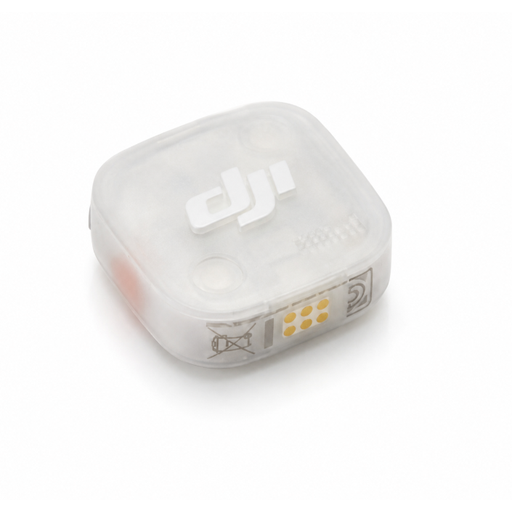
DJI Mic Mini 2S (2 TX + 1 RX + Charging Case)
This set with two transmitters and one receiver is an option if you want to record wirelessly and need both transmitters in the same version.
Bundle, according to the product name: 2 TX, 1 RX and a Charging Case.
View at Joybuy
 No image available
DJI Mic Mini 2S Transmitter
This transmitter may suit a recording set-up if you specifically need a Mic Mini 2S transmitter. Check which other components you already have first.
The product name identifies this item as a transmitter, not a complete set.
View at Joybuy
 No image available
SYNCO P2XT USB-C Wireless Microphone
A wireless microphone with a USB-C connection may suit mobile recording. Check that the receiver is compatible with your device and recording app.
The product name specifies a wireless microphone and USB-C.
View at Joybuy
 No image available
DJI Mic 3 (2 TX + 1 RX + Charging Case)
This wireless set is an option if you’re looking for a version with two transmitters and a receiver. Check that the bundle suits your recording device.
Bundle, according to the product name: 2 TX, 1 RX and a Charging Case.
View at Joybuy
 No image available
Verbex K9-Black Wireless Mini Microphone, Type-C Interface
This wireless lavalier microphone is an option for recording speech with a Type-C connection. Check the connections on your recording device and receiver.
The product name specifies a wireless mini microphone with a Type-C interface.
View at Joybuy
Frequently asked questions
Will a lavalier microphone get rid of noise from housemates?
No, a lavalier microphone won’t remove background noise completely. RØDE explains that placing the microphone close to the sound source can help, so make a test recording in the room where you practise.
How should you position a lavalier microphone when practising pronunciation?
Attach the clip so that the capsule is unobstructed and points towards your voice, without rubbing against your clothing. Test a short sentence with plosive sounds. The supplied windscreen may help reduce bursts of air hitting the microphone.
Will every lavalier microphone with a 3.5 mm plug work with your phone?
No, the plug size alone doesn’t tell you whether the microphone will work. The Shure MVL uses TRRS, while RØDE specifies TRS for the Lavalier GO. Check your port, any adapter you may need and the recording app for your particular set-up.
Can noise cancellation affect a pronunciation recording?
It depends on the processing and the recording. A setting doesn’t guarantee that background noise will disappear without other audible effects. Record the same sentence with processing switched on and off, then compare the details of your pronunciation.
What should you consider if your recording also picks up housemates?
Before sharing a recording, check separately whether it contains identifiable voices of other people. The Dutch Data Protection Authority describes an exception for privately held photos and videos used for personal or household purposes; that guidance alone does not provide a general answer about publishing audio recordings.


