Start with a microphone that can be positioned close to your mouth and has a connection compatible with your recording device. A wired lavalier may be enough if you’ll be sitting down; wireless is mainly useful if you want to move around while practising. Neither will fix the room’s acoustics, so first make a short test recording where you’ll be speaking.
Who is this for?
Language learner practising at home
Mostly records one voice and wants to listen back to words without the room overpowering the recording. A microphone close to the speaker and a test recording are important considerations. Shure explains that a microphone cannot completely separate direct speech from reflections in the room.
Recording on a phone or laptop
Wants to connect the microphone to their own device and needs to check the difference between USB-C, 3.5 mm TRRS and 3.5 mm TRS. Sennheiser and RØDE describe models and connections that vary by product.
Speaker who practises on the move
Wants to speak or move around without a cable. With a wireless set, check that the receiver and connection are compatible with your device, and bear the power requirements and Dutch frequency regulations in mind. DJI and Hollyland offer different versions.
What should you look for in a lavalier microphone?
First choose the connection that works with your recording device, then decide whether a cable will restrict your movement. Before a full practice session, make a short recording to assess the placement and sound in your room.
| What to consider |
What to look for |
Who is this important for? |
| Clarity in the room |
Position the microphone close to your mouth, keep it clear of rustling clothes and listen back to a short test recording. |
If you want to listen back to words and sounds in an untreated room, prioritise voice recording; around 36% of consumers put clarity first. |
| Connection to your device |
Check whether your microphone input requires USB-C, TRRS or TRS, and test the input in your recording app. |
If you want to use the microphone with your own phone or laptop, the right connection is essential; around 29% of consumers prioritise device compatibility. |
| Ease of setup |
Check which components are included with the version you choose, such as the receiver and any adapters. |
If you’re recording one speaker, you don’t want to buy or carry components you don’t need; around 21% of consumers give simplicity top priority. |
| Freedom of movement |
Check the receiver version, power supply and applicable frequency regulations for wireless use in the Netherlands. |
If you want to move around while speaking without a cable between you and your recording device, wireless can be practical; around 14% of consumers prioritise freedom of movement. |
Common buying mistakes
-
Confusing noise cancellation with an acoustically treated room
A microphone won’t change the room’s acoustics. Noise-cancellation features also vary by product and, on their own, don’t prove how natural a pronunciation recording will sound.
First position the microphone close enough to the speaker, then make a short practice recording. If the model has noise cancellation, compare the recording with the feature switched on and off.
-
Assuming all 3.5 mm lavaliers use the same connection
TRS and TRRS aren’t automatically interchangeable. For the Lavalier II, RØDE specifies a TRS-to-TRRS adapter for compatible mobile TRRS inputs.
Before choosing a model, check the plug type, your device’s port and the microphone input used by your recording app.
-
Choosing a wireless set without checking the version
Hollyland lists USB-C, Lightning and camera versions among the options for the LARK M2. Wireless equipment uses radio spectrum, and regulations can differ by frequency.
Check the receiver and connection for the exact set, and find out which Dutch frequency regulations apply. The Dutch Authority for Digital Infrastructure (RDI) states that some frequency bands require a licence.
Brands to consider
Sennheiser
Offers wired XS Lav versions with different connections.
- According to the product specifications, the XS Lav USB-C and XS Lav Mobile have an omnidirectional capsule and a 2 m cable.
- The plugs differ: one version has USB-C, while the other has 3.5 mm TRRS. Also check that your device and recording app support the microphone.
RØDE
Offers the Lavalier II, among other products, and provides guidance on positioning and connections.
- RØDE recommends positioning the microphone around 20–30 cm from your mouth and avoiding contact with rustling clothes.
- For the Lavalier II, RØDE specifies a TRS-to-TRRS adapter for compatible mobile TRRS inputs; a suitable port adapter may also be needed for USB-C or Lightning. This doesn’t automatically apply to every model from the brand.
DJI
The Mic Mini is a wireless clip-on system for anyone looking for a transmitter and receiver.
- DJI lists two adjustable levels of noise cancellation and a receiver that can pair with two transmitters.
- These specifications come from the manufacturer and don’t show how a setting will reproduce the sounds in a pronunciation practice recording.
Hollyland
The LARK M2 is a wireless clip-on system available in different versions, including mobile receivers.
- Hollyland lists separate Lightning, USB-C and camera versions, as well as a 9 g transmitter.
- Check which version you’re choosing. A manufacturer’s noise-cancellation claim doesn’t, by itself, determine how a specific pronunciation recording will sound.
Joybuy products for wireless practice
These Joybuy products are wireless lavalier microphones. Before buying, check which connection and receiver are compatible with your recording device, and which frequency regulations apply to the version you choose.
 No image available
Verbex K9-Black wireless lavalier microphone with Type-C interface
The wireless version may suit a practice session where you want to speak without a cable; check that the Type-C interface and recording app work with your device.
The product name specifies wireless operation and a Type-C interface.
Before using it in the Netherlands, check the frequency and regulations for this version.
View product
 No image available
Verbex K9-Black single microphone, wireless iOS version
The title describes a wireless microphone for an iOS version; check the receiver connection and that it works with your device and recording app.
The product name specifies a single microphone and an iOS interface.
Before using it in the Netherlands, check the frequency and regulations for this version.
View product
 No image available
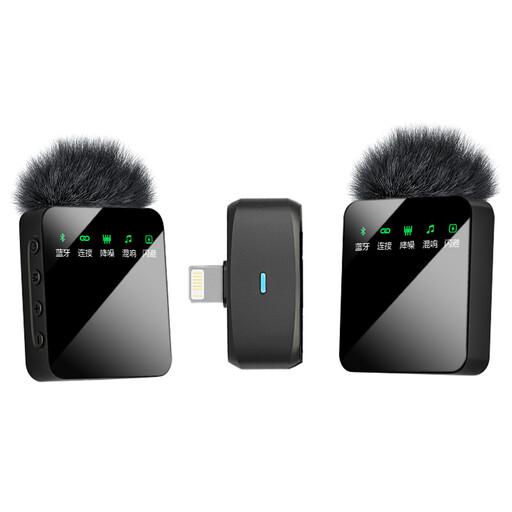
Verbex ST5 dual microphone, wireless iOS version
The title specifies two microphones and an iOS interface; check that this version connects to your recording device and whether you need both microphones for a one-speaker practice session.
The product name specifies a wireless version with two microphones and an iOS interface.
Before using it in the Netherlands, check the frequency and regulations for this version.
View product
 No image available
Verbex ST5 single microphone, wireless universal-interface version
The product name describes a wireless lavalier microphone with a universal interface; check what that connection means for your device before choosing a version.
The product name specifies one microphone and a universal interface.
Before using it in the Netherlands, check the frequency and regulations for this version.
View product
Frequently asked questions
Can a lavalier microphone remove echo from my room?
No. A microphone won’t fix the room’s acoustics and can’t completely separate recorded reflections from direct speech. Position it close to your mouth, avoid it rubbing against your clothes and compare short test recordings from different spots.
How should I position a microphone for pronunciation practice?
As a general positioning guideline, RØDE recommends clipping the microphone to your chest, around 20–30 cm from your mouth and away from rustling clothes. Then listen back to check that both soft and emphasised sounds come through clearly.
Will a lavalier with a 3.5 mm plug connect directly to my phone?
Not necessarily: check whether the plug is TRS or TRRS and which microphone input your phone has. For the RØDE Lavalier II with a TRS output, RØDE specifies a TRS-to-TRRS adapter for compatible mobile TRRS inputs; a suitable port adapter may also be needed for USB-C or Lightning.
Do I need a licence for a wireless lavalier microphone in the Netherlands?
Wireless microphones generally don’t require a licence if the equipment is used within the applicable frequency regulations. The RDI states that some frequency bands do require a licence and that available UHF frequencies can vary by location. So check the frequency used by the specific set.
What are my rights if a microphone bought online doesn’t work properly?
According to the Dutch government, you have a 14-day cooling-off period when buying online from a business. You’re also entitled to a product that works as it should; there’s no fixed statutory warranty period in the Netherlands. If a product is faulty, contact the seller to discuss a solution.


