What should you look for?
Start with the input on your recording device, then consider microphone placement and your recording workflow. Choose wireless mainly if you need to move around while recording.
Wired USB-C
Choose this if: you’re recording with a device that supports a USB-C microphone and want a direct connection. The Sennheiser XS Lav USB-C is one example, with a 2 m cable.
Bear in mind: the cable limits how far you can move. Also check that your device and recording app will use the external microphone.
Wired 3.5 mm TRRS
Choose this if: your device has a compatible 3.5 mm headset input. The Shure MVL and RØDE smartLav+ are TRRS models.
Bear in mind: a phone without a suitable input may need a compatible adapter; TRRS is not the same as TRS.
Wired TRS or recorder
Choose this if: you’re using a recorder or transmitter with a compatible TRS microphone input. RØDE designed the Lavalier GO for a TRS input.
Bear in mind: for a smartphone with a TRRS input, RØDE describes using a TRS-to-TRRS adapter. Also check which port your phone has.
Wireless clip-on microphone
Choose this if: you need to move around while recording or want to use the set for other recordings too.
Bear in mind: check the exact transmitter and receiver combination, connection and applicable Dutch frequency regulations. Wireless won’t eliminate room reverberation.
| What to consider |
What should you check? |
Who is this important for? |
| Clarity in a reverberant room |
Make a test recording in the intended location and listen for reverberation, clothing rustle and plosive sounds. For the MVL, Shure recommends positioning it 15–25 cm from your mouth; this guidance applies to that model. |
I want my voice to remain clear in a reverberant room, so I’ll check the location and microphone distance first. Around 31% of consumers prioritise clarity. |
| Connection to the recording device |
Check the exact device, input, adapter you may need, and whether the app records the external microphone signal. |
I want the microphone to work straight away with my phone or laptop; around 31% of consumers prioritise a connection that suits their device. |
| File format for the phone system |
Check the upload requirements for your platform and test the greeting with a phone call after uploading it. |
I need to provide a greeting that my phone system can play. Around 25% of consumers consider this their main requirement. |
| Freedom of movement |
Check the transmitter and receiver combination, connection and conditions for the frequency being used. |
I want to move freely while recording; around 13% of consumers prioritise this. |
Joybuy products
This selection includes wireless clip-on microphones with different models and connection options. Before buying, check which connection suits your recording device; the Netherlands Authority for Digital Infrastructure notes that some frequency bands require a licence.
 No image available
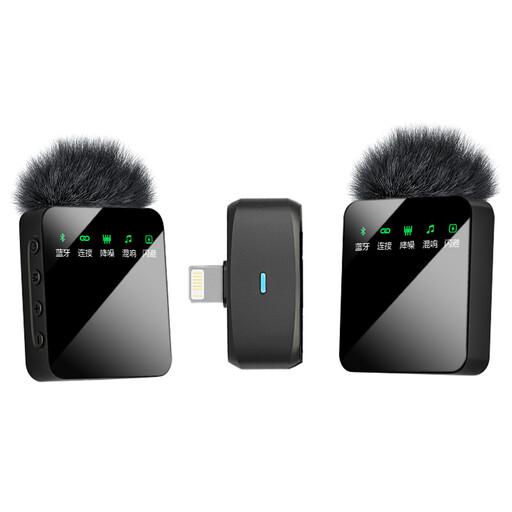
Verbex ST5 wireless dual-mic clip-on microphone, iOS interface
An option if you’re looking for a wireless clip-on microphone with two microphones and an iOS interface.
The product name specifies dual-mic and an iOS interface.
View on Joybuy
 No image available
Verbex K9-Black wireless single-mic clip-on microphone, iOS interface
An option for wireless recording with one microphone, if the listed iOS interface suits your device.
The product name specifies single-mic and an iOS interface.
View on Joybuy
 No image available
Verbex ST5 wireless single-mic clip-on microphone, universal interface
An option if you’re looking for a wireless clip-on microphone with one microphone and want to check the listed interface suits your recording device first.
The product name specifies single-mic and a universal interface.
View on Joybuy
 No image available
Verbex K9-Black wireless mini clip-on microphone, Type-C interface
An option if you’re looking for a wireless clip-on microphone and your recording device supports the listed Type-C interface.
The product name specifies a Type-C interface.
View on Joybuy
 No image available
DJI Mic 3 (1 TX + 1 RX)
A wireless set with one transmitter and one receiver; check which connection and phone adapter you need for your recording device.
The product name specifies 1 TX + 1 RX.
View on Joybuy
Frequently asked questions
How should I position the microphone for a short greeting?
First, make a test recording in a quiet place. For the Shure MVL, the manufacturer recommends attaching it to clothing 15–25 cm from your mouth. Then listen for plosive sounds, clothing rustle and reverberation. This distance is specific to this model and isn’t a universal requirement for all lavalier microphones.
Should I record directly in the file format used by my phone system?
Not necessarily, as long as you can convert the recording to a supported format before uploading it. For a pre-recorded IVR greeting, 3CX specifies PCM-WAV, mono, 8 kHz and 16 bit; Cisco Webex specifies WAV, mono, 8 kHz and 8-bit µ-law for its audio prompts. Follow the requirements for your own platform rather than automatically using those of another system.
What else should I check before buying?
Check whether you need a compatible adapter, a battery or any additional parts for a wireless set. The Dutch Government says consumers generally have a 14-day cooling-off period when buying at a distance; don’t assume this applies to a business purchase.
Do I need a licence to use a wireless lavalier microphone in the Netherlands?
That depends on the frequency used and the conditions that apply to it. The Netherlands Authority for Digital Infrastructure says use is usually licence-exempt, but some frequency bands require a licence. Check the conditions for the specific wireless set.


