If you’re recording a short greeting while staying in one place, start with a wired lavalier microphone that’s confirmed to work with your recording device. A wireless option is worth considering mainly if you want to move around while recording. Either way, a quiet location, a microphone close to your mouth and the input options offered by your phone service are key.
Who is this choice for?
Recording a single, fixed greeting
You’ll be staying in one place and want a simple way to record a single voice. First, check the connection and input method supported by your phone service. For example, Apple Support describes an option to record a greeting directly on supported iPhones.
Recording in a room with audible noise
You’re recording in a rehearsal room where reflections or background noise could affect the speech. Start by considering the location and microphone placement: RØDE recommends positioning the microphone close to the speaker.
Recording while moving around
You want to move while recording, so you’re considering a wireless clip-on microphone. Check that the receiver is compatible with your recording device and find out which frequency requirements apply to the set. The Dutch Authority for Digital Infrastructure publishes information about wireless microphone frequencies in the Netherlands.
What should you look for?
For a short greeting, a suitable signal path matters more than extra features. First, work out how the microphone connects to your device and how your phone service accepts the greeting.
Wired via 3.5 mm TRRS
Choose this if: you’re recording while staying in one place and your device has a suitable TRRS microphone input.
Bear in mind: cable reach and the need for a compatible input. Also check that your recording app uses the external microphone.
Wired via USB-C
Choose this if: you’re using a compatible USB-C device and want a direct wired connection.
Bear in mind: having the right plug doesn’t, by itself, confirm that your device and recording app support the microphone.
Wireless with a receiver
Choose this if: you want to move while recording or avoid a cable between the speaker and recorder.
Bear in mind: pairing, charging, receiver compatibility and the Dutch frequency requirements for the set.
| Consideration |
What to look for |
Who is this important for? |
| Connection |
Check your device’s input, the plug type and, if needed, the adapter. Make a test recording to check whether the external microphone is being used. |
I want to know before buying whether my phone or recorder can use the microphone, so I don’t rely on an incompatible connection. Device compatibility is the main concern for around 33% of consumers. |
| Room noise |
Make a test recording in your chosen location and listen for echo, ventilation noise and rustling from clothing or the cable. |
I’m recording in a rehearsal room and want my voice to be easy to follow despite reflections or background noise. Room noise is the main concern for around 33% of consumers. |
| Simple set-up |
Check whether your service lets you record the greeting directly or accepts an audio file. |
I’m recording one short greeting and don’t want to work out a complicated recording and upload process. A simple set-up is the main priority for around 25% of consumers. |
| Freedom to move |
For a wireless set, check the included receiver, the connection and the applicable frequency requirements. |
I want to be able to move while speaking without a cable getting in the way. Freedom to move is the main concern for around 9% of consumers. |
Common buying mistakes
-
Assuming a 3.5 mm plug guarantees compatibility
TRS and TRRS are different connections. RØDE says the Lavalier GO needs an adapter to work with a standard smartphone TRRS input.
Check the whole connection path, from the microphone to your device and recording app, rather than just the plug diameter. Test that the recording is actually being made with the external microphone.
You may need a suitable adapter if the plug and input don’t match.
-
Expecting noise reduction to silence the room
RØDE notes that background noise and reflections can still affect a recording. Noise processing is no substitute for a quiet place to record.
Record when other activities have stopped, and listen to a test recording made in the place where you plan to record the greeting.
-
Choosing a wireless set without checking what’s included and how it connects
Wireless recording requires a suitable connection between the transmitter, receiver and recording device. The fact that a microphone set is included doesn’t tell you whether it will work with your phone.
Check exactly what’s included in the set and how the receiver connects, and find out which frequency requirements apply to your chosen set.
Brands to compare
RØDE
RØDE offers options for this use, including the smartLav+ with 3.5 mm TRRS and the Lavalier GO with 3.5 mm TRS.
- The difference between TRS and TRRS makes it clear which connection you need to check.
- RØDE says an adapter is needed to use the Lavalier GO with a standard smartphone TRRS input. Check that this connection works with your device.
Shure
Shure presents the MVL as a wired TRRS lavalier microphone for recording speech on mobile devices.
- Shure lists a clip and windscreen, and compatibility with most suitable Android and iOS devices with a TRRS connection, or with an appropriate adapter.
- The stated compatibility is based on the manufacturer’s specifications. Check the connection and test that it works with your device.
Sennheiser
The XS Lav USB-C is a wired option for compatible mobile devices and computers.
- Sennheiser lists a 2 m cable for this model.
- A USB-C plug alone doesn’t confirm that your device and recording app will use the microphone.
DJI
The DJI Mic Mini is a wireless clip-on microphone option for anyone who needs to move around while recording.
- DJI lists versions with receivers and transmitters, and two levels of noise reduction.
- Bundles vary, so check exactly what’s included and how the receiver connects. Noise reduction doesn’t guarantee a recording free from echo or background noise.
Joybuy products
The products below are wireless lavalier or clip-on microphones. For each set, check that the receiver, recording device and app you’re using work together.
 No image available
Lark M2 Wireless USB-C Microphone
Worth considering if you’re looking for a wireless clip-on microphone with a USB-C receiver. Check that it works with your device and recording app.
The product name specifies a wireless microphone and USB-C.
Joybuy
 No image available
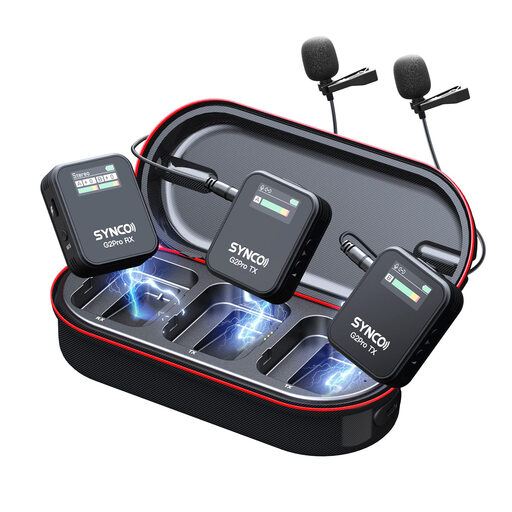
SYNCO G2(A2) Pro Wireless Lavalier Microphone
A wireless lavalier microphone to consider for recording speech. Check that the set and receiver connect to your phone.
The product name specifies a wireless lavalier microphone.
Joybuy
 No image available
DJI Mic 3 (1 TX + 1 RX)
A wireless set with one transmitter and one receiver to consider if you’re looking for a clip-on microphone with a receiver. Check that it connects to your recording device.
The product name specifies one transmitter and one receiver.
Joybuy
 No image available
DJI Mic 3 (2 TX + 1 RX + Charging Case)
Worth considering if you need a wireless set with two transmitters. Check that the receiver works with your recording device.
The product name specifies two transmitters, one receiver and a charging case.
Joybuy
 No image available
Verbex K9-Black Wireless Mini Microphone
A wireless mini microphone to consider if you’re looking for a Type-C connection. Check compatibility with your phone and recording app.
The product name specifies a Type-C interface.
Joybuy
Frequently asked questions
Can you set a recorded audio file as your voicemail greeting directly?
It depends on your phone service. Apple describes an option to record a greeting in the Phone app for supported iPhone voicemail, but this feature isn’t available with every provider or in every region. Zoom Phone also allows MP3 or WAV files smaller than 10 MB to be uploaded in certain circumstances. Check your own service’s instructions before relying on an upload option.
Where should you attach a lavalier microphone in a rehearsal room?
Clip the microphone to your clothing, close to your mouth, and make a test recording to check for rustling from your clothes or the cable. Recording close to the microphone helps balance your voice against the background noise, but a noisy or highly reflective room may still be audible.
Will every 3.5 mm microphone fit your phone?
No, the plug and input need to match. RØDE says the Lavalier GO’s TRS connection requires an adapter for a standard smartphone TRRS input. Also check that your phone has a suitable port and that your recording app uses the external microphone.
Can you use any wireless microphone frequency without a licence in the Netherlands?
No, it depends on the frequency band. The Dutch Authority for Digital Infrastructure publishes the requirements and a list of licence-exempt microphone bands; other bands may require a licence. Check the frequency of the exact set before using it. This radio-frequency issue doesn’t apply to a wired microphone.


