
Interviewer recording two voices
You want to capture both the questions and answers clearly, so you’re comparing a system with two transmitters against two separate microphones.


If both the interviewer and interviewee need to be clearly audible, choose a setup with two microphones or two separate recording channels. A single microphone worn by one speaker won’t automatically capture the other voice just as clearly. Sprekende Geschiedenis recommends using two microphones for two participants. Then choose between a wired microphone, a wireless system or a recorder based on your recording device, how freely you want to move and how you plan to store the recording.
You want to capture both the questions and answers clearly, so you’re comparing a system with two transmitters against two separate microphones.
You want to record a long conversation and are considering battery life, storage and how to check the recorded file.
You want to record with your current device and are checking whether the plug, any required adapter and recording app will work together.
Start by deciding whether both participants need their own microphone. Then check your device’s connection and recording settings.
| What to consider | What should you check? | Who is this important for? |
|---|---|---|
| Recording both voices | Check how many microphones are included and whether you can record both voices together or separately. | As an interviewer, I want both my questions and the answers to be clearly captured; around 36% of consumers prioritise recording both voices. |
| Saving a long conversation | Check the continuous operating time, storage capacity and whether you can play back a test recording. | When recording a long archive interview, I want to avoid discovering afterwards that part of the recording is missing; around 29% of consumers prioritise saving the entire conversation. |
| Connecting to your device | Check the plug or receiver, any required adapter, the recording app and the power requirements. | If I want to use my existing phone, camera or recorder, the device must recognise the microphone as an input; around 21% of consumers start by checking compatibility. |
| A fixed setup | Check the cable length, power requirements and how many microphones you need for the participants. | For a conversation where everyone stays seated at the table, I want a simple setup without unnecessary extras; around 14% of consumers consider this the most important factor. |
With one microphone worn by one participant, the interviewer’s or interviewee’s voice won’t automatically be captured just as clearly. Sprekende Geschiedenis recommends using two microphones when recording two participants.
Before buying, check how many transmitters and microphones are included in the bundle you’ve chosen, and find out how the recording channels work.
Total operating time, including the option to recharge in the case, is not the same as the length of time the system can record continuously.
Check the operating time of the transmitters and receiver under the conditions specified by the manufacturer, and plan a charging break if needed.
A connection such as 3.5mm TRRS does not, by itself, guarantee that a phone, camera or adapter will recognise the microphone as an input.
Check the plug type and microphone input on your recording device, and make a test recording before the interview.
The Wireless Micro Camera Kit is a wireless system with two clip-on transmitters and receivers for a camera and a USB-C smartphone. The Wireless ME is a separate product range.
The Mic Mini is available as a system for conversations with two speakers.
The Zoom F2 is a portable recorder that comes with one lavalier microphone and records to a memory card.
The XS Lav Mobile is a wired lavalier microphone for one speaker, with a 3.5mm TRRS connection.
The BY-M1 is a wired lavalier microphone for setups where a longer cable can be useful.
These product picks focus mainly on wireless microphone systems for interviews around a shared table.
 No image available
The product title lists two transmitters and one receiver, making this suitable for a setup where both participants wear a transmitter.
 No image available
A wireless system could be a good fit if you don’t want a microphone cable between the speaker and receiver at a shared table.
 No image available
The product title lists two microphones and receivers for cameras and smartphones, so you can check whether the connections are compatible with your recording device.
 No image available
The title specifies USB-C; check that this connection is compatible with the device and app you want to use for recording.
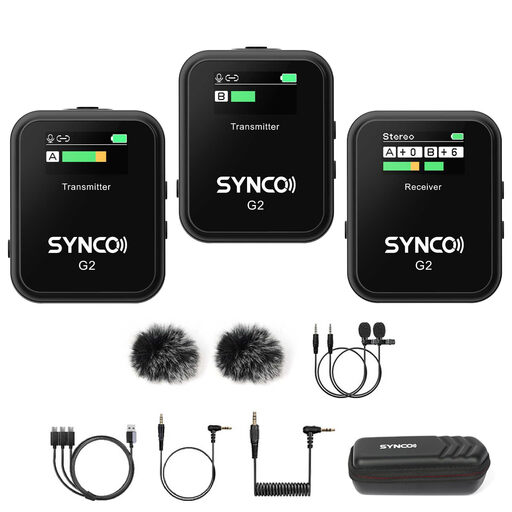 No image available
The product title describes this as a wireless dual-channel system; check how your chosen version connects to your recording device.
Ask both participants to speak, make a short test recording and listen back with headphones. Also check that the recording device is using the external microphone; Sprekende Geschiedenis recommends this as a practical preparation step, not a legal requirement.
Check that the file has been saved before taking down your setup, and keep the original file as your archive master. If you’re using a standalone recorder, you’ll also need to manage the memory card and transfer the file.
For a consumer purchase in the Netherlands, the seller is responsible for the statutory guarantee if the product doesn’t meet the expectations you could reasonably have under normal use. Depending on the circumstances, ACM ConsuWijzer advises that you may be entitled to a repair, replacement or refund. A manufacturer’s guarantee does not replace this statutory right.
Not always: according to the Dutch Data Protection Authority, processing personal data solely for personal or household use falls outside the GDPR. If your processing falls outside that exemption, you need a valid GDPR legal basis, but consent is not the only possible basis. Discuss the recording, storage and any potential reuse with the interviewee in advance; choosing a microphone alone does not determine which legal basis applies to a particular project.