
Interviewer recording two voices
Wants to record the narrator and interviewer hands-free, each on a separate channel. Check how many transmitters and microphones come with the set; RØDE and DJI both describe versions with two transmitters.


Start by deciding whether you want to record one or both interview participants separately, and where you want the audio file to be saved. A wired lavalier microphone suits one speaker and a compatible input; a two-transmitter set can record both participants, while local recording on a transmitter or portable recorder gives you another option. None of these features will automatically eliminate background noise or clothing rustle: check the connection and make a test recording in the room.
Wants to record the narrator and interviewer hands-free, each on a separate channel. Check how many transmitters and microphones come with the set; RØDE and DJI both describe versions with two transmitters.
Prioritises a local recording in case the wireless connection drops out or isn’t used. RØDE describes local recording with Wireless PRO, while Zoom specifies standalone recording with the F2.
Wants a straightforward way to connect a lavalier microphone to an existing device. The microphone and device connectors, and any adapter you may need, must be compatible.
First decide how many voices you want to record separately, then choose whether to record directly to a phone, through a receiver or locally on the speaker. This lets you assess the entire recording chain before choosing a microphone.
Suitable when: one speaker stays mostly in one place and the recording device has a compatible microphone input.
Consider: the cable limits your set-up, and one microphone on the narrator won’t automatically record the interviewer separately.
Suitable when: both the interviewer and narrator need to wear their own microphone or move around during the conversation.
Consider: check the exact version, receiver output and settings. Local recording on a transmitter is a separate feature and won’t automatically apply to the file recorded by the camera.
Suitable when: having a standalone recording on one speaker matters more than receiving a live wireless signal from a distance.
Consider: you’ll need to start the recording and transfer the file later; one recorder on the speaker won’t automatically record two voices separately.
| What to consider | What should you check? | Who is this important for? |
|---|---|---|
| Clarity | Make a test recording in the intended location and listen for speech, clothing rustle and room noise. | If you want the narrator to be easy to understand in a noisy rehearsal room, assess the microphone position in practice first. Around 33% of consumers prioritise clarity above all else. |
| Two voices | Check the number of transmitters and included microphones, and how the receiver sends both voices through. | If both the interviewer and narrator need their own microphone, check exactly what’s included in the set. Around 27% of consumers prioritise recording both voices separately above all else. |
| Keeping the recording | Check whether the model records internally, whether that feature is enabled and how to transfer the files. | If the conversation would be difficult to repeat, check whether there’s a local recording as well as the wireless option. Around 20% of consumers prioritise recording security above all else. |
| Connection and set-up | Compare the plug with the input on your phone, camera or recorder, and check whether you need an adapter. | If you want to use your existing recording device without unnecessary extras, check the complete connection first. Around 20% of consumers prioritise a simple, compatible set-up above all else. |
For the RØDE Wireless PRO, RØDE says 32-bit float recording applies to recordings on the transmitters, not automatically to the file recorded by the camera.
Check which device is capturing the file and test the internal recording feature before the interview.
RØDE lists internal recording for Wireless PRO, but not for the Wireless Micro transmitters. The product line name alone doesn’t tell you whether a set records locally.
Check the full model, the number of transmitters and whether internal recording is specifically included with that version.
The Shure MVL has a 3.5 mm TRRS plug. Your phone or recorder’s input must be compatible, possibly with a suitable CTIA-compatible adapter.
Before buying, compare the microphone connector with the one on your recording device.
The wired MOTIV MVL is an option for one speaker, provided you have a compatible mobile recording input.
Wireless PRO is a two-person set to consider if included lavalier microphones and local recording are important to you.
The F2 combines a lavalier microphone with a portable recorder for a standalone recording on one speaker.
The two-transmitter version of the Mic 2 is an option for interviews where both participants wear a microphone.
LARK MAX is a two-transmitter wireless range to compare for local recording and what’s included in the set.
This selection of Joybuy products includes wired lavalier microphones for use with compatible devices, as well as wireless sets, including versions with two transmitters. Check the exact version of each product and make sure its connection is compatible with your recording device.
 No image available
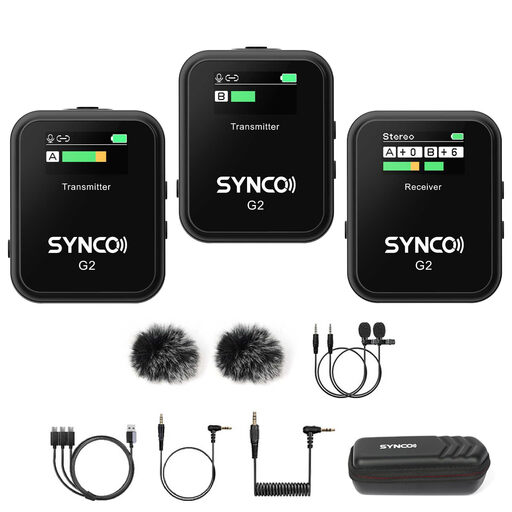
The version with two transmitters and one receiver is an option when both interview participants need their own microphone.
The product name lists two transmitters, one receiver and a charging case.
 No image available
A wireless lavalier option for recording interviews; check that the exact version is compatible with your recording device.
The product name lists 48 kHz/24-bit audio, a 9 g transmitter and a transmission range of up to 300 m.
 No image available
A wired option if you’re looking for a lavalier microphone to use with a smartphone, PC or laptop camera.
Before buying, check that the microphone connector is compatible with the input on your device.
 No image available
The product name describes a wireless dual-channel system; check that the exact version suits the number of voices you want to record.
The product name specifies 2.4G. Check which transmitters and receiver are included with the version you choose.
 No image available
The version with two transmitters may suit you if you want to record two interview participants; also check that the receiver is compatible with your recording device.
The product name lists a USB-C receiver, two transmitters and one receiver.
You’ll need two microphones for two separate microphone positions. With a wireless set, check both the number of transmitters and the microphones included; according to RØDE, Wireless PRO comes with two Lavalier II microphones.
Record a short test conversation in the intended location and listen to both voices, clothing rustle and room noise. Also check that any local recording is running; RØDE says Wireless PRO has both a manual mode and an Always mode.
Compare your recording device’s input with the microphone plug: the Shure MVL uses 3.5 mm TRRS and may need a compatible adapter. If you’re using a recorder or a transmitter with internal recording, also check how to transfer the files; Zoom describes USB transfer for the F2.
It depends on the frequency band you use. The Dutch Authority for Digital Infrastructure (Rijksinspectie Digitale Infrastructuur) lists both frequencies that can be used without a licence and bands that require one. Check the frequency and version of your set; the word ‘wireless’ alone doesn’t tell you whether a licence is needed.
Don’t assume that you can. According to the Dutch Data Protection Authority (Autoriteit Persoonsgegevens), publishing personal data online usually requires consent; the regulator describes a limited exception for purely personal or household use. The legal basis and agreements that apply depend on the intended use and audience, not on the microphone you choose.