Who is this choice relevant to?

Recording in a home with background noise

You want your walking tour script to remain clear even when there’s background noise at home. That’s why positioning the microphone close to your voice and testing it where you’ll record matter more than relying on a standalone noise-cancellation claim.

Recording with a phone

You record directly on a phone and want to check first that the plug, receiver and any adapter are compatible with your device and recording app.

Recording while moving around

You want to walk around while practising or recording. Freedom of movement, a compatible receiver and, potentially, a backup recording may all influence your choice.

What should you look for?

Wired lavalier microphone

A good fit if: you’ll mostly be recording while standing still and your phone or recorder has the right microphone input.

Bear in mind: the cable limits how far you can move; also check whether any adapter supports microphone input.

Wireless clip-on microphone

A good fit if: you want to walk around or gesture while recording, and the set includes the right receiver for your device.

Bear in mind: battery charge and connectivity; manufacturers’ stated battery life applies under the specified test conditions.

What to consider What to look for when buying Who should pay particular attention?
Clear speech Position the microphone close to your voice and compare short test recordings in the place where you’ll actually record. If household noise could drown out your words, listen first to the effect of positioning; around 33% of consumers say clear speech is their top priority.
Connection Check the input on your phone or recorder, and make sure the plug, receiver or adapter will work with it. If you’re recording on a specific device, make sure it will actually use the external microphone; around 27% of consumers put compatibility first.
Freedom of movement Consider whether the cable gives you enough room to record as you like; for wireless models, check the attachment and what’s included in the kit. If you want to practise or record while walking, a cable may restrict your movement; around 20% of consumers say being able to move freely is their main deciding factor.
Keeping a long take Check the battery charge, whether there’s an internal recording option, and whether you can play back and transfer a test file. If re-recording would be difficult, find out in advance how your recording will be saved; around 20% of consumers put recording security first.

Common buying mistakes

  • Assuming noise cancellation guarantees silence

    A feature with that name doesn’t prove that background noise will disappear in your home. Shure points out that a microphone can’t improve the acoustics of a room.

    Record a short passage where you’ll actually be recording and listen to your voice, household sounds and echo before making a long recording.

    If your test recording isn’t clear, you may need to spend extra time recording it again.

  • Treating TRRS, TRS and USB-C as interchangeable

    A wired microphone with a 3.5mm TRRS plug won’t automatically work with an input that uses a different type of plug; wireless sets may also come with different receivers depending on the version.

    Compare your recording device’s connection with the plug or supplied receiver, and check that your recording app selects the external microphone.

  • Assuming a wireless transmitter is a complete set

    Whether you can record straight away also depends on the receiver and the kit version, not just the transmitter.

    Check what’s included with the exact version and test in advance that recording and playback work.

  • Assuming the stated battery life matches your own usage

    DJI states that the Mic Mini 2S transmitter lasts around 11 hours in a test without noise cancellation or internal recording, under interference-free conditions. That doesn’t necessarily reflect battery life with your settings.

    Charge the set and test the features and recording time you’ll need for your own workflow.

    An interrupted recording could mean spending extra time re-recording your take.

Brands to consider

RØDE

RØDE offers both the wired smartLav+ and the smartphone-focused Wireless Micro, which comes with clip-on transmitters.

  • The manufacturer lists a 1.2 m cable for the smartLav+. For the Wireless Micro, RØDE describes a phone receiver and two transmitters.
  • Check your phone port and the exact wireless version; these product details aren’t an independent sound test in a noisy home.

Shure

The wired MOTIV MVL is designed for mobile voice recording via a compatible 3.5mm TRRS input or adapter.

  • Shure lists a clothing clip and windscreen.
  • Check whether your device has the right input or needs a compatible adapter. Shure’s statements about sound quality are manufacturer claims, not measurements for your room.

DJI

The Mic Mini 2S is worth considering if you want to move around wirelessly and an internal backup recording is important to you.

  • DJI specifies internal recording and noise cancellation for this model.
  • The stated transmitter life of around 11 hours applies to a test without either feature and under interference-free conditions. Check what’s included in the kit and test the features you want to use.

Hollyland

According to Hollyland, the LARK M2S is a wireless clip-on microphone available with different receiver versions.

  • Hollyland lists environmental noise cancellation as a feature.
  • Claims about clarity and battery life aren’t independently verified performance results for a noisy home. Check which receiver comes with the version you’re considering.

Saramonic

The LavMicro range includes wired versions for different connections, including the LavMicro+DC.

  • For the LavMicro+DC, Saramonic lists connection options for Lightning, USB-C and USB-A, plus a headphone output and level control.
  • Other LavMicro versions have different connections. Check the exact model and make sure it’s compatible with your recording device.

Joybuy products for wireless recording

These Joybuy products are wireless microphones for recording with room to move. For each version, check that the receiver and connection are compatible with your recording device.

DJI Mic Mini 2S with two transmitters, one receiver and charging case

DJI Mic Mini 2S, 2 TX + 1 RX + Charging Case

This set with transmitters and a receiver is worth considering if you want to move around wirelessly while recording; check that the receiver is compatible with your recording device.

Listed configuration: two transmitters, one receiver and a charging case.

View at Joybuy
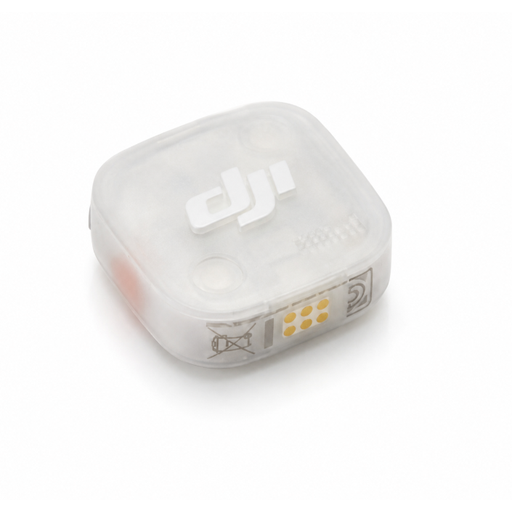
DJI Mic Mini 2S transmitter

DJI Mic Mini 2S Transmitter

This product listing is for a transmitter. Before choosing it, check whether you already have the matching receiver and any other parts you need.

View at Joybuy

DJI Mic 3 with two transmitters, one receiver and charging case

DJI Mic 3, 2 TX + 1 RX + Charging Case

The listed version includes two transmitters and a receiver; check that the set is compatible with your phone or recorder before recording.

Listed configuration: two transmitters, one receiver and a charging case.

View at Joybuy

Verbex K9-Black wireless mini microphone with Type-C connection

Verbex K9-Black Wireless Mini Microphone, Type-C

The listed Type-C connection may be useful for recording with a device that has a compatible port; also check that your recording app uses the microphone.

Listed configuration: wireless lavalier microphone with Type-C connection.

View at Joybuy
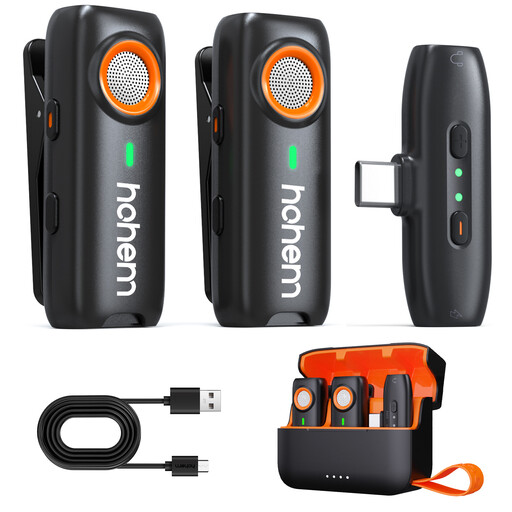
hohem Wireless Lavalier Microphone with TF backup recording

hohem Wireless Lavalier Microphone

The listed TF backup recording may be useful if you’re looking for a local recording option; check how to use this feature with your set.

Listed features: 3-Level DSP Noise Cancelling, 100m Range, 20H Battery and TF Backup Recording. TF card recording requires a TF card, which is not included.

View at Joybuy

Frequently asked questions

Will noise cancellation remove household sounds?

There’s no guarantee it will work in your room. Shure explains that a microphone can’t improve poor room acoustics, so compare short test recordings with the microphone positioned in the same place, switching any available noise cancellation on and off.

Where should I attach a lavalier microphone?

Shure recommends placing the microphone near the top of your chest. Secure it so your clothing doesn’t rub against the capsule or cable, and make a short test recording while moving as you normally would.

Will a wired lavalier microphone work directly with every phone?

No, it depends on the connection. The RØDE smartLav+ and Shure MVL mentioned here use 3.5mm TRRS; check whether your phone has a compatible microphone input or needs a suitable adapter. Also check that your recording app selects the external microphone.

Do I need a licence for a wireless microphone in the Netherlands?

A licence is usually not required for wireless microphones, but you must use the correct frequency band. The Dutch Authority for Digital Infrastructure states that licence-exempt use does not require notification or registration; check the frequencies and conditions for the exact set.

Who should I contact if my product develops a fault after purchase?

Report a fault to the retailer. According to ACM ConsuWijzer, the statutory guarantee in the Netherlands does not have a fixed duration of exactly two years for every product: what matters is what you could reasonably expect from the product under normal use. A manufacturer’s warranty does not replace this statutory right.
