
Solo speaker at a desk
You usually record museum text while seated and want a suitable microphone that’s easy to position close to your mouth.


If you usually record at the same desk, start with a wired lavalier microphone that has a connector compatible with your recording device. Wireless is useful if you need to move away from the device or want to avoid cables. For two speakers, you’ll need a suitable set with two transmitters or two recording channels. Check the exact connector and what’s included, then make a test recording at your shared workspace.
You usually record museum text while seated and want a suitable microphone that’s easy to position close to your mouth.
You record commentary or a conversation with someone else and want to check that the set has two transmitters and usable recording channels.
You also want to record away from your usual desk and are comparing wireless recording with recording locally on a portable recorder.
Choose this option: if you usually stay at your desk and the microphone’s connector is compatible with the input on your phone, camera or recorder.
Bear in mind: the cable needs to be routed safely around a shared workspace. TRS and TRRS connectors are not automatically interchangeable.
Choose this option: if you want to record without a cable running to your device, or if two speakers each need a transmitter.
Bear in mind: the receiver, connector, battery charge and radio connection. Licence-exempt use doesn’t mean interference is impossible.
Choose this option: if you want to record near the speaker without a cable to a desk device or a wireless connection.
Bear in mind: you’ll need to transfer the files afterwards and check that the storage and power supply suit your recording.
| What to consider | What should you check? | Who is this important for? |
|---|---|---|
| Clear speech | Attach the microphone so clothing doesn’t rub against it, then listen back to a test recording with the usual background noise. | When I record at a shared desk, I want to be able to assess my voice clearly without assuming background noise will disappear on its own. Around 34% of consumers put speech intelligibility at work first. |
| Connector | Compare the input on the exact device with TRS, TRRS and any adapter or power requirements. | Before recording, I want to know whether the microphone works with my phone, camera or recorder, and whether I need an adapter. Around 33% of consumers give device compatibility top priority. |
| Two speakers | Check the number of transmitters and whether the recording mode routes the voices to the channels you want. | If I’m recording with a second speaker, I want to know whether each of us has a usable microphone and recording channel. Around 20% of consumers prioritise capturing two voices. |
| Freedom to move | Compare the recording time you need with the operating time of the transmitter and receiver, or check storage and file transfer on a recorder. | If I want to move away from the desk while recording, I want to know in advance how the recording will continue and how I’ll retrieve the file. Around 13% of consumers give freedom of movement top priority. |
A microphone with a TRS connector won’t necessarily work with a device that has a TRRS input. The wrong combination may mean the microphone doesn’t record as intended.
Check the connectors on both the microphone and the exact recording device, and find out whether you need a suitable adapter.
You may need a compatible adapter or a different microphone.
A second speaker won’t automatically have their own microphone just because the product range is marketed for multiple people.
Check the version, number of transmitters and channel setup you need before choosing a set.
For two speakers, you may need a version with an extra transmitter or a different complete set.
The Dutch Authority for Digital Infrastructure warns that shared licence-exempt frequencies can experience interference when devices use the same frequency band.
Test the connection where you’ll be recording and check the recording before the speaker leaves.
If the recording fails, you may need to record it again.
The wired BY-M1 is designed for one speaker and a compatible recording device.
The MVL is designed for compatible mobile devices with a 3.5 mm TRRS input or a suitable adapter.
The wired Lavalier GO has a 3.5 mm TRS connector for a compatible recorder or transmitter.
Mic Mini is available in versions with one or two clip-on transmitters.
The F2 combines a portable recorder with an included LMF-2 lavalier microphone for local recording.
This selection includes wireless sets and wired lavalier microphones for phones, computers or cameras. For each model, check that the connector and version suit your recording device and the number of speakers.
 No image available
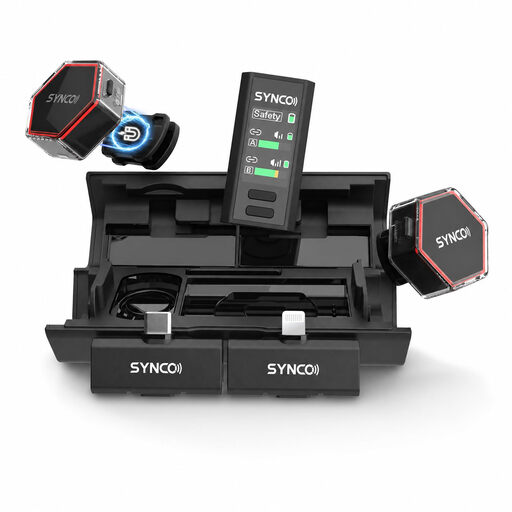
A wireless option for recording commentary with a compatible iPhone from the listed range. Check that the receiver’s connector works with your device.
The product title lists 2 TX + 1 RX and a charging case.
 No image available
A wireless option for recording with a phone or camera. Before buying, check which receiver is compatible with your device.
The product title lists iPhone, Android and camera as compatible devices. Check the connector for your exact model.
 No image available
A wired option for a device with a compatible input. Check that the connector works with your phone, computer or camera.
The product title lists use with smartphones, PCs, laptops and cameras. The connector is described as 3.5 mm.
 No image available
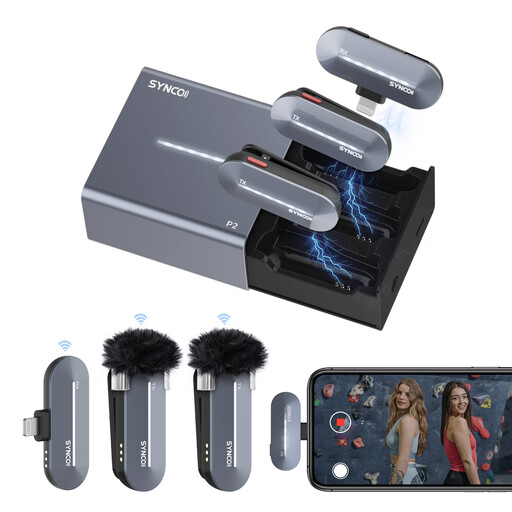
An option for recording two voices with an iPhone, provided the receiver is compatible with your device’s connector.
The product title describes it as a dual lavalier microphone. Check that the Lightning receiver is compatible with your iPhone.
 No image available
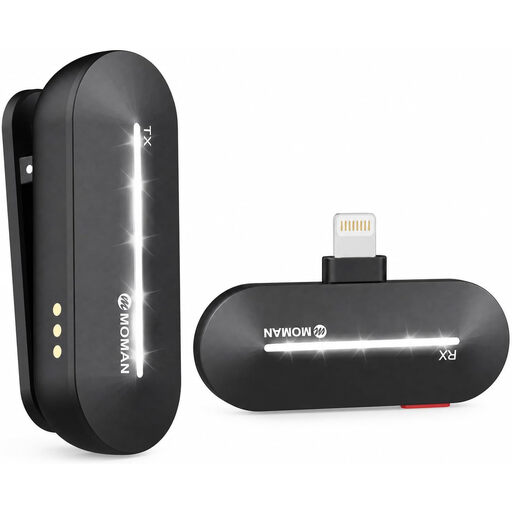
A wireless option for solo commentary with a compatible iPhone from the listed range.
The product title lists one transmitter and one receiver. This version isn’t described as a set with two separate microphones.
As a general guideline, RØDE recommends placing the microphone on your chest, about 20–30 cm from your mouth. Keep the capsule clear of rubbing clothing, then listen back at your workspace to check that its position works with your voice and clothes.
No, it depends on the connector and the microphone. Shure specifies a compatible TRRS input or CTIA adapter for the MVL. RØDE specifies a compatible TRS microphone input for the Lavalier GO, with power supplied through that input. Check the exact combination before recording.
Check whether you need batteries, storage media or adapters. BOYA lists an LR44 battery for the BY-M1, while Zoom lists two AAA batteries and microSD storage for the F2. For consumer purchases in the Netherlands, statutory guarantees are separate from any manufacturer’s warranty. ACM ConsuWijzer states that the seller must provide an appropriate remedy for a faulty product.
No, it depends on the frequency band used by the set you choose. The Dutch Authority for Digital Infrastructure publishes the frequencies on which wireless microphones may be used without a licence and notes that some other bands do require one. Check the frequency and version of the specific model.
According to the Dutch Data Protection Authority, an identifiable audio recording may contain personal data. If the GDPR applies to the processing, you need a valid legal basis. Consent is one possible basis, but it isn’t automatically the only one. Whether the recording and its intended use are permitted in your situation depends on the circumstances.