
Seated meditation narrator
You usually record in one fixed spot and want a clear, calm voice recording without clothing noise. Microphone placement and choosing the right wired connection are important considerations.


If you mainly record while sitting down, start with a wired lavalier that’s confirmed to work with your recording device and app. That way, you avoid a wireless connection and transmitter battery. Wireless is more convenient if you want to move while recording, but you’ll need to keep an eye on the receiver, battery and connection. With either option, test the clip with your own clothes and listen to the pauses too: clothing rustle and the booth’s acoustics won’t disappear on their own.
You usually record in one fixed spot and want a clear, calm voice recording without clothing noise. Microphone placement and choosing the right wired connection are important considerations.
You want to use the lavalier with a device you already own. Check that USB-C, TRRS or TRS matches the input, and that your recording app uses the external microphone.
You change your posture or position while recording and may not want a cable running to your recording device. Make sure the connection, battery life and receiver suit your recording setup.
Best for: recording in one place most of the time, with a device and app that support external USB audio.
Trade-off: you won’t need a wireless connection or transmitter battery, but the cable will limit how far you can move.
Best for: a phone, recorder or transmitter with an input that matches the microphone’s TRRS or TRS plug.
Trade-off: TRS and TRRS are different connections, so you may need a suitable adapter or a different version.
Best for: moving around while recording or avoiding a cable running to your recorder.
Trade-off: the transmitter and receiver need to be charged and connected. Check which components are included in the set too.
| What to consider | What should you check? | Who is this most important for? |
|---|---|---|
| Clear voice recording | Test the clip with your clothes and listen for breath noise or fabric rubbing against the microphone. | If I don’t want to hear rustling during a quiet passage, I test the clip position with the clothes I usually wear. Around 36% of consumers say a clear voice recording is their top priority. |
| Connection and app | Check whether you need USB-C, TRRS or TRS, then record a test file using your recording app. | If I want to use my existing phone, laptop or recorder, I check that it recognises the connection and microphone I’ve chosen. Around 29% of consumers put device compatibility first. |
| Recording without interruptions | Compare the planned session length with the stated battery life and the conditions under which it was tested. | For a long session, I want to avoid an interruption caused by the battery or connection. Around 21% of consumers say uninterrupted recording is their main consideration. |
| Freedom to move | Check that the cable is long enough or that the wireless set is compatible with your recording device. | If I change position, I don’t want to be tethered to the recorder by a cable. Around 14% of consumers put freedom of movement first. |
A microphone with a TRS plug won’t necessarily work with a TRRS input. The plug may fit physically, even if the recording setup doesn’t work as intended.
Check the type of microphone input and test your chosen setup with the recording app. You may need a suitable adapter or a different version of the microphone.
A wired microphone with a TRS plug isn’t a wireless system on its own. Wireless sets can also vary in the number of transmitters, receivers and included components.
Compare what’s in the specific box with what your recording setup needs, such as a transmitter, receiver or phone adapter.
A noise reduction feature doesn’t prove that clothing rustle will disappear. Fabric rubbing against the microphone can be especially noticeable during quiet passages.
Test the clip with your usual clothes and listen to a short recording, including the pauses, before recording a full session.
The XS Lav USB-C is a wired option for a compatible USB-C device; the XS Lav Mobile has a different connection.
The MVL is designed for voice recording with a compatible mobile device via 3.5 mm TRRS or a suitable adapter.
The Lavalier GO is a wired lavalier for a compatible TRS microphone input or transmitter.
The Mic Mini is a wireless clip-on option available in versions for one or two speakers.
This selection includes a wired lavalier for a compatible 3,5mm input and wireless clip-on sets. For the specific version, check that it has the required European conformity and CE marking.
 No image available
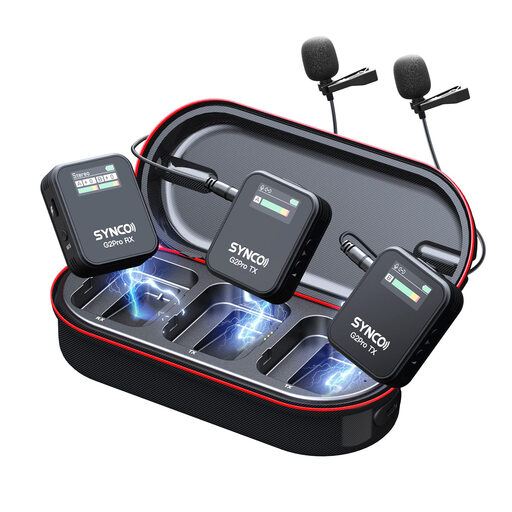
A wireless set to consider if you want more freedom to move and need multiple transmitters.
The product title lists two transmitters, one receiver and a charging case. The description mentions smartphones, cameras and PCs as possible recording devices; check that the connection works with your device.
 No image available
A wired option to consider if your recording device has a compatible 3,5mm input.
The product information lists 3,5mm connectivity and an included windscreen. Check that the connection works with your device and recording app.
 No image available
A wireless set to consider if you need two transmitters and a receiver.
The product information lists two transmitters, one receiver, a charging case and three recording modes. Check that the receiver connects to your recording device.
 No image available
A wireless option to consider if you want to record with a compatible USB-C mobile device.
The product title lists one transmitter and one receiver; the description mentions a USB-C receiver. Check that your device and app support this setup.
 No image available
A wireless option to consider if you need two transmitters and a compatible USB-C device.
The product title lists two transmitters and one receiver; the description mentions a USB-C connection. Check compatibility with your recording device and app.
Make a short test recording in your usual clothes and posture. Listen to both the spoken words and the pauses. Move the clip if fabric rubs against the capsule, and check the test file to make sure your device used the external microphone.
Not if you use the system within the frequencies and conditions that the Dutch Authority for Digital Infrastructure (RDI) classifies as licence-exempt. Some other frequency bands do require a licence. So check the frequency and conditions for the specific system: the word “wireless” alone doesn’t determine whether a licence is needed.
Not necessarily. DJI states a maximum range for the Mic Mini under conditions with an open, unobstructed signal and no interference. Test the connection in your own recording space; the RDI warns that licence-exempt frequencies are shared and interference is possible.
Check that the version you choose includes the components your recording setup needs, such as a suitable phone adapter, receiver or charging accessories. When you buy as a consumer in the Netherlands, your statutory guarantee rights apply in addition to any manufacturer’s warranty. For online consumer purchases, you generally have a 14-day cooling-off period from delivery; statutory exceptions may apply. The cooling-off period and your statutory remedies for a faulty product are separate rights.