
Practising pronunciation on your own
You want to record and listen back to your own voice hands-free. Start by checking the connection on your recording device, then make a short test recording to check that you can hear the sounds clearly.


For a regular practice spot and one speaker, a wired lavalier microphone is a sensible choice, provided the plug is compatible with your recording device. For a dialogue or exercises that involve moving around, a suitable wireless set gives you more freedom of movement, but check the transmitters, receiver, app and applicable frequency rules. In either case, make a test recording and listen out for clothing rustle and speech clarity.
You want to record and listen back to your own voice hands-free. Start by checking the connection on your recording device, then make a short test recording to check that you can hear the sounds clearly.
You want to record both your practice partner and your tutor or fellow student close to their voices. RØDE and DJI describe sets with two transmitters; check how the receiver and recording app handle both voices.
You walk around or act out scenes and don’t want to be tied to a cable. Weigh the freedom of movement offered by a wireless set against charging, device compatibility and the frequency rules set by the Dutch Authority for Digital Infrastructure (RDI).
Ideal for: a fixed spot where you mainly record and listen back to your own pronunciation.
Bear in mind: the cable restricts your movement, and TRS and TRRS plugs are not interchangeable.
Ideal for: dialogue practice where both speakers wear their own microphone.
Bear in mind: the set must include two transmitters and a compatible receiver. A manufacturer’s claim about level control won’t tell you how a recording will sound in your room.
Ideal for: speaking exercises where you walk around the room or act out a scene.
Bear in mind: charging, connectivity and the permitted frequency spectrum. According to the RDI, the available UHF spectrum can vary by region.
| What to consider | What to look for when buying | Who is this important for? |
|---|---|---|
| Clear speech | Attach the microphone so it doesn’t rub against your clothing, then listen back to a short recording. | If I want to assess sounds, I look for a clear recording without clothing rustle. Around 33% of consumers prioritise clear speech. |
| Compatibility with your device | Check the exact plug or receiver, and whether your recording app uses the external microphone. | If I want to record on my existing phone, computer or recorder, I check that the connection is compatible with the full model variant. Around 27% of consumers give device compatibility top priority. |
| Recording two voices | Check that the set includes two transmitters and a receiver that is compatible with your recording device. | For a conversation, I want to be able to hear both speakers clearly, so I look for a microphone for each speaker. Around 20% of consumers prioritise recording two voices. |
| Freedom of movement | Check what’s included in the set and its wireless frequency; also make a recording while moving around. | If I’m walking around the rehearsal room, I don’t want to be restricted by a cable. Around 20% of consumers prioritise freedom of movement. |
A 3.5 mm plug diameter alone doesn’t tell you whether a microphone is compatible: the RØDE Lavalier GO uses TRS, while the Shure MVL and Sennheiser XS Lav Mobile use TRRS.
Before buying, check the exact plug type, microphone input and any adapter you may need. A compatible adapter or a different microphone variant may be required.
A manufacturer’s feature or sound claim isn’t a measurement of your rehearsal room. Clothing rustle can also end up in the recording.
Make a short test recording in the place and using the type of exercise you’ll actually be doing.
Two transmitters are only useful if the receiver is compatible with your recording device. Wireless use is also subject to rules governing the frequency spectrum.
Check the transmitters, receiver, device variant and frequency of the specific set. The RDI says that some frequency bands require a licence.
RØDE offers both a wired Lavalier GO and the wireless Wireless Micro, which comes with two clip-on transmitters.
The wired MVL is a compact option for one speaker and a compatible mobile recording device.
The XS Lav Mobile and XS Lav USB-C are wired variants with different device connections.
The BY-M1 is a wired clip-on microphone with a switchable setting for cameras and smartphones.
The Mic Mini is a wireless clip-on option for freedom of movement or recording two speakers.
This Joybuy selection features wireless clip-on sets for one or two speakers. For each model, check that the connection and what’s included suit your recording device and type of practice.
 No image available
The two microphones are suited to a practice conversation where both speakers wear a microphone.
The product name lists a camera receiver, smartphone receiver and charging case. Check that the USB-C version is compatible with your phone and recording app.
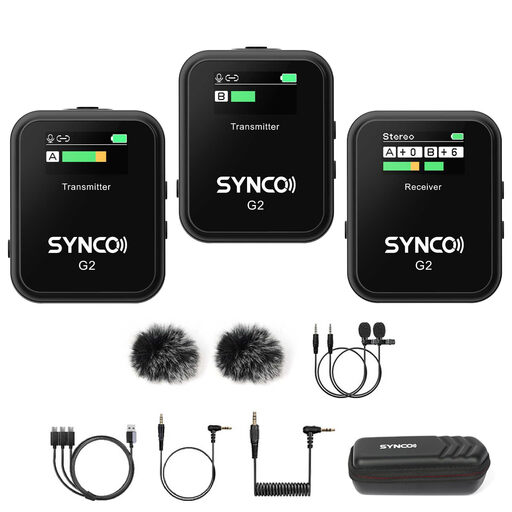 No image available
This wireless lavalier microphone may suit dialogue practice; check that the set on offer includes the transmitters and receiver you need.
The product name lists 2.4G and Dual Channel. Check that it connects to your recording device and that it meets the frequency rules for use in the Netherlands.
 No image available
The title describes one transmitter and one receiver, which could be a hands-free recording option for one speaker.
The listed variant is USB-C and mentions iPhone 18/17/16. Check that the connection is compatible with your recording device.
 No image available
The product name lists two transmitters and one receiver, which could suit a recording with two speakers.
This is the Lightning version. Check that your recording device uses this connection and that the recording app handles both voices.
 No image available
The product name lists one transmitter and one receiver, a possible wireless option for one speaker.
The product description mentions USB-C, Lightning and 3.5 mm adapters. Check which adapters are included in this bundle and whether they are compatible with your recording device.
Clip the microphone at chest height and make sure your clothing doesn’t rub against the capsule. RØDE gives around 20–30 cm from the mouth as a general positioning guideline. Then listen back to a test sentence, as the best position can vary depending on your voice and surroundings.
No. Check that your phone has a suitable input and that the plug and any adapter are compatible. The Shure MVL and Sennheiser XS Lav Mobile use 3.5 mm TRRS; the RØDE Lavalier GO uses 3.5 mm TRS for a compatible microphone input. The Sennheiser XS Lav USB-C is a separate version.
Contact the seller. According to the Dutch Government, when you buy a product you’re entitled to a product that works properly, and the seller must provide a solution if it’s faulty. There is no single fixed statutory warranty period for all products in the Netherlands.
Not always. According to the RDI, wireless microphones usually don’t require a licence, but you must use the right frequency spectrum. Some frequency bands do require a licence, so check the frequency of the specific set and the rules for the place where you’ll use it.
A recording in which someone can be recognised may count as personal data. If the GDPR applies to the processing, you need a valid legal basis; consent is one possible basis, but it isn’t automatically the only one. Whether an exception for strictly personal use applies depends on who is recording and what happens to the recording.