Who is this for?

Presenter with their own recorder

You’re recording one voice from a fixed position and mainly want to know which plug, power supply and device mode will work. RØDE and BOYA product specifications describe different connections and operating settings.

Interviewer recording two voices

You want to record the interviewer and guest with a microphone each, without running two cables through the small booth. RØDE, Shure and DJI describe sets with two transmitters or microphones; check what’s included in each version.

Recording in a noisy booth

You’re most concerned about ventilation, reflections or clothing noise, and want to test the microphone in the actual set-up. RØDE and Shure emphasise the importance of positioning it correctly. A test recording will show how it sounds with your clothing and in your space.

What should you look for when buying?

Wired lavalier for one speaker

Suitable if: you’re staying in one place and have a compatible microphone input or adaptor. The BOYA BY-M1 has camera and smartphone modes; the RØDE Lavalier GO is designed for a 3.5mm TRS microphone input.

Trade-off: you don’t need to manage a wireless connection, but you’ll need to keep the cable tidy and check the plug, power supply and mode.

Wireless set with two clip-on transmitters

Suitable if: both the interviewer and guest need their own microphone, or a cable would get in the way in the booth. RØDE says the Wireless Micro Camera Kit includes two transmitters and receivers for a camera and a USB-C smartphone.

Trade-off: check the exact kit, phone port, camera connection and recording app. The smartphone version of Wireless Micro and the Camera Kit don’t offer the same connection options.

Wireless set with additional recording or app features

Suitable if: you need an additional recording option for each transmitter, as with the Mic 2 set described by DJI, or want to record directly to a phone using Shure apps and sometimes use a camera.

Trade-off: these are different features, not evidence of a ranking in sound quality. Check which receiver and cables are included in each version; Shure describes direct phone use with its MOTIV apps.

What to consider What should you check? Who is this important for?
Connection Check the phone port or microphone input, TRS versus TRRS, whether power is required, and whether the recording app uses the external microphone. I want to be sure my recorder or phone recognises the microphone and that the plug and power supply are compatible; around 36% of consumers prioritise a working connection.
Number of voices Check how many transmitters are included and whether the receiver or app can record voices separately, if you need that. If both the interviewer and guest will be speaking, I don’t want to rely on one microphone worn by one person; around 29% of consumers prioritise recording two voices.
Booth noise Make a test recording with your actual clothing and the ventilation running. Position the microphone so fabric won’t rub against it, then play the recording back. If there’s ventilation or clothing that might rub against the capsule, I want to hear how the recording sounds in my actual set-up first; around 21% of consumers prioritise clear speech in the booth.
Simple set-up Run through the whole process before recording: attach the microphone, connect or pair it, record a test sentence and play it back. For a short introduction, I want a set-up that’s quick to connect and test, without unnecessary extra steps; around 14% of consumers prioritise simplicity and control.

What to watch out for when buying

  • Assuming a matching plug size proves compatibility

    Both TRS and TRRS plugs can be 3.5mm, but your transmitter or phone may require a different input.

    Compare the exact microphone and device connections, then make a recording in the app you plan to use.

  • Choosing a set with one transmitter for two speakers

    A product range name doesn’t tell you how many microphones or transmitters are included in the version you’ve chosen.

    Check what’s included in the kit and whether both voices will be recorded the way you need.

  • Assuming noise cancellation makes a positioning test unnecessary

    Clothing rubbing against the microphone can be audible; noise-processing specifications don’t tell you how it will sound in every booth.

    Test it with the clothing and ventilation you’ll have during the interview, and move the clip if fabric rubs against the microphone.

Brands to compare

RØDE

The range includes the wired Lavalier GO for a compatible TRS input, as well as wireless Wireless Micro versions. The Camera Kit is worth considering if you switch between phone and camera recording.

  • RØDE specifies the connections and included receivers for each version.
  • Don’t confuse the smartphone-focused Wireless Micro with the Camera Kit; product specifications aren’t an independent measure of booth sound.

BOYA

The wired BY-M1 is an option for one speaker, with a compatible camera or smartphone.

  • BOYA specifies a camera and smartphone switch for the BY-M1.
  • Check the correct mode and LR44 battery; don’t assume the BY-M1S specifications apply to the BY-M1.

DJI

Mic Mini and Mic 2 are different wireless ranges, with features that should be checked for each version.

  • DJI describes Mic Mini as having two transmitters and adjustable noise cancellation; for the Mic 2 set mentioned, DJI describes internal recording on each transmitter.
  • These features aren’t interchangeable between the ranges, and don’t prove how a microphone will sound in every booth.

Shure

The MoveMic Two Receiver Kit is designed for two speakers who switch between recording on a phone and using a camera set-up.

  • Shure says the microphones work directly with the MOTIV apps, or with cameras and other compatible apps via the included receiver.
  • Connecting directly to a phone won’t necessarily work with every recording app.

Sennheiser

The ME 2-II is a lavalier option if you already have a compatible bodypack transmitter.

  • Sennheiser lists compatibility with bodypacks in the evolution Wireless series.
  • This isn’t a universal plug-and-play option for a phone; check compatibility with your existing transmitter.

Products at Joybuy

This selection focuses on wireless lavalier and microphone sets for interview recording. Check the connection for your recording device and how many transmitters you need for each model.

DJI Mic Mini 2S with two transmitters, one receiver and charging case

DJI Mic Mini 2S (2 TX + 1 RX + Charging Case)

The two transmitters are suited to a set-up where you want to record two speakers.

The product name lists 2 TX, 1 RX and a Charging Case. Check that the connection is compatible with your camera or phone.

Joybuy

Lark M2 Wireless Lavalier Microphone System

Lark M2 Wireless Lavalier Microphone System

A wireless lavalier option for interview recording.

Check that the version and receiver are compatible with your recording device and app.

Joybuy

RØDE Wireless Micro Camera Kit with two microphones and receivers

RØDE Wireless Micro Camera Kit

The product name lists two microphones, a camera receiver and a USB-C smartphone receiver.

Check that the receiver is compatible with the recording set-up you use.

Joybuy

SYNCO P2XT USB-C Wireless Microphone

SYNCO P2XT USB-C Wireless Microphone

A wireless microphone option for an interview set-up.

The product name specifies USB-C; check that the connection is compatible with your device and recording app.

Joybuy
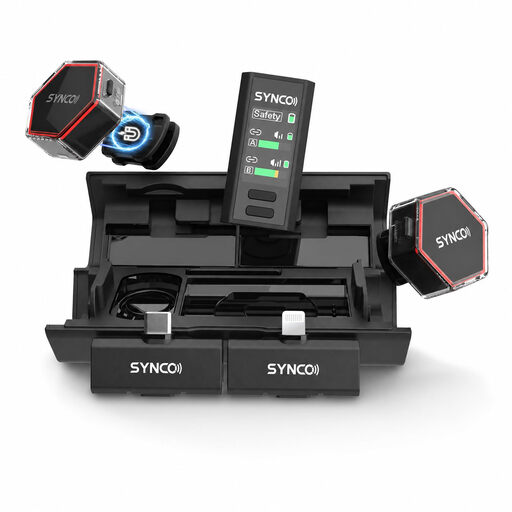
SYNCO G4 Wireless Lavalier Microphone

SYNCO G4 Wireless Lavalier Microphone

A wireless lavalier option for interviews where you don’t want to connect the microphone to the recording equipment with a cable.

Check the connections on your chosen version and whether they’ll work with your phone or camera.

Joybuy

Frequently asked questions

Will every 3.5mm lavalier work with a wireless transmitter?

No. Check that the plug type matches the transmitter input. For example, RØDE specifies a TRRS plug for the smartLav+ and a TRS input for the Wireless GO II transmitter; RØDE says you’ll need a suitable TRRS-to-TRS adaptor. Check the power supply too.

Is one lavalier microphone enough if both the interviewer and guest will be speaking?

Choose two microphones if you want to mic up both people individually. With a wireless set, check that the version you’ve chosen actually includes two transmitters, and whether you want to record the channels separately.

Where should I clip the microphone for a test recording?

As a starting point, RØDE recommends positioning it on the chest, around 20–30 cm from the mouth, with no fabric rubbing against the microphone. Make a test recording in the clothing you’ll actually wear and play it back; the best position can vary depending on your outfit.

Do I need a licence for a wireless lavalier in the Netherlands?

That depends on the frequency used and the rules that apply to it. The Dutch Authority for Digital Infrastructure publishes the frequencies on which wireless microphones can be used without a licence, and also lists bands that require one. Before use, check the exact frequency variant of the model you’ve chosen.

Can I use or publish a recognisable interview recording without further checks?

First, consider which privacy rules apply. The Dutch Data Protection Authority states that an organisation needs a legal basis under the GDPR to collect and use personal data; consent is one possible legal basis. The microphone you choose doesn’t determine which legal basis applies to a particular recording.
