For solo practice, a wired lavalier microphone is a sensible choice if its connector is compatible with your recording device. If you want to record a teacher and learner at the same time, a set with two transmitters is more practical. Shure recommends positioning the microphone close to the speaker, but this won’t eliminate the hall’s reverberation. Before buying, check the connector and, for a wireless set, the receiver and permitted frequency for use in the Netherlands.
Who is a lavalier microphone for pronunciation practice suitable for?
Practising pronunciation on your own
If you want to listen back to one voice and usually practise in the same place, consider how far you’ll be from the microphone and whether its connector is compatible with your recorder or phone. Shure explains how microphone placement affects the balance between direct speech and reflections.
Recording a teacher and learner
If you want to record two voices during the same practice session, check how many transmitters are included and whether the recording can capture them on separate channels if needed. DJI describes the Mic Mini as available in a bundle with two transmitters and separate channels.
Practising while moving around the hall
If you want to keep your hands free as you move around, weigh the convenience of wireless recording against the need to charge and test the transmitter and receiver. Shure also highlights handling noise when clothing rubs against the microphone capsule or cable.
What should you look for in a lavalier microphone for a community hall?
Wired, for one speaker
Suitable when: you’re recording one voice in a fixed position and your device supports the plug.
Bear in mind: the cable restricts your movement; a TRRS plug won’t necessarily fit a TRS input.
Wireless, with two transmitters
Suitable when: a teacher and learner need to be recorded at the same time, or you’ll be moving around the hall.
Bear in mind: you’ll need to charge the transmitters and test the connection where you’ll be practising.
Wireless, with extra recording features
Suitable when: you need a backup recording or separate lavalier microphones; check the features of the exact version you’re considering.
Bear in mind: internal recording won’t, by itself, prevent clothing rustle or hall reverberation.
| What to consider |
What to check before buying |
Who is this important for? |
| Keeping speech clear |
Position the microphone close to the speaker and make a test recording while wearing the clothes you’ll practise in. Shure notes that a microphone won’t automatically separate direct speech from reverberation. |
If I want to listen back to sounds in a reverberant hall, I focus on microphone placement and clothing noise. Around 36% of consumers say speech clarity is their top priority. |
| One or two speakers |
Check how many transmitters are included in the bundle you’ve chosen and whether it can record voices on separate channels. |
If a teacher and learner are speaking at the same time, I want a microphone for each of them and separate channels if needed. Around 29% of consumers are primarily looking to record two voices. |
| Connecting to your device |
Check the plug type, receiver and any phone adapter you’ll need for your recorder, camera or phone. The RØDE smartLav+ has a TRRS plug; DJI says a Lightning adapter for the Mic Mini is sold separately. |
If I want to use my current phone or recorder, I want to know in advance whether the plug or receiver will connect to it. Around 21% of consumers say device compatibility is their top priority. |
| Movement and recording time |
Test the wireless connection by walking around the hall, then listen back to the test recording. DJI states approximately 11.5 hours for one transmitter and receiver, measured at a short distance, without noise cancellation or interference. |
If I’m walking around the hall, I want to record without a cable and avoid having to stop halfway through a practice session. Around 14% of consumers say freedom of movement and uninterrupted recording are their top priorities. |
Common mistakes when buying a lavalier microphone
-
Assuming a high stated wireless range means reliable recording in the hall
The conditions used for a product specification aren’t necessarily the same as those in your community hall.
Before your practice session, walk the route you plan to take with the transmitters and listen back to the entire test recording.
-
Assuming all 3.5 mm connections are the same
The RØDE smartLav+ has a TRRS plug; for the TRS input on a Wireless GO II transmitter, RØDE specifies a TRRS-to-TRS adapter.
Check both the plug type and the input on your recording device before choosing a microphone.
-
Assuming every version includes the same items and features
The number of transmitters varies by bundle. Saramonic lists internal storage for the B2R transmitter, but not for the B2.
Compare the full model name and the contents of the bundle you’ve chosen, not just the series name.
Lavalier microphone brands to consider
RØDE
RØDE offers both a wired option for one speaker and wireless systems with extra recording features.
- According to the product specifications, the smartLav+ has a TRRS plug; the Wireless PRO comes with two Lavalier II microphones and internal recording.
- Check that the TRRS plug fits your device. The Wireless PRO’s extra features aren’t necessary for every solo practice session.
DJI
The DJI Mic Mini is available, among other options, as a combination with two transmitters and one receiver for recording two speakers.
- DJI says that in stereo mode, the two transmitters are recorded on separate channels.
- Check which phone adapter is included with the bundle. The stated battery life was measured under specific conditions and isn’t a guarantee of performance in a busy hall.
Saramonic
The Blink500 ProX B2 and B2R are two-channel systems supplied with two lavalier microphones.
- Saramonic lists internal storage for the B2R transmitter.
- The B2 doesn’t have this storage feature. Also check that the 3.5 mm receiver is compatible with your recording device.
Hollyland
The LARK M2 range includes small wireless clip-on transmitters with different receiver versions.
- Hollyland offers, among other options, versions for USB-C phones, Lightning devices and cameras.
- Check the receiver included with the exact bundle. A noise-cancellation claim doesn’t prove that details of speech will be preserved in your hall.
Wireless lavalier microphones at Joybuy
These product picks are wireless lavalier options. Pay particular attention to the number of microphones and the connector that’s compatible with your recording device.
 No image available
DJI Mic Mini 2S (2 TX + 1 RX + Charging Case)
The two transmitters are useful when both a teacher and learner need a microphone.
The product name specifies two transmitters, one receiver and a charging case.
View at Joybuy
 No image available
Hollyland LARK M2 Wireless Lavalier Microphone System
A wireless lavalier option if you want to wear a microphone close to the speaker; check which receiver comes with the version you’ve chosen.
The product name specifies 48 kHz/24-bit audio and a transmitter weight of 9 g.
View at Joybuy
 No image available
RØDE Wireless Micro Camera Kit (USB-C)
The product name specifies both a camera receiver and a smartphone receiver, making it suitable if you want to switch between these recording set-ups.
The kit is listed in the product name as including two microphones, a smartphone receiver and a charging case.
View at Joybuy
 No image available
SYNCO P2XT USB-C Wireless Microphone
This version is designed for a USB-C recording set-up; check that the connector is compatible with your device.
The product name specifies a wireless microphone with USB-C.
View at Joybuy
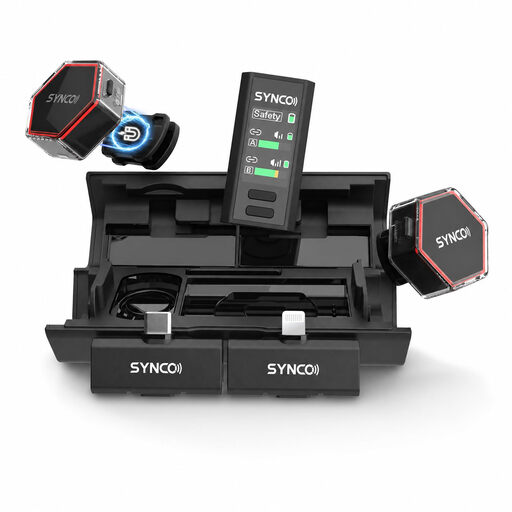 No image available
SYNCO G4 Wireless Lavalier Microphone (iPhone7-17/Android/Camera)
The product name lists phones and cameras as recording devices; check which receivers are included with the version you’ve chosen.
According to the product name, this is a wireless lavalier microphone.
View at Joybuy
Frequently asked questions about lavalier microphones for pronunciation practice
Can noise cancellation automatically eliminate reverberation and pronunciation errors?
No. Shure explains that a microphone can’t effectively separate direct speech from reflected speech. Make a test recording in the place you plan to use it and listen to check that the sounds you’re practising are still clear.
How can you prevent rustling while practising?
Attach the microphone capsule and any cable so that they don’t rub against your clothes. Shure recommends testing it while moving as you normally would; even when positioned like this, not every fabric will be noise-free.
Do you need a licence to use a wireless microphone in the Netherlands?
Not always. According to the Dutch Authority for Digital Infrastructure, a licence is usually not required for wireless microphones, although one is needed for some frequency bands. Check the frequency and conditions for the set you’ve chosen; this general information doesn’t confirm that every model is authorised for use.
Can an organisation keep recordings of identifiable learners?
Identifiable audio recordings count as personal data under the Dutch Data Protection Authority’s guidance. Before processing them, an organisation must establish an appropriate legal basis under the GDPR and tell those concerned about the purpose and use; consent is one possible legal basis.
What can you do if the microphone turns out to be faulty after purchase?
For consumer purchases in the Netherlands, statutory consumer rights apply alongside any manufacturer’s warranty; the seller must offer a solution for a faulty product. According to the Dutch Government, the Netherlands does not have a fixed statutory warranty period of two years.


