What should you look for in a lavalier microphone?
For short spoken flashcards in a small booth, the main factors are connectivity, repeatable recordings, freedom of movement and what you need to use the microphone.
Wired to a phone
Suitable if: you record in one place and your phone has a compatible TRRS input or suitable CTIA adapter.
Bear in mind: the cable limits your freedom of movement, and the adapter needs to be compatible with your device.
Wired to a recorder or camera
Suitable if: you can check the recording device’s microphone input, for example if you switch between devices.
Bear in mind: the plug, settings and power requirements vary by model. The RØDE Lavalier GO, for example, has a TRS plug and will not necessarily connect directly to a TRRS phone.
Wireless with a phone receiver
Suitable if: you want more freedom of movement while recording and the receiver is compatible with your phone’s port.
Bear in mind: you’ll need a receiver and charged equipment; going wireless does not, in itself, guarantee better audio.
| What to consider |
What should you check? |
Who should prioritise this? |
| Connection and recognition |
Check your device’s input and app, and compare TRRS, TRS or the correct USB-C or Lightning version. Make a test recording to check which microphone is being used as the input. |
If I’m using a phone, I want to make sure my device and app recognise the microphone. Around 40% of consumers give connectivity top priority. |
| Speech and clothing noise |
Secure the clip firmly, minimise contact between clothing and the capsule, and listen back to a test recording while moving as you normally would. |
If I’m recording several flashcards in a row, I want to be able to attach the microphone in roughly the same position each time. Around 30% of consumers prioritise consistent speech recordings. |
| Freedom of movement |
Decide whether you’ll move around while recording. If you choose wireless, check that the receiver is compatible with your device and bear charging in mind. |
If I move while recording, I don’t want to be restricted by a cable connecting me to the recording device. Around 20% of consumers give freedom of movement top priority. |
| What you need and aftercare |
Check which adapter, power supply or batteries are required, and keep your proof of purchase and model details. |
If I’m choosing a microphone for regular use, I want to know in advance what extras I’ll need. Around 10% of consumers prioritise running costs and aftercare. |
Products on Joybuy for wired and wireless recording
This selection includes wired lavalier microphones for a fixed set-up and wireless kits for phones or other specified recording devices. Check that each model’s connection is compatible with your device.
 No image available
SYNCO S8 lavalier microphone for smartphone, PC and camera
The wired option may suit a fixed set-up if the connection works with your recording device and app. The product information specifies 3.5mm connectivity and an included windscreen.
View on Joybuy
 No image available
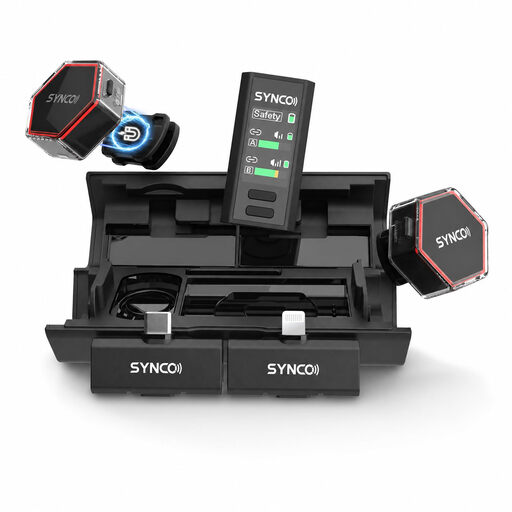
SYNCO G4 wireless lavalier microphone
This wireless kit may suit you if you switch between the specified recording devices. The product information lists USB-C, Lightning and camera receivers; check which receiver you need.
View on Joybuy
 No image available
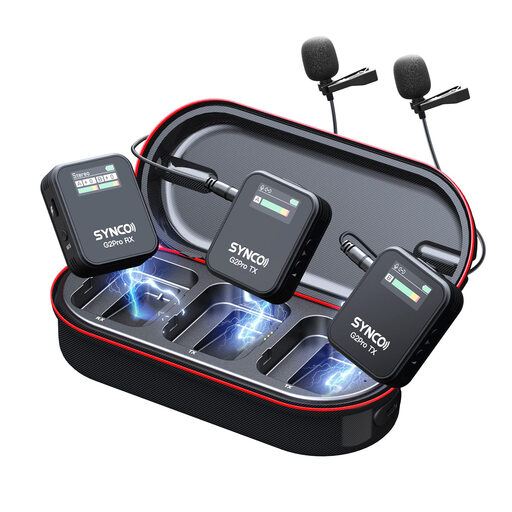
SYNCO G2(A2) Pro wireless lavalier microphone
The product information lists a headphone socket on the receiver, which may be useful if you want to monitor audio while using it. Bear in mind that the wireless kit includes a receiver and charging case.
View on Joybuy
 No image available
Moman M1CT wireless lavalier microphone, USB-C, 1TX+1RX
This version is designed for a compatible USB-C device. The wireless kit has one transmitter and one receiver; bear in mind that it includes a receiver and a built-in battery.
View on Joybuy
 No image available
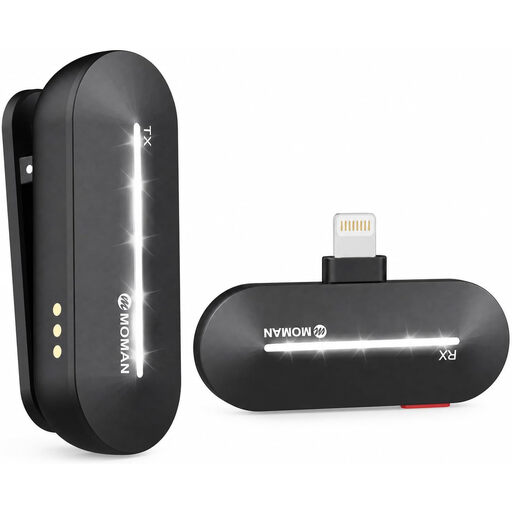
Moman M1CL wireless lavalier microphone for iPhone 14/13/12/11/X, 1TX+1RX
This version is designed for the specified iPhone models. The wireless kit has one transmitter and one receiver; check that this version is compatible with your device and bear in mind that it has a built-in battery.
View on Joybuy
Frequently asked questions about lavalier microphones
Can I connect a TRS lavalier microphone directly to any phone?
Don’t assume so. The RØDE Lavalier GO has a TRS plug for a compatible microphone input; the Shure MVL uses TRRS for compatible phones or a suitable CTIA adapter. Check the input and test the recording app.
How should I attach the microphone for a series of short flashcards?
Attach the clip in the same place each time, avoid contact between the capsule and your clothing, and listen back to a test recording. Shure says that placement and clothing movement can affect the recording; this is manufacturer guidance, not a guarantee of a particular result.
What if a microphone I bought online doesn’t fit or breaks quickly?
For a consumer purchase made at a distance, ACM ConsuWijzer says you generally have up to 14 days after delivery to change your mind, subject to exceptions. Your statutory guarantee is separate from any manufacturer’s warranty: if a product used normally doesn’t meet what you could reasonably expect, contact the seller.
Do I need consent or a legal basis under the GDPR to record spoken flashcards?
The Dutch Data Protection Authority states that processing carried out solely for personal or household use falls outside the GDPR. If you process identifiable recordings of other people beyond that exception, for example on behalf of an organisation, assess in advance which GDPR legal basis applies. Consent is one possible legal basis, but it is not automatically the only one.
Which rules are relevant when I buy a wireless microphone kit?
The Dutch Authority for Digital Infrastructure outlines European requirements for radio equipment and CE marking when products are placed on the market. Check the product and conformity information for the specific version; that general information alone does not establish that an individual product on offer meets all the requirements.


