
Speaker recording in one place
You usually record the meditation sitting or standing in one place and want to use a wired microphone. According to Sennheiser, the XS Lav USB-C has a 2 m cable.


If you’re recording in one place, a wired lavalier microphone is a good fit, provided it’s confirmed to work with your recording device. If you’ll be moving around, a wireless set may be more practical, as long as you check the receiver, power supply and complete recording setup. RØDE recommends positioning the microphone on your chest, around 20–30 cm from your mouth, and checking for clothing noise in a test recording. If pupils’ voices can be recognised in the recording, check the school’s policy in advance to find out how the recording should be handled.
You usually record the meditation sitting or standing in one place and want to use a wired microphone. According to Sennheiser, the XS Lav USB-C has a 2 m cable.
You move around the classroom while speaking and don’t want to be restricted by a microphone cable. A wireless set does add a transmitter, receiver and connection that you’ll need to check.
You want to connect the microphone to your existing phone setup and make sure in advance which input or adapter you’ll need. Sennheiser, Shure and RØDE describe different USB-C, TRRS and TRS connections.
A good fit when: you’ll be speaking from virtually the same spot and your recording device supports your chosen USB-C microphone.
Keep in mind: the cable limits how far you can move; according to Sennheiser, the XS Lav USB-C has a 2 m cable.
A good fit when: your recording device has a compatible TRRS connection, or you’ve found a suitable adapter.
Keep in mind: a TRRS plug won’t necessarily work with a TRS input; RØDE specifies a TRRS-to-TRS adapter for the smartLav+ with the Wireless GO II.
A good fit when: you’ll be walking around the classroom and the set has a receiver that connects to your recording device.
Keep in mind: you’ll need to test the transmitter, receiver, connection and recording; DJI’s stated battery life applies to specific test conditions.
| What to consider | What should you check? | Who is this important for? |
|---|---|---|
| Voice and clothing noise | Check the microphone’s position and make a test recording while speaking and moving as you normally would. RØDE recommends positioning it on your chest, around 20–30 cm from your mouth. | When recording a calming meditation, you’ll want to assess your voice clearly without overlooking rustling clothes. Around 33% of consumers give voice quality top priority. |
| Connection to your recording device | Check the exact device, microphone input, any adapter and the selected input in your recording app. | If you’re using your existing phone or computer, you’ll want to know whether the microphone works with it before recording. Around 27% of consumers give a compatible device connection top priority. |
| Freedom of movement | For a wireless set, check what’s included, how the receiver connects, the battery status and the connection at the recording location. | If you want to walk around the classroom, you won’t want to be limited by the length of a cable. Around 20% of consumers give freedom of movement top priority. |
| Ease of repeated recording | Test where the audio is saved and what you’ll do if the battery runs flat or a recording fails. | If you record frequently or for longer periods, you’ll want a setup you can test fully in advance. Around 20% of consumers give a simple recording setup top priority. |
A 3.5 mm plug won’t automatically fit every input. RØDE states that the smartLav+ has a TRRS connection and needs a suitable adapter to work with a Wireless GO II transmitter with a TRS input.
Compare the connection with that on your exact phone, recorder or transmitter; don’t just check the plug’s diameter.
You may need a suitable adapter or a different microphone version.
Wireless transmission doesn’t necessarily mean that the transmitter itself saves a recording. For example, RØDE states that the Wireless Micro transmitter does not make internal recordings.
Check what’s included and where the audio is saved; make a test recording and play it back before use.
A missing receiver or adapter could make the setup unusable; if a recording fails, you may have to record it again.
Noise reduction won’t remove the need to assess the voice, background noise and clothing rustle in the classroom yourself. DJI describes noise reduction for specific modes.
Make a test recording in the actual location and listen out for ventilation noise and rustling clothes too.
The XS Lav range includes wired versions with USB-C and 3.5 mm TRRS connections.
The MOTIV MVL is a wired TRRS lavalier microphone for recording with compatible mobile devices.
The smartLav+ has a TRRS connection for mobile recording, while the Lavalier GO has a TRS connection for compatible equipment.
The Mic Mini is a wireless clip-on system for anyone who wants to move around while speaking.
This selection includes wireless clip-on sets with a USB-C receiver and one wired 3.5 mm lavalier microphone. Before choosing, check that the connection is compatible with your recording device.
 No image available
A wireless set for speakers who want to move around; check that the USB-C receiver works with your recording device.
The product title lists two transmitters and one receiver.
 No image available
A wired clip-on microphone for anyone looking for a cable setup; check that your recording device supports the 3.5 mm connection.
The product title lists a 6 m cable and use with smartphones.
 No image available
A wireless set for recording on the move; check that your Android device and recording app work with the USB-C receiver.
The product title lists two transmitters and one receiver.
 No image available
A wireless clip-on set for hands-free recording; check the connection and device compatibility before you start recording.
The product title lists one transmitter and one receiver, and mentions iPhone 18/17/16 with USB-C.
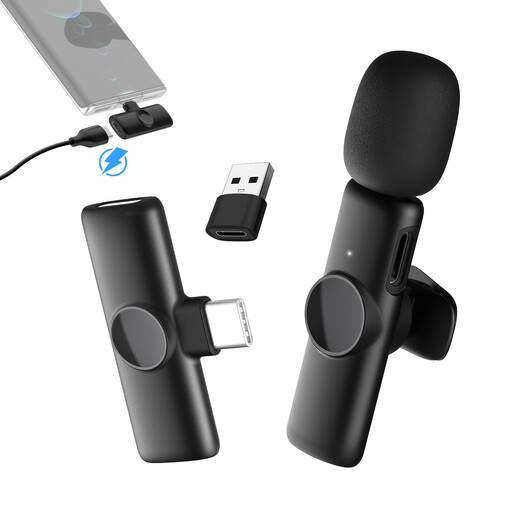 No image available
A wireless clip-on set for recording on the move; check that your USB-C phone and recording app work with the receiver.
The product title lists one transmitter and one receiver.
Position the lavalier microphone on your chest, around 20–30 cm from your mouth, and keep clothing away from the capsule. RØDE recommends this positioning; also make a test recording at your chosen location.
No. Check that the plug types are compatible. RØDE states that the smartLav+ uses TRRS and needs a suitable TRRS-to-TRS adapter to work with a Wireless GO II transmitter with a TRS input.
If the school processes personal data, it must identify an appropriate legal basis in advance and inform pupils and parents about the processing. The Dutch Data Protection Authority explains these obligations; the legal basis for a particular recording depends on its purpose and circumstances. Avoid recording pupils’ voices unnecessarily, and make sure the purpose, storage and sharing comply with the school’s policy.
For a consumer purchase in the Netherlands, statutory consumer rights may apply in addition to any manufacturer’s warranty. ACM ConsuWijzer explains that the seller is responsible for providing an appropriate solution free of charge if the product does not meet what you could reasonably expect. Different contractual circumstances may apply when a school makes the purchase.
No. Wireless transmission doesn’t automatically mean the transmitter saves audio. For example, RØDE states that the Wireless Micro transmitter does not make internal recordings. Check where the audio is saved for each model and make a test recording before the session.