
Recording in an echoey hall
You want to capture clear speech despite reflections or background noise. Positioning a microphone close to the speaker and listening back to a test recording will help you judge whether the setup works in that location.


Choose a microphone that can be positioned close to each key speaker and is confirmed to work with your recording device. A wireless set won’t fix echo caused by poor positioning. For one speaker in a fixed position, a wired microphone may be simpler, while movement or two speakers may call for a suitable wireless set. Check the connections, what’s included in the bundle and the frequency requirements.
You want to capture clear speech despite reflections or background noise. Positioning a microphone close to the speaker and listening back to a test recording will help you judge whether the setup works in that location.
You want to record both the questions and the book discussion. Look for a setup with a microphone for each speaker, and check how the receiver records the channels.
You’ll mainly be speaking yourself and want an easy connection to your phone or computer. Check the input and any power requirements for the exact microphone and recording device.
Start with positioning and speech clarity, then check the connection. Next, decide how many speakers you want to record at once and whether you need a backup recording.
| What to consider | What to look for | Who should prioritise this? |
|---|---|---|
| Speech clarity in the hall | Position the microphone close to the speaker and listen back to a test recording made at the venue. | If your main concern is preventing echo or background noise from overpowering the voice, make speech clarity your priority. Around 31% of consumers prioritise this concern. |
| Connection to the recording device | Compare the exact output with your device’s input; also check whether you need a suitable adapter or plug-in power. | If you want to record using a device you already own, you’ll want to know in advance whether the microphone will connect to it. Around 25% of consumers prioritise compatibility. |
| Number of speakers and freedom to move | Check whether the bundle includes one or two transmitters and how the receiver handles the recording channels. | If both the interviewer and reviewer speak regularly, you’ll want to record both voices close to a microphone. Around 25% of consumers prioritise recording two speakers. |
| Recording security | Check the recording features for the exact model, battery charge and recording before the discussion starts. | If you can’t record an important discussion again, you’ll want to check the recording in advance and know what backup is available. Around 19% of consumers prioritise recording security. |
Shure explains that a microphone can’t effectively distinguish direct sound from echoing reflections when it’s poorly positioned. That’s why a test recording at the actual venue is still important, even if the set has extra features.
An extra feature won’t automatically overcome poor microphone positioning; reflections can still affect speech clarity.
Clip the microphone close to the speaker and listen back to a short test recording at the venue.
USB-C and 3.5 mm TRS are different connection types. The RØDE Lavalier GO also requires a suitable microphone input with plug-in power.
Check the connection and compatibility information for both the microphone and the recording device before choosing.
A microphone on the reviewer won’t automatically pick up an interviewer’s questions just as clearly. DJI offers Mic Mini bundles for one or two people.
Check how many transmitters are included in the full bundle and how the receiver records the channels.
According to the Dutch Authority for Digital Infrastructure (RDI), not every UHF frequency is available in every location, and some frequency bands require a licence.
Before buying or using the set, check the frequency of the exact model and the requirements that apply at your location.
The XS Lav USB-C is a wired option for one speaker using a compatible USB-C device.
Lavalier GO is a wired microphone with 3.5 mm TRS; Wireless GO (Gen 3) is a separate two-channel wireless system.
Mic Mini comes in bundles for one or two speakers; Mic 2 is a separate product line.
Hollyland says LARK M2S is designed for discreetly worn wireless recording, including interviews.
Blink500 B2+ is a wireless set with connections for different types of recording devices.
These products are designed for wireless recording with two transmitters, for example when both the reviewer and interviewer speak.
 Image unavailable
The version with two transmitters and one receiver suits a two-speaker setup. Before recording, check which recording mode you need and how to back up your files.
 Image unavailable
The product name lists two microphones and receivers for a camera and smartphone. Check that this version is compatible with the recording devices you plan to use.
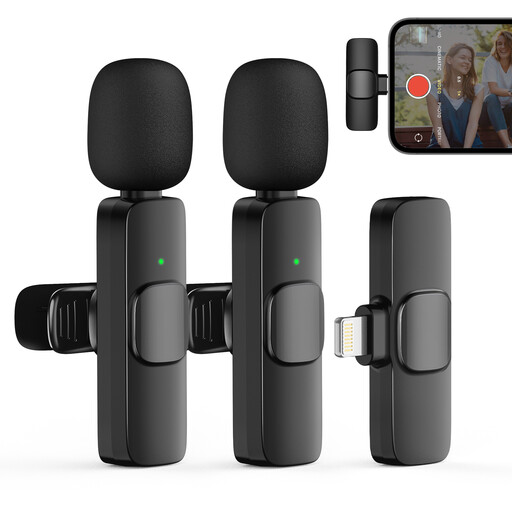 Image unavailable
The listed version with two transmitters and one receiver is designed for recording two speakers. The title mentions iPhone; check that this version is compatible with your exact device.
 Image unavailable
The version with two transmitters and one receiver is suitable for a conversation between two speakers. Check which connection and recording features apply to this exact set before recording.
 Image unavailable
The product name lists two microphones and a Type-C connection. Check that the connection and recording settings are suitable for the device you’ll use in the hall.
Clip the microphone to clothing close to the speaker, make sure it doesn’t rub against the fabric, and record a test at the venue. For its MVL specifically, Shure recommends positioning it 15–25 cm from the mouth; this distance doesn’t automatically apply to every model.
Don’t assume that a single lavalier microphone on the reviewer will pick up questions from further away just as clearly. If the interviewer speaks regularly, two microphones positioned close to the speakers are better suited to the setup; decide separately how audience questions will be recorded.
It depends on the frequency used and the applicable requirements. The Dutch Authority for Digital Infrastructure (RDI) states that some frequency bands require a licence and that not all UHF frequencies are available in every location. Check the frequency of the exact set and where you’ll be using it.
First consider the privacy of anyone who can be identified in the recording. According to the Dutch Data Protection Authority, consent is required in most cases to publish personal data online. So let the people involved know about the recording and intended publication in advance.
In the Netherlands, statutory consumer rights apply alongside any manufacturer’s warranty. According to ACM ConsuWijzer, there is no fixed statutory warranty period of exactly two years; your rights against the seller depend partly on what you could reasonably expect with normal use.