What should you look for when choosing?
Wired lavalier microphone
Choose this option: if you stay at your desk and would rather not manage a wireless receiver.
Bear in mind: the cable may restrict your movement or rub against your clothes; check the plug and whether you need an adapter.
Wireless clip-on microphone
Choose this option: if you regularly get up or move around while recording.
Bear in mind: you’ll need to choose the right receiver and manage the transmitter and receiver; a second transmitter isn’t automatically necessary for one speaker.
First, check that the microphone works with your device and recording app. Then decide whether you value the simplicity of a cable or greater freedom to move around.
| What to consider |
What should you check? |
Who is this for? |
| Your voice and background noise |
Make a test recording in the intended location and pay attention to the microphone’s position. RØDE describes noise reduction for continuous noise, not as a guarantee against colleagues’ conversations. |
If I want to listen back to my own story without assuming that conversations at other desks will be inaudible, I pay attention to microphone placement and choose a quiet time to record. Around 36% of consumers prioritise voice and background noise. |
| Connection to your device |
Check the plug, whether you need an adapter, and whether the recording app accepts external audio. For some devices using the MVL, Shure specifies a suitable CTIA adapter. |
If my phone or recorder doesn’t recognise the microphone, I want to check the entire connection setup first. Around 29% of consumers give device compatibility top priority. |
| Simple setup at a fixed seat |
Check the cable length and how it can be routed. For the exact model, also check whether it needs a battery. BOYA lists an LR44 battery for the BY-M1. |
If I want to make a short recording from the same chair, I value having fewer extra components more than freedom of movement. Around 21% of consumers prioritise a simple desk setup. |
| Freedom of movement |
Check that the receiver is right for your device and whether one transmitter will be enough. DJI distinguishes between a single-person kit and a two-person package. |
If I get up while recording, I don’t want to be tethered by a cable, so I check which receiver works with my device. Around 14% of consumers consider freedom of movement their main priority. |
Joybuy product picks
These Joybuy product picks focus on wireless clip-on microphones for recording with a compatible mobile device. Check the connection, receiver and any app requirements for each model.
 No image available
DJI Mic Mini 2S (2 TX + 1 RX + Charging Case)
This wireless set could suit you if you want to record without a cable; the product information mentions smartphone use and an included USB-C phone adapter.
According to the product name, the set includes two transmitters, one receiver and a charging case. Check that the connection suits your device and whether one transmitter will be enough for your recordings.
View at Joybuy
 No image available
SYNCO P2XT USB-C Wireless Microphone
This wireless USB-C microphone could be a good option if you use a compatible Android device.
The product information lists Type-C and enabled OTG as requirements for Android use; also check that your recording app accepts external audio.
View at Joybuy
 No image available
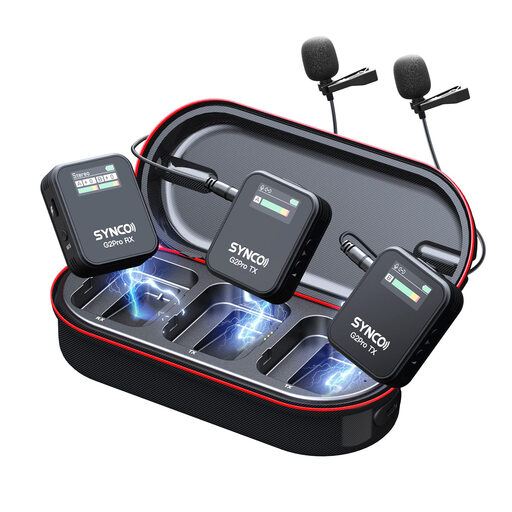
SYNCO G2(A2) Pro Wireless Lavalier Microphone
This is a wireless lavalier microphone for anyone who wants to record without a cable.
The product information lists a headphone output on the receiver. Check that the included kit and connections are suitable for your recording device.
View at Joybuy
 No image available
Moman M1CXT Wireless Lavalier Microphone, USB-C, 2TX+1RX
This wireless USB-C set could suit you if you want to move around while recording and use a compatible mobile device.
The product name lists two transmitters and one receiver. Check whether you need both transmitters for your audio diary.
View at Joybuy
 No image available
Moman M1CT Wireless Lavalier Microphone, USB-C, 1TX+1RX
This wireless USB-C set could suit you if you want to record without a cable using a compatible mobile device.
The product name lists one transmitter and one receiver. Check that your device and recording app work with the USB-C receiver.
View at Joybuy
Frequently asked questions
Will noise reduction remove colleagues’ voices?
No, don’t assume that it will. RØDE describes the Wireless Micro’s noise reduction as being mainly for continuous background noise, and says it isn’t designed to instantly silence sudden sounds. Test the recording in your own workplace and, if possible, choose a quieter time to avoid capturing recognisable conversations from others.
How should I attach the microphone for a seated voice recording?
Clip it to your clothing close to your mouth, keep the capsule clear of rubbing fabric and route any cable so it doesn’t pull. Then make a short test recording and listen back to it.
Do I need anything else for a phone without a 3.5mm socket?
An analogue lavalier microphone may need a suitable adapter, which must also support microphone input. For the TRS Lavalier GO microphone, RØDE specifies a TRS-to-TRRS adapter for use with a standard smartphone TRRS input. Check that it works with your device and recording app.
What if the microphone turns out to be faulty after purchase?
In the Netherlands, products are covered by a legal guarantee that they must be of satisfactory quality, with no fixed statutory guarantee period. The Dutch government advises contacting the seller about a faulty product; the available remedy depends on the circumstances. An additional manufacturer’s warranty does not replace your legal rights.
Can I record other people’s conversations for my audio diary at a shared desk?
Don’t assume you can record recognisable conversations with colleagues without restriction. Focus the recording on your own voice, avoid other people’s conversations and check your workplace rules before recording.


