
Voice artist in a reverberant room
You want clear, consistent speech throughout each chapter, so you start by positioning the microphone and making a test recording in the room.


Start with a test recording in the rehearsal room: you can position a lavalier close to your voice, but it won’t remove the room’s reverberation. A wired microphone is a good fit if you don’t move around much and have a compatible recording device; a recorder with a lavalier gives you a self-contained option, while a wireless system offers greater freedom of movement. Check the entire connection chain and listen for clothing rustle before recording a long session.
You want clear, consistent speech throughout each chapter, so you start by positioning the microphone and making a test recording in the room.
You want the connections, power and storage to suit the way you work, including during longer recording sessions.
You need freedom of movement and weigh that against keeping an eye on the connection, charging and what’s included in a wireless kit.
A good fit if: you’ll be sitting mostly still and your recording device supports the microphone’s connection and power requirements.
Trade-off: you don’t need to monitor a wireless connection, but cable movement and an incorrect TRS or TRRS connection can cause problems.
A good fit if: you want to record chapters independently without relying on a phone or wireless receiver during recording.
Trade-off: you’ll need to manage the power, memory card and file transfers yourself.
A good fit if: you want to move around while recording or find a cable running to the recording device inconvenient.
Trade-off: you’ll need to monitor the connection and power, and check which transmitter, receiver and adapters are included with the kit you choose.
First, make a test recording where you’ll be speaking. The percentages below indicate which buying consideration takes priority for the recording task described; they are not measured market shares.
| Consideration | What should you check? | Who should give this more weight? |
|---|---|---|
| Clear speech | Make a test recording in the room and check the microphone position and for possible clothing noise. | If I want to hear how my voice sounds in the rehearsal room, I’ll listen to a test recording first. Around 36% of consumers prioritise speech clarity and the sound of the room. |
| Compatible connection | Check the exact device, the TRS or TRRS connection, and whether plug-in power is required. | If I want to record using my existing phone, recorder or transmitter, I’ll first check that the entire signal chain is compatible. Around 29% of consumers put device compatibility first. |
| Recording a full chapter | Check whether the chosen setup records independently and what power and storage it needs. | If I want to record a chapter without missing anything, I’ll consider the power, storage and how the files are saved. Around 21% of consumers make uninterrupted recording their main concern. |
| Freedom of movement | Decide whether you’ll move around while reading and check that the receiver is compatible with your recording device. | A cable can get in the way if you want to move around while reading, but wireless recording requires you to keep an eye on the connection and power. Around 14% of consumers give freedom of movement top priority. |
These features don’t change the acoustics of the rehearsal room. A test recording lets you hear what the microphone actually picks up in the position you’ve chosen.
First, record a short passage in the actual room and check the microphone position and any unwanted sounds before recording a whole chapter.
An audible room sound may mean extra time spent on retakes or editing.
A 3.5 mm plug alone doesn’t tell you whether the microphone will work with the input. For example, RØDE distinguishes between TRS and TRRS; for the smartLav+ with a Wireless GO II transmitter, the brand specifies a compatible adapter.
Check the exact plug type, input, any microphone power requirements and the recording function of your entire recording chain.
Depending on the combination, you may still need a suitable adapter, transmitter or recorder.
Configurations can differ in the number of transmitters and receivers. Shure says that a receiver is sold separately for certain uses of the MoveMic One.
Before buying, check what’s included in the exact configuration you’ve chosen and compare it with your recording device.
If a receiver or adapter is missing, you may need to buy another component.
RØDE offers wired lavaliers for different recording inputs. Choose based on the connection and your recording device, not just the brand name.
The Zoom F2 combines a portable recorder with an included lavalier, making it a good option if you want to record independently.
The Mic 2 is a wireless clip-on microphone system available in several kits.
The MoveMic One is a wireless option if you want to record using supported mobile apps.
The ME 2 is a speech lavalier that, according to the manual, connects to a compatible bodypack transmitter.
The product picks below include wireless clip-on microphones and a wired lavalier for recording with a device you already own.
 Image unavailable
A wireless kit with two transmitters and one receiver, ideal if you want to move freely while recording.
 Image unavailable
A wired option for a recording chain with a compatible 3.5 mm input; check the plug type on your device.
Cable length: 6 m. Connection: 3.5 mm.
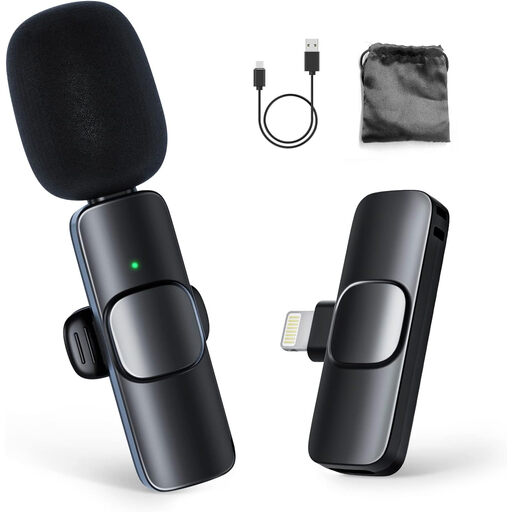 Image unavailable
The product title describes a wireless kit with one transmitter and one receiver for iPhone; check that the connection is compatible with your recording device.
 Image unavailable
A wireless kit with one transmitter and one receiver for a solo setup; check that it connects to your recording device.
 Image unavailable
According to DJI, this configuration is designed for recording one person, and the transmitter can record independently. Check that the complete kit is compatible with your recording device.
No, a lavalier can’t remove reverberation from the room. Position the microphone close enough to the speaker to be effective and assess a test recording in the actual location; Shure explains that a microphone can’t improve the acoustic environment.
Attach the clip so that clothing doesn’t rub against the capsule, then make a test recording while moving as you normally would. RØDE describes a cable loop as a possible strain relief that can help reduce noise caused by movement.
Not necessarily: the Dutch Authority for Digital Infrastructure says that wireless microphones usually don’t require a licence, but you must use the correct frequency range. A licence is required for some bands. So check the frequency band used by the specific kit.
According to the Dutch government, you need the creator’s permission to publish or distribute someone else’s copyrighted book. A private copy for personal use can’t be distributed or made public. Check separately which rights or licence apply to the title in question.
In the Netherlands, you have a legal guarantee in addition to any manufacturer’s warranty. If the product doesn’t meet what you could reasonably expect, the seller must provide an appropriate free remedy, such as repair or replacement, according to ACM ConsuWijzer. There isn’t one fixed statutory warranty period for every microphone.