
Writer who finds key labels difficult to read
You want to enter names, times and punctuation without having to decipher tiny labels. Koninklijke Visio and the Hulpmiddelenwijzer describe larger or higher-contrast key labels as possible adjustments.


A large-print keyboard is a sensible choice if you find the lettering on the keys difficult to read. If you struggle to press individual keys accurately, also consider their physical size and layout. You can enlarge the text for your noticeboard message separately in the programme you use to create it: larger lettering on the keys won’t change the text of your message. Also check the keyboard layout, connection and any software needed for special shortcut keys.
You want to enter names, times and punctuation without having to decipher tiny labels. Koninklijke Visio and the Hulpmiddelenwijzer describe larger or higher-contrast key labels as possible adjustments.
Your main aim is to make the text on your noticeboard larger. Set this in the writing or publishing programme you use; Microsoft Support explains how to enlarge on-screen text in Windows.
You find it difficult to press individual keys accurately. So look beyond the lettering to the physical keys, key repeat settings and the keys you need for your work.
Large, high-contrast labels can help you distinguish between keys, while you format the message text separately. Microsoft Support explains how to enlarge on-screen text in Windows; this is different from changing the font size of a published message.
| What to consider | What to check before buying | Who is this most relevant for? |
|---|---|---|
| Reading key labels | Check the contrast, numbers and symbols, and the layout of the exact model. | If I need to recognise numbers and punctuation while typing, I look for clear labels; around 36% of consumers prioritise being able to read the keys. |
| Enlarging the message text | Check whether you can adjust the text size in the programme you use to create the message. | If the main thing is making the noticeboard text easy to read, I want to be able to enlarge it in my writing or publishing programme; around 29% of consumers prioritise larger message text. |
| Pressing individual keys | Check the physical size of the keys, the navigation and function keys available, and any key repeat settings. | If I sometimes press the wrong key or hold one down for too long, I look at the controls and keys available; around 21% of consumers prioritise accurate typing. |
| Computer and workspace | Compare the connection, keyboard layout, dimensions and whether it has a numeric keypad with your workspace and programme. | If I have limited space for my mouse or need a particular connection and layout, I compare these practical requirements; around 14% of consumers prioritise their workspace setup. |
Key labels and message formatting are set in different places. A large-print keyboard won’t automatically make your finished text larger.
First, change the font size in the programme you use to create your noticeboard message. Then check separately whether you can read the labels on the keyboard.
An adapted layout may have fewer keys than you’re used to. According to the manufacturer, the Clevy Contrast Keyboard 3 has 67 keys; other models include a numeric keypad.
Before buying, check that it has the navigation, function and number keys you need.
The special keys on the ZoomText keyboard are designed for use with ZoomText or Fusion. They won’t automatically enlarge the content of a noticeboard message.
Consider this model especially if you use the software it’s designed for. For ordinary message formatting, use the features in your writing programme.
The Large Print models are designed for people looking for larger key labels, including for Windows.
The Contrast Keyboard 3 is designed for people who want prominent key labels alongside adapted key controls.
Large-print models are available with high-contrast labels, including a white-on-black version.
The large-print keyboard with shortcut keys is designed for users of ZoomText or Fusion software on Windows.
The S-board 840 is a compact alternative for people who need space for their mouse and are comfortable with standard key labels.
These models are designed for typing and different workspace setups. Enlarge the finished message text separately in the programme you use to create your noticeboard message.
 No image available
An option for typing and editing messages with a numeric keypad.
Wired QWERTY keyboard; the product information also mentions a separate navigation cluster with arrow keys.
 No image available
A full-size layout for anyone looking for a 108-key keyboard for work.
The product information lists Bluetooth, 2.4 GHz wireless and wired USB-C connections.
 No image available
A more compact layout for anyone looking to save desk space while keeping the keys they need.
The product information lists 82 keys, including arrow and function keys, plus Bluetooth, 2.4 GHz wireless and wired USB-C connections.
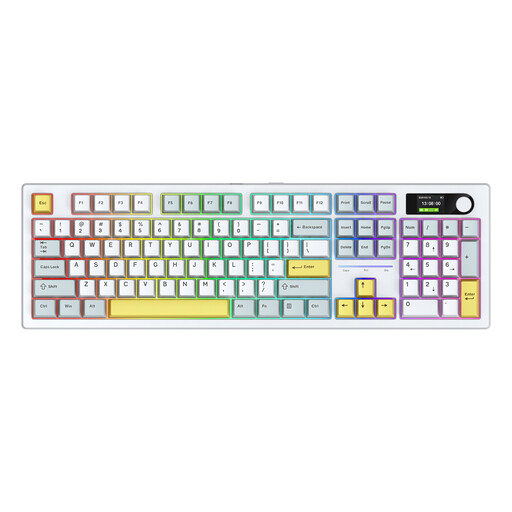 No image available
An option for anyone looking for a 104-key keyboard with an alternative layout.
The product information lists an Alice layout and Bluetooth, 2.4 GHz wireless and wired USB-C connections.
 No image available
A compact option for anyone short on desk space who wants a wired connection.
The product name lists 61 keys and RGB backlighting. According to the product information, this layout doesn’t have a numeric keypad.
No. The larger lettering is on the keys. Increase the message text size in the programme you use to create it; Windows text size or Magnifier changes what you see on your own screen, not the formatting of the published message.
Yes. If the main issue is that the labels are too small, you could consider high-contrast large-print stickers. Stickers don’t change the physical size of the keys.
The special shortcut keys are designed for use with ZoomText or Fusion; check that they’re compatible with your software and version of Windows. For ordinary document text, you can also use the formatting features in your writing programme.
For a consumer product bought online, you generally have a statutory cooling-off period of up to 14 days after delivery, subject to legal exceptions. A product must also meet reasonable expectations; if it’s faulty during normal use, the seller is responsible for providing an appropriate solution. ACM ConsuWijzer explains these consumer rights.
This depends, among other things, on who provides the noticeboard and whether it’s a website or app. The Digital Accessibility Decree for Government applies to the websites and mobile apps of public bodies covered by the decree; this requirement doesn’t automatically apply to a privately run or paper noticeboard. DigiToegankelijk explains the scope of these obligations.