
Writers who find the keys difficult to read
Large, high-contrast legends can make it easier to find letters and punctuation marks on the physical keyboard. Microsoft Support describes screen magnification as a separate setting.


Choose a keyboard with large, high-contrast key legends if you find the physical keys difficult to read. If it’s mainly your manuscript that looks too small, enlarge the on-screen text separately. Then compare the layout, connection and typing feel with your writing setup: what feels comfortable to type on varies from person to person and from one workspace to another.
Large, high-contrast legends can make it easier to find letters and punctuation marks on the physical keyboard. Microsoft Support describes screen magnification as a separate setting.
If you spend long hours working on a fantasy series, you can compare the key feel and your workspace setup. Logitech describes different keyboard shapes; consider for yourself how they suit your posture.
If you switch between, for example, a computer and a tablet, check the connection, device compatibility and physical key layout. Logitech and Keychron describe different connection options for their models.
First decide whether you want the lettering on the keyboard, the text on the screen or both to appear larger. Then compare the physical layout, typing feel and connection with your writing setup.
| What to consider | What should you check? | Who is this important for? |
|---|---|---|
| Readable key legends | Compare the size, contrast and illumination of the legends. Also check the exact layout of the version you’re considering. | If I find letters and punctuation marks on the keys difficult to see, I focus on easy-to-recognise legends. Around 36% of consumers say readable physical keys are their top priority. |
| Key feel and posture | Compare the feel of the keys and the shape of the keyboard; consider support alongside your workspace setup. | For long writing sessions, I want a key feel and posture that suit me, rather than relying on an ergonomic label alone. Around 29% of consumers prioritise typing comfort and workspace layout. |
| Key layout and symbols | Check the physical ANSI, ISO or language-specific layout and compare it with your selected input language. | If I often use punctuation marks and keyboard shortcuts, I want the symbols to be where I expect them. Around 21% of consumers care most about having a physical layout that suits them. |
| Connections and devices | For a wired model, check which port you have available; for a wireless model, compare the connection and supported devices. | When I work on more than one writing device, I want to know how the keyboard connects to each one. Around 14% of consumers say device connectivity is their top priority. |
Large legends change the lettering on the physical keys, not how text appears on your screen.
First work out which text you find difficult to see. Adjust screen magnification separately if you want your manuscript to appear larger.
Language variants and ANSI or ISO layouts can differ in the position of keys and symbols.
Check the exact version, look at the keyboard image and compare it with your selected input language.
According to Joybuy Netherlands, the standard PBT keycaps on the Keychron V6 Max version described do not let the lighting shine through.
Check separately whether the legends on the version you choose are illuminated.
The PERIBOARD-317 is a wired keyboard with large legends.
The Large Print NERO for Windows combines high-contrast legends with a choice of layout variants.
The MX Keys S and Wave Keys offer different shapes for everyday typing, rather than specifically featuring large key legends.
The V6 Max is aimed at anyone looking for a mechanical keyboard with customisable components.
The large-print keyboard described by Optelec Netherlands has high-contrast legends and dedicated software keys.
These keyboards are for writers looking for a mechanical key feel, a particular layout or a choice of connection options.
 No image available
Suited to anyone looking for a wired mechanical keyboard with a number pad and interchangeable switches.
Wired; RGB lighting; number pad; volume knob; MDA-profile PBT keycaps; hot-swappable switches; Beige Switch.
 No image available
Suited to anyone looking for a compact, wired keyboard with interchangeable switches.
66 keys; wired; RGB lighting; volume knob; MDA-profile PBT keycaps; hot-swappable switches; Chartreuse Switch.
 No image available
Suited to anyone looking for a wired mechanical keyboard with a number pad and interchangeable switches.
Wired; RGB lighting; number pad; volume knob; MDA-profile PBT keycaps; hot-swappable switches; Cream Switch.
 No image available
Suited to anyone looking for a 75% layout and wired or wireless connection options.
75% layout; QWERTY US; wired, Bluetooth and 2.4G; side-engraved keys; Reaper Switch.
Check that the QWERTY US layout and symbol positions suit your preferences.
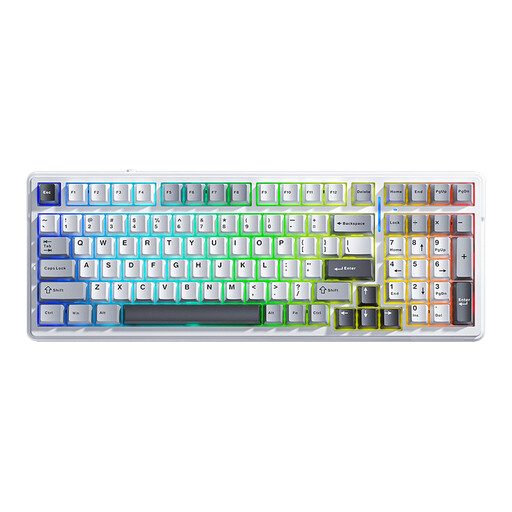 No image available
Suited to anyone looking for a 99-key keyboard with a choice of wired or wireless connection options.
99 keys; QWERTY US; wired, Bluetooth and 2.4G; hot-swappable switches; RGB lighting; compatible with Mac and Windows.
Check that the QWERTY US layout and symbol positions suit your preferences.
No. Large legends change the physical keys. In Windows, you can make on-screen text larger separately via Settings > Accessibility > Text size. Microsoft Support also lists scale and Magnifier as separate display options.
For the PERIBOARD-317, check that your computer has a suitable USB-A port; Perixx describes it as a wired connection that doesn’t require separate software installation. Follow the instructions for your chosen model when cleaning it.
For online consumer purchases, you generally have a 14-day cooling-off period, according to the Dutch government. You’re also entitled to a product that meets the legal guarantee requirements; if a product is faulty, the seller must provide a solution. The Dutch government states that the Netherlands does not have a fixed statutory guarantee period for every product.
Not if you’re writing at home for personal use. Arboportaal describes rules for employees who work at a screen for more than two hours a day: in those circumstances, the screen and keyboard must not be attached to each other. Don’t automatically apply this workplace rule to personal use.