What should you look for when choosing?
First, choose between a large 16:9 screen and an ultrawide model. Then decide which resolution and refresh rate your source device can support through your preferred input.
| What to consider |
What should you check? |
Who is this important for? |
| Sharpness on a large screen |
Compare QHD with 4K and check which resolution your source device can output in your games. |
If I want to see map details and text clearly, I look at the resolution in relation to the screen size. Around 36% of consumers put sharpness first. |
| Refresh rate for each input |
Check the maximum mode for each port and any overclocking requirements. Also note which resolution is available in that mode. |
If I want to follow the action smoothly, I check what my connection and games actually support. Around 29% of consumers make motion performance their top priority. |
| Ultrawide and game support |
Check the aspect ratio in your favourite games and measure the space available on your desk. |
If I mainly want extra horizontal space, I want to know whether my games display that aspect ratio well. Around 21% of consumers prioritise screen width. |
| PC or console output |
Check the resolution and refresh rate you want for each input; on a PS5, test the available video output in the console settings. |
If I use a console, I want to know which output is supported by both my screen and the game I want to play. Around 14% of consumers start by checking the connection and console output. |
Gaming monitors at Joybuy
This selection includes large 16:9 QHD and 4K screens, as well as curved ultrawide models for anyone looking for extra horizontal space.
 No image available
Samsung Odyssey G5 G50F 32-inch IPS 180Hz LS32FG502EUXEN
A large 16:9 QHD screen for anyone looking for IPS and a high listed refresh rate.
32 inches, 2560 × 1440 pixels, IPS, 180 Hz and Adaptive Sync.
View at Joybuy
 No image available
LG 45GX900A-B 44.5-inch OLED
A curved ultrawide for anyone looking for extra horizontal space. Check that your chosen games support 21:9.
44.5 inches, 3440 × 1440 pixels, 21:9, OLED and a listed 240 Hz.
View at Joybuy
 No image available
MSI MAG 341CQP QD-OLED X28 34.18-inch
A curved ultrawide for anyone looking for a wider gaming view. Check how your chosen games display in 21:9 before you buy.
34.18 inches, 3440 × 1440 pixels, 21:9, QD-OLED and a listed 280 Hz.
View at Joybuy
 No image available
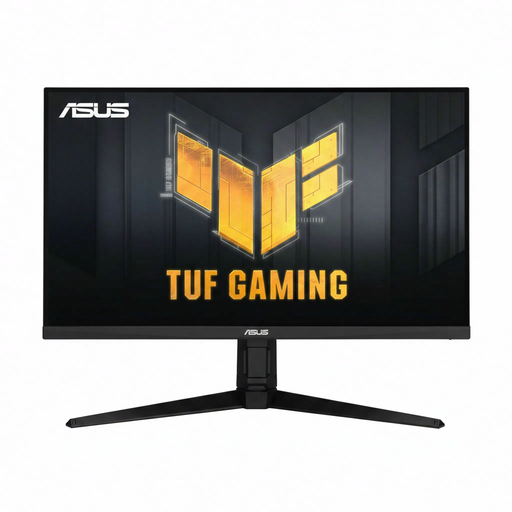
ASUS TUF Gaming VG32AQL1A 31.5-inch QHD
A large, flat QHD screen for anyone who prefers 16:9. Match your preferred mode to the connection you’re using.
31.5 inches, 2560 × 1440 pixels, IPS and up to 170 Hz. ASUS lists 170 Hz as an overclocked DisplayPort mode and a maximum of 144 Hz via HDMI.
View at Joybuy
 No image available
MSI MAG 322UP QD-OLED E16 31.5-inch 4K UHD
A large 4K screen for anyone who prioritises detail and wants to follow the OLED guidance on static images.
31.5 inches, 3840 × 2160 pixels, QD-OLED and a listed 165 Hz. The product information advises avoiding static images at high brightness for long periods and using the OLED care features.
View at Joybuy
Frequently asked questions
Will a 170Hz monitor automatically run at 170 Hz via HDMI?
No, it depends on the exact model and connection. ASUS lists a maximum of 170 Hz for the VG32AQL1A as an overclocked mode via DisplayPort, and a maximum of 144 Hz via HDMI. Check your chosen resolution too.
How can you check whether your PS5 supports your preferred display mode?
Check the video output in your PS5 settings and test the available 1440p output there. PlayStation also explains the VRR and 120 Hz settings. What you can use will also depend on the screen, connection and game.
What should you know about OLED care?
Follow the instructions for your exact model and avoid leaving static images on screen for long periods. LG warns that these can cause temporary image retention and explains how to run pixel cleaning through the monitor settings. Also check the terms for the version you receive.
How do you compare the energy consumption of gaming monitors?
Compare the energy label and stated consumption for the exact version. The European Commission says that electronic displays, including computer monitors, carry an energy label from A to G. The refresh-rate figure alone doesn’t tell you how much energy a monitor uses.
What are your rights if a monitor is faulty or you change your mind about an online purchase?
If a product doesn’t meet the reasonable expectations you’re entitled to have when used normally, ACM ConsuWijzer says you have a statutory guarantee against the seller; there is no single fixed guarantee period for every monitor. Online consumer purchases usually come with a 14-day cooling-off period from the date of receipt, subject to applicable exceptions and terms.


