If you mainly read lengthy dialogue, compare large 4K monitors and check that the size and text scaling suit your desk and viewing distance. OLED may be a good fit if contrast in dark scenes matters more to you, but bear in mind that text boxes and menus can remain static for long periods. When most scenes are static, a high refresh rate alone isn’t a compelling reason to choose a monitor.
Who would benefit from a large monitor for visual novels?
Readers of lengthy dialogue
If you spend a lot of time reading text boxes and menus, compare resolution and text scaling as well as screen size. BenQ’s monitor information and Display Ninja’s guide to pixel density provide useful context for weighing up your options.
Fans of illustrations
If dark scenes and illustrations matter a lot to you, compare the panel type and stated contrast. With OLED, it’s also worth considering the effect of static interface elements remaining on screen for long periods; ASUS explains this risk for OLED monitors.
Versatile gamers
If you also use the same large screen for other games or multiple devices, look beyond picture quality and check the connections and how the monitor will fit on your desk. Compare the specifications of the exact model with your own devices.
What should you look for?
Large 4K IPS screen
A good fit if: text and detailed illustrations come first, and you have room for around 32 inches on your desk.
Consider: BenQ states that the EX3210U model has a native contrast ratio of 1000:1, so compare the contrast of the exact model too.
Large 4K OLED screen
A good fit if: contrast in dark scenes matters more to you than taking extra care with static text boxes and menus.
Consider: ASUS warns that static, high-contrast images displayed for long periods can cause burn-in on OLED screens; check the protection features and terms for the model on offer.
Large QHD screen
A good fit if: a large display area matters more to you than the higher pixel density of 4K.
Consider: at the same screen size, QHD has fewer pixels than 4K, so check how text looks from your intended viewing distance.
| What to consider |
What to check |
Who it matters to |
| Text clarity |
Compare QHD and 4K at the same screen size, and assess the text from your own viewing distance with your preferred text scaling. |
If I’m reading lengthy dialogue, I want to be able to assess small text clearly from my viewing distance. Around 36% of consumers prioritise text clarity above all else. |
| Illustrations and contrast |
Compare the panel type and contrast details for the exact model; for OLED, check the protection features and model terms. |
Dark scenes and illustrations come first for me, but I also want to know how to manage static menus. Around 29% of consumers give illustrations and contrast top priority. |
| Positioning and comfort |
Check the dimensions, including the stand, your desk depth and the adjustment options available on the model. |
I want a large screen that suits my viewing setup and is comfortable to use during long reading sessions. Positioning and comfort are the top priority for around 21% of consumers. |
| Connections |
Compare the inputs with your PC or console, and check which resolution and refresh rate the entire connection supports. |
If I also play other games or switch between devices, I want to know whether the connections suit my equipment. Connections and versatility are the top priority for around 14% of consumers. |
Common mistakes when choosing
-
Choosing based on 32 inches alone
A large screen doesn’t tell you how much detail the text will show. A relatively low resolution can make text look less sharp when using the monitor at a desk.
Compare the native resolution with the screen size, and check how text looks from your own viewing distance.
-
Choosing OLED without considering static text boxes
ASUS explains that static, high-contrast images displayed for long periods can cause burn-in on OLED screens.
Check the protection settings and written terms for the exact model you’re considering.
-
Making refresh rate your main consideration
When you’re mostly reading static dialogue, the maximum refresh rate alone tells you little about text clarity, contrast or how well the monitor will fit on your desk.
Compare the resolution, panel and connections first. Give refresh rate more weight if you’ll also use the monitor for fast-paced games.
Brands and models to consider
BenQ
The MOBIUZ EX3210U is an example of a large 4K IPS gaming monitor with an adjustable stand and HDMI 2.1.
- BenQ lists this model as 32 inches, 3840 × 2160, IPS and 144 Hz, with height adjustment and HDMI 2.1.
- The stated native contrast ratio is 1000:1. These are model specifications, not independent measurements or a statement about every BenQ monitor.
Dell / Alienware
The AW3225QF is an example of a large 4K QD-OLED monitor with a high refresh rate.
- Dell lists this model as 31.6 inches, 3840 × 2160 at 240 Hz, with a curved QD-OLED panel.
- Its high refresh rate doesn’t automatically make it better suited to text-focused games; consider the screen shape and the OLED trade-offs too.
AOC
The AGON PRO AG326UD is a 31.5-inch 4K QD-OLED model to consider if you’re comparing contrast.
- AOC lists the AG326UD as QD-OLED with a 165 Hz refresh rate.
- These specifications aren’t an independent comparison of picture quality or suitability for visual novels.
LG
The UltraGear 32GR93U-B is an example of a large 4K monitor with an IPS panel.
- LG lists this model as 31.5 inches, 3840 × 2160, IPS and up to 144 Hz.
- LG marks this model as discontinued; use its specifications for comparison, not as confirmation that it’s currently available.
Monitors at Joybuy
These models include large 4K monitors with VA, IPS and OLED panels. Compare the resolution, connections and positioning options with the way you plan to use yours.
 No image available
Philips 32E1N1800LA
A 32-inch 4K monitor to consider if you’re looking for a large screen with high native resolution.
VA panel; 3840 × 2160; 60 Hz; 300 cd/m²; 2 HDMI ports and DisplayPort. The title lists a tilt-adjustable stand and speakers.
View at Joybuy
 No image available
BenQ PD3225U
A 32-inch 4K IPS model to consider if you want to view text and detailed illustrations on a large screen.
3840 × 2160; IPS panel; Thunderbolt 3. The product description lists a height-adjustable stand and pivot function.
View at Joybuy
 No image available
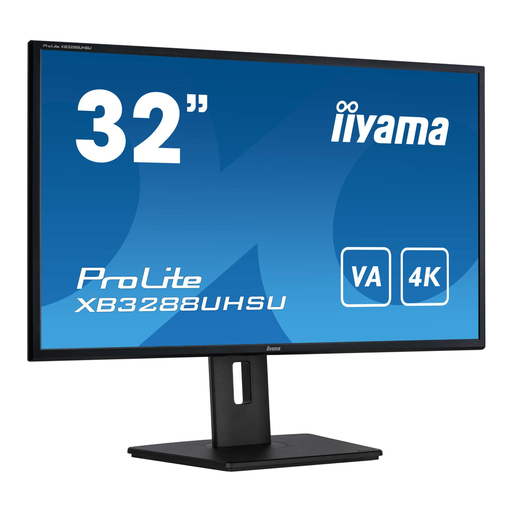
iiyama ProLite 32-inch VA 4K
A 32-inch VA model to consider if a large 4K screen is what you’re looking for.
3840 × 2160; VA panel; HDMI and DisplayPort. The product description lists height adjustment and pivot.
View at Joybuy
 No image available
Dell UltraSharp U3226Q
A 32-inch 4K QD-OLED model to consider if contrast matters a lot to you.
4K UHD; 120 Hz; QD-OLED. The product description lists several video inputs and a height-adjustable stand. ASUS warns that static images displayed for long periods can cause burn-in on OLED screens; check the protection features and terms for this model.
View at Joybuy
 No image available
GIGABYTE MO32U
A 31.5-inch OLED model to consider if you’re looking for a large 4K screen.
3840 × 2160; 4K UHD; OLED. ASUS warns that static images displayed for long periods can cause burn-in on OLED screens; check the protection features and terms for the model on offer.
View at Joybuy
Frequently asked questions
Is 4K essential for a large monitor for visual novels?
No, 4K isn’t essential. Check the text in your own game at the screen size and viewing distance you have in mind: QHD and 4K are different native resolutions, so don’t choose based on screen size alone.
How should I use an OLED monitor during long reading sessions?
Check the protection features on the exact model, and avoid leaving static, high-contrast elements on screen for longer than necessary. ASUS describes potential burn-in and Pixel Shift on its OLED monitors; don’t assume other models have these features without checking.
How do I compare power consumption, warranty and returns when buying online?
Compare the energy use on the EU energy label, which shows consumption for electronic displays in kWh per 1000 hours. For online consumer purchases in the Netherlands, you generally have 14 days from delivery to change your mind, subject to statutory exceptions, according to ACM ConsuWijzer. The statutory guarantee is separate from any manufacturer’s warranty: with normal use, the product must meet what you could reasonably expect from it.


