
Map explorer
You want to read routes, landmarks and the minimap clearly. The LG, Philips and Xiaomi models listed here offer different screen sizes and resolutions to help you weigh up your options.


A 32-inch QHD monitor with a 16:9 aspect ratio is a practical choice if you want to keep track of map details while enjoying fast-paced action. A 34-inch ultrawide is worth considering if your game supports the 21:9 format you want and you have enough desk space. Also check that your PC or console can deliver the chosen resolution and refresh rate through the right connection.
You want to read routes, landmarks and the minimap clearly. The LG, Philips and Xiaomi models listed here offer different screen sizes and resolutions to help you weigh up your options.
You’re learning the map while playing fast-paced duels, so you’ll also want to consider the refresh rate, synchronisation and the output from your PC or console. LG and AOC publish examples with different stated maximum refresh rates.
You want a wider PC screen, but how useful it is depends on how your game displays and how much space you have on your desk. Philips and Xiaomi describe 34-inch ultrawide models with a resolution of 3440 × 1440.
Best for: anyone who wants to follow map details on a large screen with a familiar 16:9 layout.
Keep in mind: a larger screen doesn’t automatically show more of the game world. Viewing distance and desk space still matter.
Best for: anyone who plays on PC and wants extra horizontal screen space, provided the game supports the 21:9 format they want.
Keep in mind: Philips and Xiaomi list 3440 × 1440. Check that your PC can handle this resolution well in your game.
Best for: anyone looking for extra image detail with a system that can handle the 4K mode they want.
Keep in mind: ASUS lists 4K at 165 Hz or Full HD at 330 Hz for the XG32UCWG. The higher stated refresh rate is therefore available at a lower resolution.
| What to consider | What to look for when buying | Who is this important for? |
|---|---|---|
| Map readability | Compare 31.5- or 32-inch 16:9 screens with QHD 2560 × 1440, and check the dimensions including the stand. LG and AOC publish this screen format and resolution for the models mentioned here. | I want to read routes, landmarks and the minimap without needing an ultrawide layout. Around 31% of consumers prioritise map and interface readability. |
| Smooth visuals | Check the refresh rate at your chosen resolution and connection, the frame rate your device can deliver, and support for variable refresh rate. AMD describes FreeSync as a technology for compatible setups. | If I play fast-paced multiplayer games, I want to know what my device can actually deliver through the connection I’ve chosen. Around 31% of consumers prioritise smooth visuals and suitable synchronisation. |
| Ultrawide and game support | Check whether your game supports 21:9, how the minimap and HUD are displayed, and whether 3440 × 1440 suits your PC’s graphics performance. Philips and Xiaomi list this resolution for specific 34-inch models. | I want a wide PC setup, but only if my game makes the most of the extra space. Around 23% of consumers choose an ultrawide layout when it suits the games they play. |
| Positioning and use | Check the dimensions including the stand, the energy label and any panel care instructions. For OLED, guidance on prolonged static images and the model-specific warranty is particularly relevant. | If I have limited desk space or want to factor in energy use and panel care, these things will influence my choice. Around 15% of consumers prioritise positioning and lifespan. |
An ultrawide monitor’s resolution doesn’t tell you how a specific game displays the playing area or HUD.
Check how your multiplayer game displays in 21:9 before choosing ultrawide over 16:9.
The refresh rate delivered depends on your device, connection and resolution. Manufacturers also use different response time methods, such as GtG and MPRT.
Check the specifications for each connection and resolution, and only compare response times measured using the same method.
Xiaomi lists a VESA size of 75 × 75 mm for the G34WQi and 100 × 100 mm for the separate G34WQi 2026.
Check the full model name and specifications for the exact version you’re considering, especially if you plan to use a monitor arm.
ASUS warns that prolonged high-contrast static images can cause burn-in on OLED screens. Protective features don’t eliminate the risk.
Read the care instructions and warranty terms for the exact model before making a decision.
The UltraGear 32GR75Q-B is an example of a flat 31.5-inch QHD monitor with a 16:9 aspect ratio and an IPS panel.
The CQ32G4VE is an example of a curved 32-inch QHD monitor with a VA panel, offering a 16:9 alternative.
The Evnia 34M2C3500L/00 is an example of a 34-inch ultrawide monitor with a resolution of 3440 × 1440.
The Dutch specifications page lists the product model C34WQBA-RGGL for the Curved Gaming Monitor G34WQi.
The ROG Strix OLED XG32UCWG is an example of a 31.5-inch 4K monitor with a switchable speed mode.
This selection includes 32-inch QHD gaming monitors and a 34-inch ultrawide option. Before choosing, check that your game and device support the resolution and aspect ratio you want.
 No image available
A 32-inch model for anyone looking for a large QHD screen to follow map details.
The product information lists a resolution of 2560 × 1440, a maximum refresh rate of 180 Hz, an IPS panel, and support for G-SYNC Compatible and FreeSync. Check which refresh rate your device can deliver at your chosen resolution and connection.
 No image available
This 32-inch model is for anyone looking for a large QHD display and a curved screen.
The product name lists a resolution of 2560 × 1440, a refresh rate of 180 Hz, a VA panel, 1500R curvature and Adaptive Sync. Check compatibility with your device and connection.
 No image available
Worth a look if you’re after a large, curved QHD screen for viewing maps and playing multiplayer games.
The product name lists a refresh rate of 165 Hz and a DisplayPort connection; the product information also mentions Adaptive-Sync. Check the full resolution specification for the version on offer before ordering.
 No image available
This 34-inch ultrawide is a good fit if you want a wider PC setup, provided your game supports the 21:9 format you want.
The product information lists a resolution of 3440 × 1440, a refresh rate of 165 Hz, a VA panel, 1500R curvature and VESA 75 × 75 mm. A wider monitor doesn’t guarantee that your game will show more of the map.
 No image available
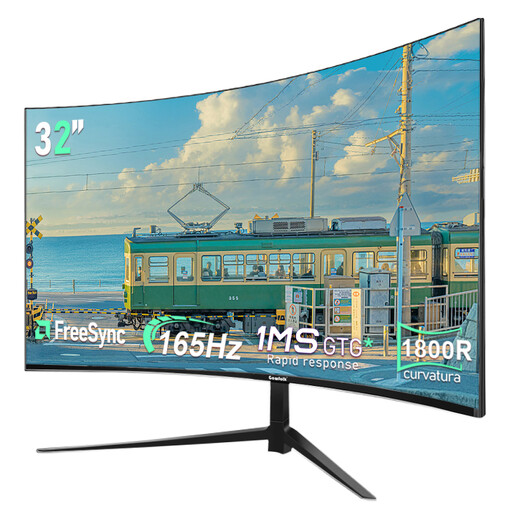
A 32-inch curved option for anyone who wants to view map details on a large QHD screen.
The product name lists a resolution of 2560 × 1440, a refresh rate of 165 Hz and 1800R curvature. Check that the refresh rate suits your device’s output.
No, that isn’t guaranteed by the monitor specifications alone. Check how your game displays 21:9, the playing area and the HUD before choosing ultrawide.
Use a connection that supports the resolution and refresh rate you want, then check your device’s display settings. Variable refresh rate requires a compatible combination of source and monitor. For 4K at 120 Hz on an Xbox Series X, Microsoft also lists requirements for the console, HDMI cable and screen.
According to ASUS, prolonged high-contrast static images can cause burn-in on OLED screens. Follow the screen protection and pixel cleaning instructions for the exact model, and check the relevant warranty terms.
Compare the stated energy consumption per 1,000 hours on the energy labels. To work out your personal cost, you’ll also need to know how long you use the monitor and your electricity tariff. In the Netherlands, a product must meet reasonable expectations; the Dutch government identifies the seller as the point of contact if there’s a problem. A manufacturer’s warranty is in addition to this.
When you buy remotely, the seller must provide you with information about the product and your cancellation period, among other things. The Dutch government states that a 14-day cancellation period applies in many cases. EU energy labelling rules apply to electronic displays, including computer monitors; check the label for the model you choose too.