Who is a large screen suitable for?

Players who want a clear overview

If you want to keep track of the map, units and interface on a large screen, compare screen size, resolution and 16:9 versus ultrawide. Samsung Netherlands, Philips Netherlands and KTC describe models that illustrate these formats.

Players who want smooth controls

The refresh rate you need depends on your PC, resolution and connection. KTC lists different maximum refresh rates for each input on the H32S5.

Players who enjoy long sessions

If you leave game menus on screen for long periods, weigh up OLED against your usage habits and the care features for the specific model. ASUS describes measures that help reduce the risk of burn-in; LG warns that static elements displayed for a long time can cause temporary image retention.

Which features should you consider when choosing?

Consideration What to look for Who does this matter more to?
Sharpness and overview Compare QHD and 4K for the screen size and viewing distance you use, and check whether your PC can handle the resolution you want. On a large screen, I want to read map details and the interface clearly, and choose a resolution that suits my PC. Around 36% of consumers prioritise sharpness and a clear overview.
Smooth map movement Check the supported resolution and refresh rate for each port, as well as the performance your PC delivers in-game. If I move around the map frequently, I want a refresh rate that suits my PC and connection. Around 29% of consumers put smooth controls first.
Extra screen width Check the aspect ratio and how the interface appears in the games you play, as well as the space available on your desk. I want more horizontal space, but only if my strategy game displays it well. Around 21% of consumers give extra screen width top priority.
Long sessions and OLED Weigh up OLED against the care it requires and check the warranty terms for the exact model. For long sessions, I want to know how static game menus fit with my choice of screen and its care requirements. Around 14% of consumers prioritise long-term use.

Things to watch out for when buying

  • Focusing only on the highest Hz figure

    The maximum refresh rate may vary depending on the resolution and connection. For the KTC H32S5, KTC lists up to 180 Hz via DisplayPort and 144 Hz via HDMI at QHD; 185 Hz is only available as an optional overclock.

    Check the figure for the input and resolution you’ll actually use, and see what frame rate your PC can achieve in-game.

  • Assuming ultrawide shows more of the map in every game

    A wide monitor specification doesn’t confirm how a particular strategy game displays its playing area and interface.

    Check how the games you play are displayed before choosing ultrawide.

  • Mistaking an OLED care feature for a guarantee against image retention

    ASUS describes features that help reduce the risk of burn-in, not eliminate it. LG says that static elements displayed for a long time can cause temporary image retention.

    Follow the screen care instructions for the exact model and read the relevant warranty terms.

Monitor brands to consider

Samsung

Samsung Netherlands describes the Odyssey G7 G70D as a 32-inch 4K Fast IPS monitor with a stated refresh rate of 144 Hz.

  • An example to consider if you’re looking at the 32-inch 16:9 and 4K route.
  • The maximum refresh rate doesn’t tell you how many frames your PC can render in a strategy game.

Philips

Philips Netherlands describes the Evnia 34M2C5501A/00 as a curved 34-inch Fast VA monitor with a resolution of 3440 × 1440 and a stated refresh rate of 180 Hz.

  • A model to consider if you’re looking at ultrawide.
  • The specifications don’t confirm that every strategy game will show more of the playing area; check how each game is displayed.

ASUS

ASUS Netherlands describes the ROG Swift OLED PG32UCDM Gen3 as a 32-inch 4K QD-OLED monitor with a refresh rate of 240 Hz.

  • ASUS lists OLED Care features that help reduce the risk of burn-in.
  • These features don’t eliminate that risk. According to ASUS, the ASUS TUF VG32UQA1A is a 31.5-inch 4K VA alternative without height adjustment.

Dell Alienware

Dell Netherlands describes the AW3225QF as a curved 32-inch 4K QD-OLED monitor with a stated refresh rate of 240 Hz.

  • A model to consider if you’re looking at OLED and a curved 16:9 screen.
  • Check the offer terms for the exact model.

KTC

KTC describes the H32S5 as a curved 31.5-inch QHD monitor with a resolution of 2560 × 1440.

  • For QHD, KTC lists up to 180 Hz via DisplayPort.
  • For QHD, KTC lists up to 144 Hz via HDMI; 185 Hz requires an optional overclock.

Joybuy monitors for strategy games

This Joybuy selection includes 16:9 QHD and 4K monitors, as well as ultrawide options. If you’re considering ultrawide, check how your strategy game displays that aspect ratio.

Samsung Odyssey G5 G50F 32-inch IPS gaming monitor

Samsung Odyssey G5 G50F LS32FG502EUXEN

An option if you’re looking for a large 16:9 QHD screen for maps and interface elements.

32 inches; IPS; stated refresh rate of 180 Hz.

View at Joybuy

MSI MAG 322UP QD-OLED E16 31.5-inch 4K UHD monitor

MSI MAG 322UP QD-OLED E16

A 4K option if fine detail on a large screen matters to you and you want to make sure the resolution suits your PC.

31.5 inches; 4K UHD; QD-OLED; stated refresh rate of 165 Hz.

For long sessions with static menus, follow the care instructions for this model’s OLED screen.

View at Joybuy

CRUA 49-inch curved ultrawide gaming monitor

CRUA 49-inch Curved Ultrawide Gaming Monitor

A super-wide option if your strategy game displays the aspect ratio well; check how each game handles it before choosing.

32:9; 5120 × 1440; VA panel; stated refresh rate of 165 Hz.

View at Joybuy
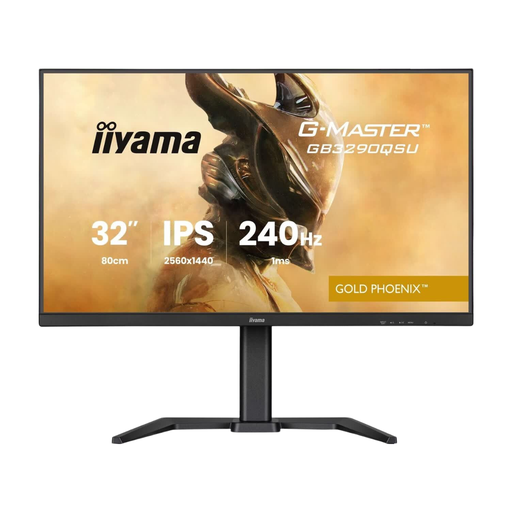
iiyama G-MASTER GB3290QSU-B1 31.5-inch Quad HD monitor

iiyama G-MASTER GB3290QSU-B1

A 16:9 QHD option if you want a large screen without stepping up to 4K.

31.5 inches; Quad HD; 2560 × 1440 pixels.

View at Joybuy

iiyama G-MASTER GCB3486WQSCP-B1 Gold Phoenix curved ultrawide monitor

iiyama G-MASTER GCB3486WQSCP-B1 Gold Phoenix

A curved ultrawide option if you want extra horizontal space; first check how your own games display this format.

Stated refresh rate: 240 Hz.

View at Joybuy

Frequently asked questions

Is 4K always better than QHD for a large strategy gaming screen?

No. The right choice depends on your PC, viewing preferences and screen size. Based on their stated resolutions, 4K has more pixels than QHD, but a monitor’s resolution doesn’t determine the frame rate your PC can achieve in-game.

Why don’t I see the maximum Hz figure after connecting my monitor?

The achievable refresh rate can vary depending on the input and resolution. For the H32S5 at QHD, KTC lists up to 180 Hz via DisplayPort and 144 Hz via HDMI; 185 Hz is only available with an optional overclock. Also check your cable and display settings.

How should I care for an OLED monitor during long strategy gaming sessions?

Follow the instructions for the exact model and use the recommended screen care features. LG says that static elements displayed for a long time can cause temporary image retention; ASUS describes features that help reduce, but don’t eliminate, the risk of burn-in.

What are my rights when buying a monitor online in the Netherlands?

According to ACM ConsuWijzer, for a standard online purchase you generally have a statutory cooling-off period of up to 14 days after delivery, subject to applicable exceptions. In addition, if a product doesn’t meet what you could reasonably expect under normal use, the seller must offer a solution under the terms of the statutory guarantee. A manufacturer’s guarantee doesn’t replace this right.
