
Menu and detail reader
You want to see departments across a large screen and read small in-game menus from your usual seat. So compare resolution, screen size, viewing distance and text scaling.


For a virtual hospital, a QHD monitor around 32 inches is a practical way to get a large playing area. At a similar size, 4K offers more pixels for fine detail, but demands more from your PC. So first check whether menus are readable from your usual viewing distance and whether your computer can handle the resolution you choose. For long sessions with fixed menus, it’s also worth taking an OLED model’s care instructions into account.
You want to see departments across a large screen and read small in-game menus from your usual seat. So compare resolution, screen size, viewing distance and text scaling.
You want plenty of screen space without automatically opting for 4K or the highest stated refresh rate. Your PC’s capabilities and video connection also play a part.
You’re thinking about where to position a large screen and how long menus remain visible. Adjustability, panel type and model-specific care instructions may all affect your decision.
Start by checking whether menus are readable from your usual viewing distance. Then make sure your PC can handle your preferred combination of resolution and refresh rate through the connection you plan to use.
| What to consider | What should you check? | Who is this important for? |
|---|---|---|
| Readable menus | Compare QHD and 4K at roughly the same screen size, and assess text scaling from your usual viewing distance. | If I want to read small menus and details clearly across a large playing area, I look at both resolution and text size. Around 33% of consumers prioritise readability. |
| PC demands and spending | Check which resolution and refresh rate your PC can output through the port you’ve chosen. | If I want more screen space without paying for performance my PC or this game won’t use, I compare the system requirements first. Around 27% of consumers prioritise balancing PC demands with cost. |
| Screen setup | Check the dimensions, stand, adjustability and any mounting options for the exact model. | If I have limited desk space or need the screen at a particular height, positioning affects my choice. Around 20% of consumers focus mainly on screen setup. |
| Panel type for fixed menus | For OLED, read the care instructions and warranty terms for the specific model. | If game menus stay in the same place during long sessions, I want to know in advance what care the manufacturer recommends. Around 13% of consumers give panel care the greatest weight. |
| Refresh rate | Compare the monitor’s maximum Hz rating with your PC’s output and the other games you play. | If I also play games on the same screen where smooth movement is my deciding factor, I look closely at the stated Hz. Around 7% of consumers put motion smoothness first. |
A large diagonal doesn’t tell you how many pixels are available for small text and menus. At a similar size, 4K has more pixels than QHD.
Compare both resolutions from your usual viewing distance and check whether you need text scaling.
A monitor’s maximum refresh rate doesn’t tell you how many frames your PC will display in a specific management game.
Check what your PC and connection can handle, and weigh the Hz rating against the other games you play and your need for readability.
In its general OLED support information, LG warns that static elements left visible for long periods, including game menus, can cause temporary image retention. This doesn’t mean the same outcome will occur with every OLED model.
Before buying, read the care instructions and warranty terms for the exact model.
Additional cover isn’t the same as your statutory rights. The Dutch government states that there is no fixed statutory warranty period in the Netherlands.
Compare the additional cover and terms with the statutory protection that applies to your product.
LG’s UltraGear range includes the 31.5-inch flat QHD IPS monitor, the 32GR75Q-B, for anyone looking for a large, adjustable screen.
The Evnia 32M2C5501/00 and 32M2N6800M/01 offer a curved QHD VA option and a 4K IPS option respectively.
The Odyssey G5 G50F LS32FG502EUXEN is a 32-inch QHD IPS option for anyone who also values a high stated refresh rate.
The AW3225QF is a 31.6-inch 4K QD-OLED monitor for buyers who are specifically considering this panel type.
These large gaming monitors are for anyone comparing QHD or 4K, and flat or curved screens, to find the right fit for their setup.
 Image unavailable
A good fit if you’re looking for a large QHD screen with an IPS panel; Samsung lists a resolution of 2560 × 1440 and a maximum refresh rate of 180 Hz for this model.
The maximum Hz rating doesn’t tell you how many frames your PC can achieve in your game.
 Image unavailable
A good fit if you’re considering a large, curved QHD screen; the product name lists 32 inches, 2560 × 1440, 180 Hz, HVA and 1500R curvature.
Assess the curve from your usual sitting position.
 Image unavailable
A good fit if you’re considering a large, curved screen; the product name lists 32 inches, QHD, 165 Hz and 1500R curvature.
Check the connections and whether the curve suits your seating position.
 Image unavailable
A good fit if you’re considering a large, curved 4K screen; the product name lists a VA panel, 3000R curvature and 3840 × 2160.
Check that your PC and connection can handle the resolution you choose.
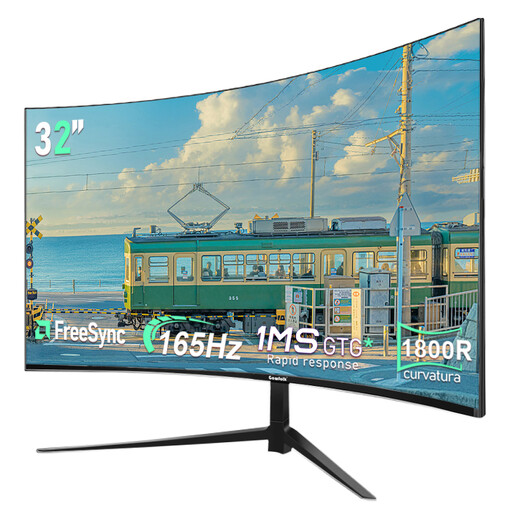 Image unavailable
A good fit if you’re looking for a large, curved QHD screen; the product name lists 2560 × 1440, 165 Hz and 1800R curvature.
Assess the curve and screen positioning in your own setup.
No, not automatically. At almost the same screen size, 4K offers more pixels than QHD, but also consider text scaling, viewing distance and what your PC can handle. The stated specifications can’t predict exactly how readable your game will be.
Check the dimensions and adjustability of the exact model, and assess the screen from your usual seat. LG advises switching off and unplugging the monitor before cleaning it; also follow the care instructions from your screen’s manufacturer.
For online distance purchases from a business, a 14-day cooling-off period applies in many cases, according to the Dutch government. Statutory warranty also applies; in the Netherlands, there is no fixed statutory period. Check who the seller is and which terms apply to your purchase.
Computer monitors are covered by EU energy labelling rules for electronic displays, which use a scale from A to G. The European Commission also sets out requirements for displaying label information when selling online. Compare the label for the exact model; the energy class alone doesn’t tell you how much your electricity will cost.
The obligations described by Arboportaal are aimed at employers and employees, and aren’t automatically legal requirements for a personal gaming setup. The guidance on readability and screen positioning can still help you assess your own setup.