
PC gamer who likes fast-paced action
Wants to follow the action on a large screen and match the resolution and refresh rate to what their PC can handle in games.


For fast-paced squad matches on a large screen, QHD with a high refresh rate suits players who prioritise smooth motion. Choose 4K if extra detail matters and your PC or console can handle the desired output. Also check the limits of each connection, the space on your desk and whether a curved screen or OLED suits your preferences. Manufacturer specifications describe the monitor, but don’t guarantee a particular frame rate in a game.
Wants to follow the action on a large screen and match the resolution and refresh rate to what their PC can handle in games.
Prioritises detail on a screen of around 32 inches and checks whether their PC or console supports the desired 4K output.
Wants to match the connections and output settings to their devices, games and preferred resolution or refresh rate.
Start with the output your PC or console actually supports. Then compare the resolution and refresh rate for each connection, and only after that choose your panel type and screen shape.
| What to consider | What should you check? | Who is this important for? |
|---|---|---|
| Smooth motion | Check the resolution and maximum refresh rate for each input, along with any overclocking conditions and VRR support. | If you follow fast camera movements, you’ll want a refresh rate that matches your PC’s output. Around 36% of consumers prioritise smooth action. |
| Sharpness on a large screen | Compare QHD and 4K at your preferred screen size, and check whether your system can handle your chosen resolution and in-game settings. | If detail on a large screen matters more to you than reducing the load on your PC, consider 4K. Around 29% of consumers prioritise sharpness. |
| Connections and output | Check the port limits of the exact model and its support for your desired resolution, 120Hz output and VRR on your console. | If you switch between PC and console, you’ll want to know which output the combination of device, connection and game actually supports. Around 21% of consumers put compatibility first. |
| Panel and screen shape | Check the panel type and curvature of the exact model. For OLED, also check the care guidance and warranty terms that apply. | If you’re mainly interested in contrast or a curved picture, weigh up that preference against the panel choice and its terms. Around 14% of consumers prioritise contrast or screen shape. |
The maximum refresh rate may vary depending on the input or setting. ASUS specifies up to 170 Hz via DisplayPort in overclock mode and 144 Hz via HDMI for the VG32AQL1A; separate conditions apply for 120Hz output on PS5.
Compare the resolution and refresh rate for each connection, and check what your own device can output.
QHD and 4K are different native resolutions. To play at 4K, your PC or console and the game settings also need to support that output.
Choose a resolution that matches your desired frame rate and your system’s performance.
The manufacturer’s warranty terms for a specific panel and your statutory rights under Dutch law are separate matters. According to ACM ConsuWijzer, if a product is faulty, the retailer is responsible for providing an appropriate solution.
Read the warranty terms for the version you’re considering and keep your proof of purchase. If there’s a fault, contact the retailer.
These models illustrate different technical options. They don’t, in themselves, confirm current availability or suitability for every gamer.
The TUF Gaming VG32AQL1A is an example of a flat 31.5-inch QHD IPS screen.
The CQ32G4VE is an example of a curved 31.5-inch QHD Fast VA monitor.
The M32U is an example of a 31.5-inch 4K IPS monitor for use with PC and console.
The MPG 321URX QD-OLED is an example of a 31.5-inch 4K OLED monitor.
The UltraGear 32GR93U-B is an example of a 31.5-inch 4K IPS option.
This range includes large gaming monitors in QHD and 4K, with a variety of stated refresh rates and both flat and curved screens.
 No image available
Suited to anyone looking for a large IPS screen with a stated refresh rate of 180 Hz for PC gaming.
32 inches; IPS panel; 180 Hz.
 No image available
Suited to anyone looking for 4K detail and a QD-OLED panel, who checks that their hardware can handle their preferred game output.
31.5 inches; 4K UHD; QD-OLED; 165 Hz; USB-C.
 No image available
Suited to anyone looking for a large QHD screen with a curved design and a stated refresh rate of 180 Hz.
32 inches; 2560 × 1440; HVA; 1500R; 180 Hz; Adaptive Sync.
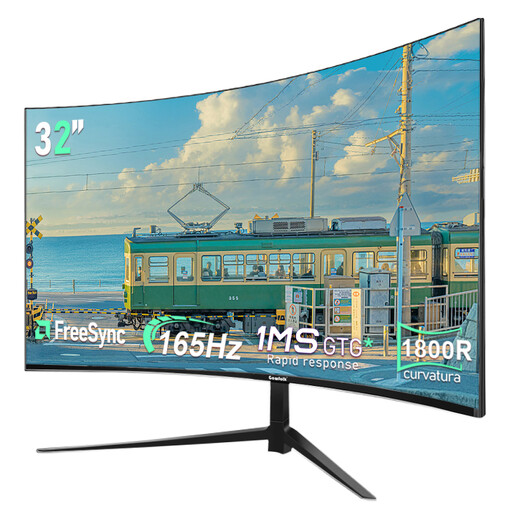 No image available
Suited to anyone looking for a large curved QHD screen and wanting to compare a stated refresh rate of 165 Hz.
32 inches; 2560 × 1440; 165 Hz; 1800R.
 No image available
Suited to anyone looking for a curved QHD screen and wanting to match the connections and mounting options to their setup.
32 inches; 2560 × 1440; 165 Hz; 1500R; HDMI; DisplayPort; VESA 100 × 100 mm.
No. The monitor’s maximum figure doesn’t mean the PS5 will use that refresh rate in every game. Sony says that 120Hz output depends on supported games and a compatible screen. On your PS5, check the capabilities reported by the connected HDMI device.
Run the 1440p output test and check the information about the connected HDMI device. According to Sony, the available combinations of resolution, 60 or 120 Hz, SDR or HDR, and VRR depend on the screen and the game.
Check the dimensions of the monitor and stand, and look at the adjustment or VESA mounting options for the exact model. With OLED, panel care and the terms of any burn-in cover are separate points to consider.
Compare the EU energy labels for the exact models. The European Commission says that the label for electronic displays includes efficiency information and may also show information about consumption in HDR mode.
If a product is faulty, you can contact the retailer under your statutory rights under Dutch law. ACM ConsuWijzer explains that this depends on what you could reasonably expect from the product. For a standard online purchase by a consumer, there is usually a statutory 14-day cooling-off period from delivery, with some exceptions.