
Team player who wants to keep chat in view
Want to keep both game information and team chat in view while practising? Check that your game, PC and window layout work well on the monitor you choose. Set up your voice equipment separately.


A large 16:9 screen is a good fit if you mainly want to focus on a single game, while an ultrawide is worth considering if it suits your PC, game and window layout. Then check which resolution and refresh rate your device supports through the connection you plan to use. Set up your microphone, audio output and voice chat software separately: a bigger screen won't manage voice chat for you.
Want to keep both game information and team chat in view while practising? Check that your game, PC and window layout work well on the monitor you choose. Set up your voice equipment separately.
If smooth action is your priority, check which resolution and refresh rate your PC or console actually supports through the connection you plan to use.
If you want to use one large monitor with different devices, compare the video signals and ports supported by each device.
For gaming alongside team chat, start with the screen layout you want. Then check the video connection for each device, and set up sound and voice chat separately.
| What to consider | What to look for | Which shoppers this suits |
|---|---|---|
| Game and chat on screen at the same time | Check the aspect ratio and resolution, measure the space available on your desk and try out your preferred layout using your software. | I want to follow team information while playing, and I want to know in advance whether my window layout will work. Around 28% of shoppers put this combination at the top of their list when buying. |
| Smooth action | For each HDMI or DisplayPort input, check the supported resolution and Hz combination, as well as your device's output settings. | If fast-paced action is my priority, I'll compare the refresh rate with what my game and connection can deliver. Around 22% of shoppers give smooth visuals their top priority. |
| Voice chat that works | Check where your headset or microphone connects, then test the selected input and output in your voice chat software. | I want to be sure I can hear others and be heard clearly before and during a team session. Around 22% of shoppers say a working audio setup is their main concern when buying. |
| PC and console compatibility | Compare the signal support of your device, cable and monitor port. On a console, check that the game supports the output mode you want. | I want to switch between PC and console without overlooking which display settings are supported. Around 17% of shoppers put compatibility with multiple devices first. |
| Long-term use and aftercare | Read the usage and warranty terms for the exact model, and make a note of who the seller is. | If a screen is on a lot, I want to know which model-specific usage instructions apply and what to do if something goes wrong. Around 11% of shoppers name long-term use and aftercare as their main concern when buying. |
More screen space and working voice chat are two different things. If you have trouble hearing others or being heard, the issue could be with your microphone, audio output or voice chat software.
Before a practice session, test your microphone, headset and selected input and output devices in your voice chat software.
If your current input or output equipment isn't up to the job, you may need additional audio equipment.
The maximum refresh rate can vary by connection and resolution. KTC lists up to 180 Hz at QHD via DisplayPort and up to 144 Hz via HDMI for the H32S5; 185 Hz is an optional overclocking mode.
Check the exact monitor's specifications for each input and resolution before comparing them with your PC or console's output.
According to ACM ConsuWijzer, your statutory rights apply alongside any seller's or manufacturer's warranty.
Compare what an additional package actually offers, and report any fault to the seller.
The Odyssey range includes both flat and curved 32-inch models, so focus on the specific screen and setup you want.
The H32S5 is an example of a large, curved QHD screen for people who usually sit directly in front of their monitor.
The AW3225QF is a 32-inch 4K QD-OLED model for shoppers who value these display and panel features.
The XG32UQ is a large Fast IPS model to consider when comparing PC and console connections at model level.
The range includes large OLED monitors with different picture modes on specific models.
This selection focuses on large gaming monitors for an expansive view of your game. Compare the stated resolution, refresh rate and connections with your PC or console.
 Image unavailable
An option if you're after a large IPS gaming display and want to check how your preferred chat layout will work on screen.
32 inches, IPS and 180 Hz.
 Image unavailable
An option if you want a large QHD gaming display and need the connections to work with your PC or console.
2560 × 1440 QHD, 180 Hz, Adaptive Sync, HDMI 2.0 and DisplayPort 1.4.
 Image unavailable
An option if you're looking for a large, curved screen; check that its shape suits your seating position and preferred window layout.
QHD 2650 × 1440P, 165 Hz and DisplayPort.
 Image unavailable
An option if you're after a large UHD gaming display; also check which resolution and frame rate your device can output.
UHD 3840 × 2160, curved 3000R and VA panel.
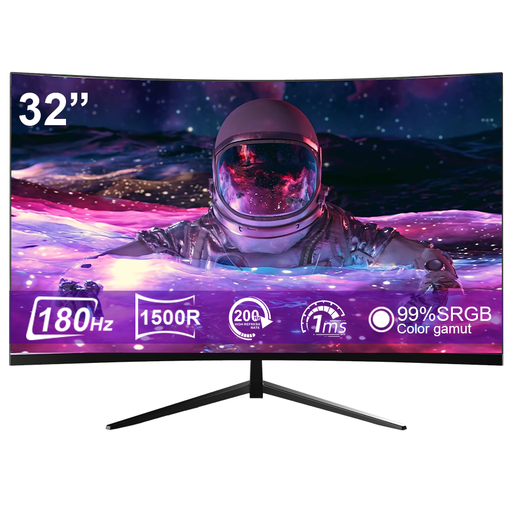 Image unavailable
An option if you want a large, curved QHD screen; compare the available connections with the devices you plan to use.
2K QHD 2560 × 1440, HDMI and DisplayPort.
No. Use the screen to create your preferred game and window layout, but test your microphone and selected audio output device separately in your voice chat software. Discord treats problems with hearing others or being heard as audio settings issues.
First, check the input and resolution you've selected. For example, KTC lists up to 180 Hz at QHD via DisplayPort and up to 144 Hz via HDMI for the H32S5; 185 Hz is an optional overclocking mode on this model.
No. According to PlayStation, 120Hz output is intended for a compatible display and games that support a 120 Hz frame rate. Also check the specifications of the monitor port you're using.
For a purchase as a consumer in the Netherlands, you have statutory rights in addition to any commercial warranty. According to ACM ConsuWijzer, if a product breaks sooner than you could reasonably expect under normal use, the seller must provide an appropriate solution at no extra cost, such as a repair, replacement or refund. There isn't one fixed statutory warranty period for every monitor.
According to ACM ConsuWijzer, online purchases often come with a 14-day cooling-off period after delivery. Before buying, check how to cancel your purchase and which terms apply to your situation; the cooling-off period is different from making a complaint about a fault.