What should you look for when choosing?
First, check which software and files you need. Then compare the battery claim, screen and ports on the specific configuration with the way you work.
| What to consider |
What should you check? |
Who should consider this? |
| Working without a power socket |
Only compare battery claims when the test activity is clearly stated, and check how you can recharge the laptop. |
If you can’t recharge straight away during rehearsals, you’ll want to know what a battery claim means for your work. Around 33% of consumers in this buying context prioritise uninterrupted battery use. |
| Page layout |
Check the screen size and resolution, and compare the memory with the requirements of your own layout software. |
If you want to view text and page previews at the same time, focus on screen space and ease of use. Around 27% of consumers prioritise page layout. |
| Software and files |
Check the operating system, programme version and file workflow before choosing a configuration. |
If you need to open and edit existing project files, you’ll want to know in advance whether your programmes will run on the laptop. Around 20% of consumers prioritise software compatibility. |
| Connecting devices and charging |
Check the ports, the required charging power and whether the adapter is included with the exact configuration. |
If you use existing peripherals or want to recharge when a power socket becomes available, check the connections and power supply. Around 20% of consumers prioritise ports and charging equipment. |
Apple states that the 13-inch MacBook Air offers up to 15 hours of wireless web browsing; this isn’t a battery-life measurement for laying out a programme. Adobe lists 8 GB RAM as the minimum and 16 GB as recommended for InDesign on the Windows version described. Don’t automatically apply this requirement to other programmes.
Joybuy laptops for text and page layout
These Joybuy products are laptops for text and page layout. Compare their screens, memory and ports with your workflow, and check the battery details for the exact configuration before working somewhere without a regular place to charge.
 No image available
HP OmniBook 3 AI PC 14-ht0013nd
A 14-inch screen with a 16:10 aspect ratio may suit you if you want to view text and page previews side by side.
14-inch screen, 1920 × 1200; Intel Core 3 304; 8 GB RAM; 512 GB SSD; Windows 11 Home.
The listed ports are two USB-C ports, two USB-A ports and HDMI.
Joybuy
 No image available
Auusda T156A
The 15.6-inch screen is worth considering if you’re looking for more screen space for layout work.
15.6-inch FHD IPS screen; 16 GB DDR4 RAM; 512 GB SSD; 3050E processor.
The listed ports are USB 3.0, USB 2.0, USB-C and HDTV.
Joybuy
 No image available
Ruzava 14-inch laptop, N5095
The 14-inch FHD IPS screen and stated weight of 1.39 kg are useful to consider if you view text in different work locations.
N5095 processor; 8 GB RAM; 256 GB SSD; 14-inch FHD IPS screen.
The description lists USB 3.0, USB-C for data, Mini-HDMI and a 180° foldable screen.
Joybuy
 No image available
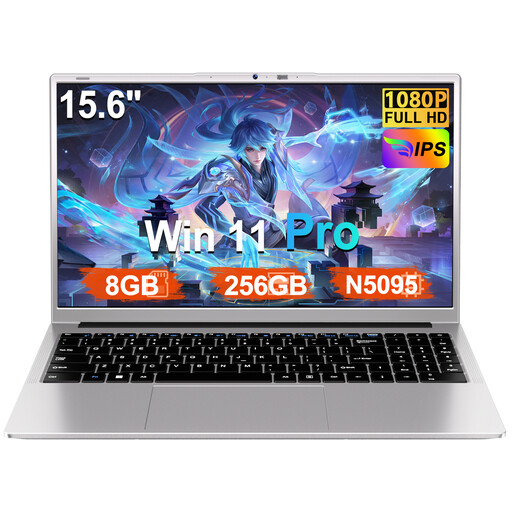
Ruzava 15.6-inch laptop, N5095
This configuration has a 15.6-inch screen for anyone who wants more screen space when working on layouts.
N5095 processor; 8 GB RAM; 256 GB SSD; FHD screen; Windows 11 Pro.
The description lists USB 3.0, USB-C for data, a Micro-SD slot and an included charger.
Joybuy
 No image available
NOTODD 14-inch laptop, Celeron N5095
The 14-inch screen with a stated resolution of 1920 × 1200 may be useful if you want to see text and page previews clearly.
Celeron N5095 processor; 8 GB RAM; 256 GB SSD; Windows 11.
The title lists Mini-HDMI for connecting to an external screen or projector.
Joybuy
Frequently asked questions
Do you need a laptop with 16 GB RAM for a theatre programme?
Not necessarily; it depends on the software you use. For the Windows version of InDesign 21.3 and later described, Adobe lists 8 GB as the minimum and 16 GB as recommended. Check the requirements for other programmes separately.
How do you compare battery life if you often work without a power socket?
Compare the test activity for each battery claim and check the charging options available on the exact laptop. Apple, for example, states that the MacBook Air offers up to 15 hours of wireless web browsing; that doesn’t tell you how long you can use it to lay out programme pages.
Do you need to buy a charger separately?
It depends on the configuration. For the Zenbook 14 OLED UX3405 eShop configuration reviewed, ASUS states that a 65 W adapter is required but isn’t included. Dell likewise states that no charger is included with the Pro 14 configuration reviewed. Check what’s in the box and the charging power required for your configuration.
Can you assume your existing layout software will work?
No. First check the programme version, operating system and files you need to open. If you use Adobe InDesign, compare Adobe’s requirements with the laptop configuration; don’t automatically apply those requirements to other software.
What rights do you have when buying a laptop online in the Netherlands?
For online consumer purchases from a business, the Dutch government generally provides a 14-day cooling-off period. Check the terms that apply to your purchase; this explanation doesn’t necessarily apply to purchases from a private seller.


