
Vandaag of morgen in huis

Kwaliteit gegarandeerd

Welkomstaanbiedingen ontgrendelen: GRATIS bezorging | Tot 80% korting | Gratis 30 dagen JoyPlus-proefperiode
Download de app
A laptop backpack may seem simple at first glance: choose a model that fits your laptop and you’re ready to go. In practice, problems often only appear after a few weeks. A compartment turns out to be too small, the shoulder straps dig in, or the bag does not offer enough room for a charger, lunch and documents.
For students, school pupils, professionals and commuters, these three common pitfalls are particularly important:
Do not just look at the 15.6-inch laptop backpack or 17.3-inch laptop backpack designation. Also check your own laptop’s dimensions, including any protective case. A compartment that fits closely may leave little room for a sturdy sleeve. A compartment that is too spacious may allow the laptop to move around.
For a business backpack, a separate, padded laptop compartment is practical. If you also carry a tablet, mouse, charger and documents, several separate compartments can be helpful. Check whether the zip opens fully and whether accessories could press against the laptop.
For everyday cycling, train journeys or walking, adjustable shoulder straps, a handle and a padded back panel are useful features. Also consider the depth. A 14 cm-deep bag feels different to carry from a model that is almost 19 cm deep, especially when it is completely full.
A backpack for work and study should not only hold plenty, but also remain stable when the weight is unevenly distributed. Place heavy items close to the back panel and avoid leaving sharp objects loose next to electronics.
A water-resistant laptop backpack is suitable for situations where you may encounter light rain while out and about. Check whether the product specification only states “water-resistant” or “water-repellent”. This is not the same as a guaranteed waterproof construction. In poor weather, a rain cover or additional protection is still advisable.
Some models have a USB port. This is usually a pass-through connection to a power bank that you place in the bag yourself; it is not automatically a built-in battery. So check whether a power bank is included and how the connection is designed.
For travel, lockable zips, an RFID pocket or a luggage strap may be useful. These features do not make a bag theft-proof. Treat them as practical extras and remain vigilant in busy stations, airports and city centres.

Why it suits this profile: This model is designed for everyday use at the office, for study, commuting and travel. The product title states compatibility with laptops up to 15.6 inches, a USB port and a lightweight, slim design.
The stated laptop size and business-oriented design provide more guidance in advance than a standard daypack without a laptop compartment. However, check the actual internal dimensions.
According to the product listing: a USB charging port, a water-resistant exterior and a lightweight, slim design for everyday carrying.
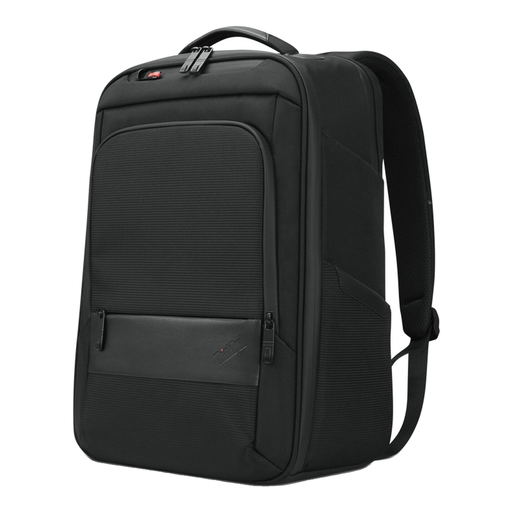
Why it suits this profile: This backpack is intended for everyday work and travel with a ThinkPad or similar laptop. The specifications mention space for accessories and documents, a handle and a padded notebook compartment.
The stated dimensions of 30 × 43.5 × 18.5 cm make it easier to plan what to pack. The advice to use the laptop compartment properly helps prevent carrying the laptop loose.
According to the product specification: suitable for screens up to 16 inches, weighing approximately 1 kg and made with 70% recycled material.

Why it suits this profile: This travel backpack with a laptop compartment is designed for commuters and travellers who carry clothing, accessories or other essentials alongside their laptop.
The fixed capacity of 25 litres and expandable capacity of up to 30 litres clearly show the difference between everyday luggage and additional travel essentials.
According to HP: 25 litres of capacity, expandable to 30 litres, chest straps, an RFID pocket and lockable zips. These features are practical extras, not a guarantee against theft.
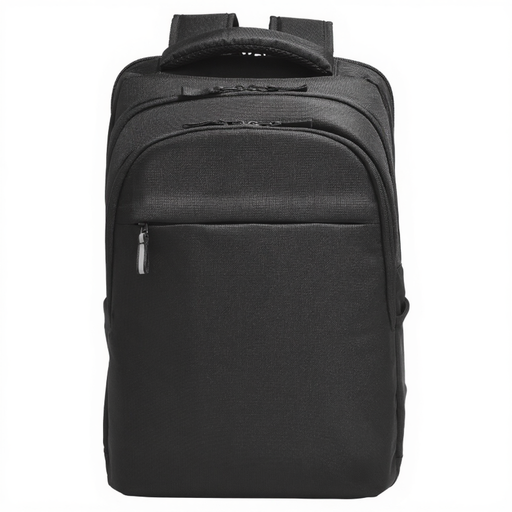
Why it suits this profile: This model is suitable for users of larger laptops who value organisation and convenience when travelling, for example during their commute or on business trips.
The maximum screen size of 17.3 inches is clearly stated. This makes it a more targeted choice than a general backpack with an unclear laptop compartment.
According to the product information: water-resistant material, an RFID pocket, a compartment for a Bluetooth tracker and a luggage strap for wheeled suitcases.
We have put together a complete, up-to-date list of products that fully meet these strict selection criteria and the applicable European safety regulations.
No. The screen size is only one indication. Check your laptop’s width, height and thickness and compare them with the dimensions of the laptop compartment. Allow for a case or protective edge.
Its lifespan depends on the material, stitching, zips, carrying weight and conditions of use. A bag that is filled heavily every day will wear out faster than a model used for light commuting. Distribute the weight, do not overload the bag and clean the material according to the care instructions.
For light rain, a water-resistant exterior can be useful. In prolonged rain, it does not guarantee that the contents will stay dry. When cycling, use a rain cover or choose additional protection for your laptop. Also bear in mind that zips and seams do not automatically have the same level of moisture resistance as the fabric.
