
Daily commuter who writes on the train
You take your laptop with you regularly and want to be able to type in a limited space, even when there’s no power socket available. NS says that charging facilities can vary between train types.


First, choose a size and keyboard that let you type comfortably in your usual seat. Then check that you can open and save documents offline, and that your required software runs on the operating system. Don’t assume every train has a usable power socket.
You take your laptop with you regularly and want to be able to type in a limited space, even when there’s no power socket available. NS says that charging facilities can vary between train types.
You’re working on an essay outline on the go, but need to be able to open it later in the programmes required by your course or workplace. So check that the software runs on the laptop’s operating system.
You want to get started once the train has set off and edit documents if your connection drops. If you use Chromebook files and apps, it’s a good idea to test how they work offline in advance.
First, check that your required programmes run on the operating system. Then test whether you can open and edit documents without an internet connection, and compare the size, keyboard and charging options with your train journey.
| What to consider | What to look for | Who this matters to |
|---|---|---|
| Size and portability | Compare the screen size, dimensions and weight of the exact configuration. If possible, try the keyboard and trackpad too. | If I write in a cramped seat and take my laptop with me often, I want a size that suits my bag and workspace. Around 21% of consumers put portability first. |
| Battery and charging | Check what activity the stated battery life is based on, and make sure the charging option meets the laptop’s requirements. | If I want to keep working during a longer journey without being sure of a power socket, I don’t want to have to rely on finding one. Around 26% of consumers give battery reliability top priority. |
| Offline use and software | Check the operating system, make the files you need available offline in advance, and test them without an internet connection. | If I need my documents on the go or use specific software, I want to know in advance that everything works together. Around 21% of consumers put offline access or software compatibility first. |
| Keyboard and controls | Check the keyboard layout of the configuration on offer and make sure it suits the kind of writing you do. | If I type longer pieces, I want a layout that feels comfortable for the way I write. Around 16% of consumers give typing comfort top priority. |
| Configuration and accessories | Compare the exact configuration and check which charger is included before buying. | If I want to choose a suitable laptop within my budget, I also need to know whether the required adapter comes with it. Around 16% of consumers put the total purchase cost first. |
NS says that Sprinter trains may have power sockets or USB charging points, depending on the train type. Just because a connection is available doesn’t mean it’s suitable for your laptop’s charging requirements.
Check the charging requirements of the exact configuration and set off with a fully charged battery.
Google says that some apps don’t work offline. Files made available offline can sync once your connection is restored.
Check that your required programmes work, then try opening and editing the document you’ll actually use without an internet connection before you leave.
Configurations, keyboard layouts and included accessories can vary between versions.
Compare the full model number and configuration on the product page, and check what’s in the box.
For some configurations, the right adapter is sold separately, so check before you order.
The MacBook Neo and 13-inch MacBook Air M5 are macOS options to compare if the software you need runs on them.
The IdeaPad Slim 3 14, part number 82XN008RMH, is a specific Windows option for typing and storing files locally.
The Chromebook Plus 514 CB514-4HT-36BJ is a ChromeOS option if you can use your writing apps on it.
The OmniBook 5 Flip 14-fp0605ndx is a Windows 2-in-1 for anyone who wants to use a convertible touchscreen as well as type.
These Joybuy products are laptops for taking with you and editing documents on the go, including Windows and macOS models.
 No image available
A 14-inch laptop for viewing and editing documents on the go.
The product name lists an AMD Ryzen 5 7520U, 8 GB RAM, a 512 GB SSD and Windows 11 Home.
According to the product information, the USB-C charger isn’t included. Check which compatible charger you need.
 No image available
A 13-inch MacBook for anyone looking for a compact laptop to write on while travelling.
The product name lists an A18 Pro chip, 8 GB of memory, 256 GB of storage and a QWERTY keyboard.
According to the product information, the USB-C power adapter isn’t included; it recommends a USB-PD adapter of at least 20 W.
 No image available
A 14-inch Windows laptop for typing an essay outline on the go and editing it later.
The product name lists 16 GB of memory, 512 GB of storage, Windows 11 Home and a QWERTY keyboard.
 No image available
A 14-inch laptop for anyone looking for a model to take along every day and write on while travelling.
The product name lists a Snapdragon X2P-42-100 processor and a QWERTY keyboard.
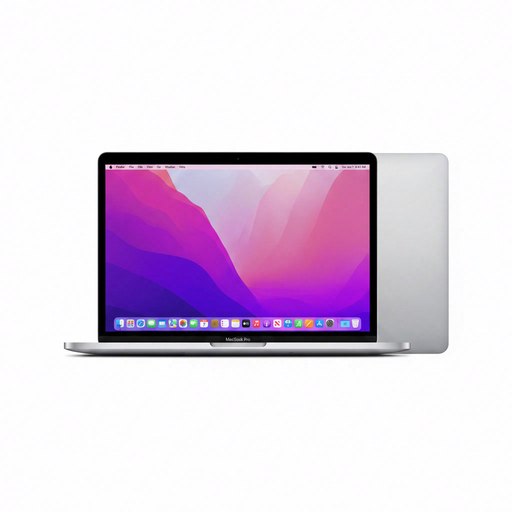 No image available
A 13-inch MacBook for anyone who wants to work on documents while travelling.
The product name lists an M2 chip, 24 GB of memory, 256 GB of storage and a QWERTY keyboard.
Don’t assume so. NS says Sprinter trains have a power socket or USB charging point depending on the train type. Also check that the connection can supply the power your laptop needs.
Before you leave, make the document available offline by following Google’s instructions, then test it with your connection switched off. Google says changes sync once the Chromebook reconnects, and that some apps don’t work offline.
No, not necessarily. Apple gives separate maximum usage times for the MacBooks mentioned, for activities such as video streaming and wireless web browsing; Acer lists a maximum battery life for its specific Chromebook. These figures don’t tell you how long the laptop will last with your apps and settings.
For online consumer purchases, you generally have a statutory 14-day cooling-off period after delivery. ACM ConsuWijzer explains how to unpack and try out a product with care; check the applicable returns policy before trying the laptop.
No. According to ACM ConsuWijzer, your statutory guarantee is separate from any guarantee offered by the manufacturer or seller. If a product breaks sooner than you could reasonably expect under normal use, the seller must offer a solution. This doesn’t mean there’s one fixed warranty period that applies to every laptop.