Choose a laptop based on your writing software, keyboard and screen, then check how to create a restorable copy on external storage. Microsoft Support explains File History for Windows, while Apple Support Netherlands covers Time Machine for macOS. On a Chromebook, you can make Drive files available offline, but syncing is not the same as having a separate backup.
Who is this laptop guide for?
Writers working on long chapters
If you write for long stretches, it’s worth checking the keyboard layout and how easy the screen is to read for yourself. Check the exact configuration you’re considering: specifications can’t tell you how comfortable it will feel to type on.
Writers who want to keep their work offline
If you want to retrieve chapters and earlier versions without an internet connection, create a separate copy on external storage and check that you can restore it. The NCSC recommends keeping multiple versions of important data; Microsoft Support and Apple Support Netherlands explain backup features for external storage.
Writers with specific software needs
If you use a particular writing programme or Google Docs, check the system requirements and how it works offline beforehand. Literature & Latte explains how to download Scrivener for macOS and Windows; Google Chromebook Help explains how to make Drive files available offline.
What should you consider when choosing?
Windows laptop
A good fit if: your writing programme runs on Windows and you want to use File History with external storage.
Bear in mind: set the correct manuscript folder and check the keyboard layout of the exact configuration.
MacBook with macOS
A good fit if: you write on macOS and want to set up Time Machine on an external drive.
Bear in mind: check whether your drive connects directly via USB-C or needs an adapter. Scrivener for macOS has a separate licence from the Windows version.
Chromebook with ChromeOS
A good fit if: you mainly use Google Docs and make the files you need available offline in advance.
Bear in mind: not every app works offline, and Drive syncing later is no substitute for a separately verified backup.
Compare the exact configuration for writing comfort, software and how easily you can restore a copy.
| What to consider |
What to look for |
Who is it relevant to? |
| Comfort during long writing sessions |
Check the keyboard layout, screen size and finish of the configuration. |
If you type and read long chapters, you’ll want the keyboard and screen to suit your work. Around 29% of consumers prioritise typing comfort. |
| Restorable offline copies |
Check that your external drive is compatible, set up a backup of the right folder and test the restore process. |
If you want to restore your manuscript and earlier versions without an internet connection, choose a method that keeps a separate copy. Around 29% of consumers prioritise recoverability. |
| Software and files |
Check the system requirements and licence, and whether your project opens and exports offline. |
If you rely on an existing programme or project, you’ll want to keep using it on your laptop. Around 24% of consumers prioritise software continuity. |
| Writing on the go |
Compare weight and screen space, and check the conditions under which the battery life is measured. |
If you write in different places, portability and working away from a power socket matter. Around 18% of consumers prioritise mobile writing. |
Common pitfalls
-
Relying on Drive syncing as your only backup
Google Chromebook Help explains that changes made to Drive files offline sync later. Syncing is not the same as having a separate copy that you can restore without an internet connection.
Keep an additional backup on separate storage and check that you can open an earlier version.
-
Assuming the default backup folder is outside your laptop
Literature & Latte explains that Scrivener saves backups in a folder on your computer by default. That copy won’t automatically be available if the laptop itself fails.
Check which folder is selected and also create a copy on external storage.
-
Forgetting to check the connection on your existing drive
According to Apple, the 13-inch MacBook Air with M5 has two USB-C ports; Lenovo and Acer list both USB-A and USB-C ports for the models mentioned.
Compare your drive’s connector with the ports on the exact configuration before you choose.
Laptop brands to compare
Lenovo
The ThinkPad E14 Gen 7 (Intel) is a Windows option to consider if you want to connect external storage via USB-A and USB-C.
- Lenovo lists two USB-A and two USB-C ports for this model series.
- Port details don’t tell you how comfortable a particular configuration is to type on; check its keyboard layout and specification.
Apple
The 13-inch MacBook Air with M5 is a macOS option for anyone looking to combine Time Machine with a portable screen size.
- Apple lists two USB-C Thunderbolt 4 ports and supports Time Machine backups to external storage.
- Check that your existing drive will connect. The stated battery life is not an independent measurement of a writing session.
Acer
The Dutch Chromebook Plus 514 CB514-5H-3544 is a ChromeOS option for anyone who makes documents available offline in advance.
- Acer lists a matt 14-inch screen, a 256 GB SSD, two USB-A ports and two USB-C ports for this configuration.
- ChromeOS supports external USB storage, but Drive syncing alone is not a separate offline backup.
Laptop picks on Joybuy
These laptops are suited to writing on a laptop and, where supported by the configuration, working with external storage.
 No image available
HP OmniBook 3 14-hy0058ndx, Ryzen 5 7520U, 8 GB RAM, 512 GB SSD, Windows 11 Home
A Windows configuration to consider if you want to use external storage. Set up File History for the folder containing your manuscript and test that you can restore it.
The 14-inch IPS screen has an anti-glare finish and a resolution of 1920 × 1200. The laptop has USB-A and USB-C ports.
This configuration is supplied without a charger.
Joybuy
 No image available
Ruzava 14-inch laptop, N5095, 8 GB RAM, 256 GB SSD, red
Could be a good fit if you’re looking for a laptop with a 14-inch screen for writing. Check which operating system and writing software come with this configuration first.
The product name lists an N5095 processor, 8 GB RAM, a 256 GB SSD that can be upgraded to 1 TB, and USB 3.0 and Type-C ports.
Joybuy
 No image available
Ruzava 14-inch laptop, N5095, 8 GB RAM, 256 GB SSD, gold
Could be a good fit if you’re looking for a laptop with a 14-inch screen for writing. Check which operating system and writing software come with this configuration first.
The product name lists an N5095 processor, 8 GB RAM, a 256 GB SSD that can be upgraded to 1 TB, and USB 3.0 and Type-C ports.
Joybuy
 No image available
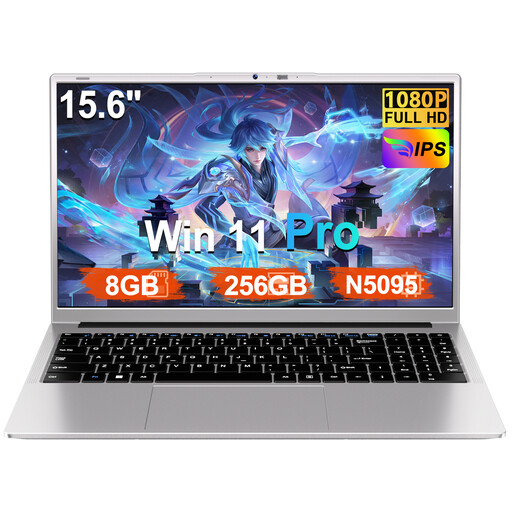
Ruzava 15.6-inch laptop, N5095, 8 GB RAM, 256 GB SSD, Windows 11 Pro, silver
A Windows configuration with a larger screen to compare if you’d like more room for text. Check that its dimensions suit your workspace and how you travel.
The product name lists a 15.6-inch FHD screen, numeric keypad and Windows 11 Pro. The product description mentions USB 3.0 and Type-C ports.
Joybuy
 No image available
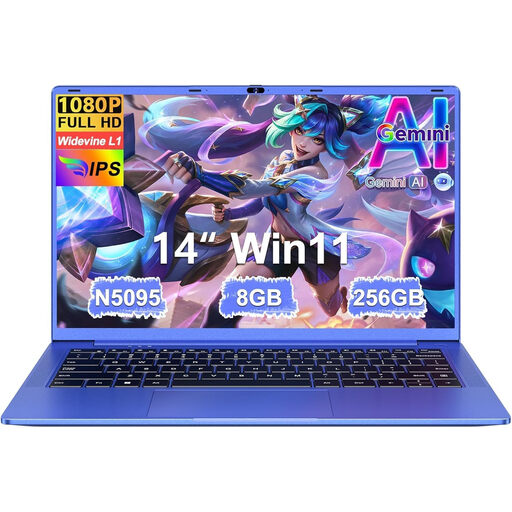
Ruzava 14-inch laptop, N5095, 8 GB RAM, 256 GB SSD, purple
Could be a good fit if you’re looking for a laptop with a 14-inch screen for writing. Check which operating system and writing software come with this configuration first.
The product name lists an N5095 processor, 8 GB RAM, a 256 GB SSD that can be upgraded to 1 TB, and USB 3.0 and Type-C ports.
Joybuy
Frequently asked questions
Can I open my manuscript on a Chromebook without Wi-Fi?
Yes, if you’ve made the Drive files you need available offline in advance. Google Chromebook Help warns that some apps don’t work offline, so check before you leave that you can open your manuscript without a connection.
How do I back up to an external drive?
On a Mac, you can set up an external drive for Time Machine; on Windows, you can use File History. Apple Support Netherlands and Microsoft Support explain these backup features. After making a copy, check that you can restore a file.
Do Scrivener’s automatic copies count as an offline backup?
Not necessarily: Literature & Latte explains that Scrivener saves backups in a folder on your computer by default. Check where that folder is and also create a copy on external storage that you can use without the laptop.
What can I do if a laptop I bought online isn’t suitable?
If a product is faulty, you should contact the seller as a Dutch consumer, according to the Dutch government. Online purchases are also generally covered by a statutory cancellation period; ACM ConsuWijzer states that it ends 14 days after delivery. The cancellation period and your rights relating to faulty goods are separate matters.


