
Columnist who does a lot of editing
You write long pieces and want to navigate drafts using a physical keyboard and keyboard shortcuts. The app you use and the keyboard layout both affect how well this works.


When writing a series of garden columns and using lots of keyboard shortcuts, the physical keyboard, its layout and how your word-processing software works matter more than processing power alone. The Consumentenbond points out that a physical keyboard is better suited to typing than a touchscreen. A compact laptop is handy if you often change where you write, while a larger screen gives you more room to view your text alongside reference material or garden photos. Check the keyboard layout, software compatibility and screen for the exact model, and make sure you know whether a charger is included.
You write long pieces and want to navigate drafts using a physical keyboard and keyboard shortcuts. The app you use and the keyboard layout both affect how well this works.
You take your drafts between home, the garden and other workspaces, and weigh up size against screen space and battery use.
You keep reference material or garden photos alongside your text, so you need enough screen space and suitable storage for your files.
Start with the keys and shortcuts in the editing software you use; then weigh up portability, screen space and configuration based on how you store and use garden photos.
| What to consider | What to look for | Who should pay particular attention? |
|---|---|---|
| Typing and keyboard shortcuts | Check the physical keyboard layout separately from the selected input language, and test the combinations you usually use in your editing app. | If I write for long periods and edit text frequently, I want the keys and shortcuts to suit the way I work. Around 36% of consumers give typing comfort and keyboard shortcuts the highest priority. |
| Portability | Compare the dimensions and weight of the exact model; consider battery figures only alongside the usage conditions they refer to. | When I write in different places, size matters because I want a laptop that’s easy to carry. Around 29% of consumers put portability first. |
| Viewing text and images | Compare the screen size and resolution of the model, and decide how many garden photos you want to store locally. | If I want to view reference material or garden photos alongside my text, I look for enough screen space to work comfortably. Around 21% of consumers give this combination the highest priority. |
| Total cost | Check the memory, storage, included power supply and any software costs for the exact model. | I want to know in advance which features I really need for my writing, and whether I’ll also need to buy a charger. Around 14% of consumers focus mainly on the total cost. |
The markings on the physical keys, the selected input layout and an app’s keyboard shortcuts are all different things.
Look at photos of the keyboard and check the exact model, then test your most-used shortcuts in the app you work with.
Apple gives separate battery-life figures for video streaming and wireless internet use. These conditions don’t show how long a laptop will last during your writing and image workflow.
Compare battery figures only with the stated activity they refer to, and consider whether you can charge your laptop where you write.
Some models don’t come with a charger.
Before buying, check what’s in the box and which power supply is compatible with the exact model.
If the model doesn’t include a charger, you’ll need to arrange a suitable power supply separately.
Whether extra memory, storage or processing power is worthwhile depends on your software, how many windows you have open and how many garden photos you store locally.
Choose a configuration to suit your own files and how you work, rather than paying for features you don’t need for writing.
The ThinkPad E14 Gen 7 is a specific 14-inch Windows laptop to consider if you want a compact writing setup.
The 13-inch and 15-inch MacBook Air models run macOS. Compare them for portability and screen space, and consider whether you prefer Command shortcuts.
The Vivobook 15 X1504 range includes models with a larger built-in screen, so you can view text and reference material side by side.
The OmniBook range includes 14-inch Windows models and 2-in-1 touchscreen models.
This selection of Joybuy products includes compact Windows laptops for writing in different places, as well as larger Windows laptops with more screen space for text and reference material.
 No image available
A compact Windows laptop for writing in different places; according to the product description, this model weighs around 1.42 kg.
14-inch IPS screen with a resolution of 1920 × 1200 and a 16:10 aspect ratio. The product description lists Windows 11 Home, 8 GB of memory and a 512 GB SSD.
A charger isn’t included, so you’ll need to arrange a suitable one before use.
 No image available
A larger Windows laptop to consider if you want to view text and reference material on one screen.
The product description lists a 15-inch touchscreen with a resolution of 2496 × 1664 and a 3:2 aspect ratio, Windows 11 Pro, 16 GB of memory and a 512 GB SSD.
 No image available
A 15.6-inch model for anyone who prefers viewing text and reference material on a larger built-in screen; the product description lists a weight of 1.59 kg.
IPS Full HD screen, Windows 11 Home, 8 GB of DDR5 memory and a 512 GB SSD.
According to the product description, a power adapter isn’t included.
 No image available
A compact model for writing in different places; the product description lists a weight of around 1.4 kg and a backlit keyboard.
14-inch anti-glare Full HD IPS screen, Intel Core 7 150U, 16 GB of DDR4 memory, 512 GB SSD and Windows 11 Home.
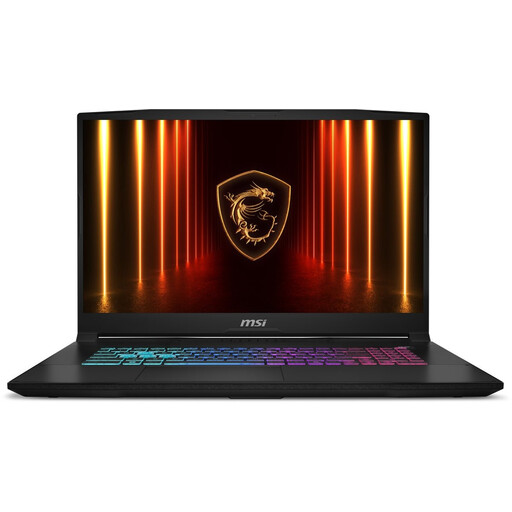 No image available
A model with a large screen for viewing text alongside reference material, and an explicitly listed Dutch QWERTY keyboard layout.
The product description lists a 17.3-inch QHD IPS screen, 16 GB of RAM, a 1000 GB SSD and Windows 11 Home. Check that the keyboard layout suits your preference.
No, keyboard shortcuts can vary between operating systems and apps. Test the combinations you usually use in your own word-processing software, and check the physical keyboard layout. Windows lets you choose an input layout, while many common shortcuts on a Mac use Command.
Yes, with suitable offline apps. Google explains how to create and edit documents offline in Google Docs; check in advance that your files and other editing apps also work without an internet connection.
The Consumentenbond advises against blowing compressed air into the ventilation openings, as this could blow dust into the computer.
According to ACM ConsuWijzer, for a standard online product purchase you usually have a statutory 14-day cooling-off period from delivery, although there are exceptions. You’re also entitled to a legal guarantee if a product doesn’t meet what you could reasonably expect under normal use; the seller is your point of contact. A manufacturer’s warranty doesn’t replace this right.
For employees who work with a screen for more than 2 hours a day, Arboportaal states that the screen and keyboard must not be attached to each other. A separate screen or keyboard may be needed; this is a workplace requirement for that situation, not a standard product specification for every buyer.