
Writer who needs to view sources alongside a draft
You’re writing the handbook on your laptop and want to refer to information in another document without constantly switching between windows.


If you usually work on the built-in screen, compare laptops that let you view a draft and source document side by side at a comfortable text size. Models with a 15- or 16-inch screen are a good place to start. If you often take your laptop with you, weigh that extra screen space against its size and weight. Also check that your volunteer group’s document app and file format work with the operating system you choose.
You’re writing the handbook on your laptop and want to refer to information in another document without constantly switching between windows.
You edit a lot of text and value a comfortable keyboard and enough memory when you have other programmes open too.
You take your laptop to meetings and want a practical balance between screen space and portability.
Start with the document app and file format your volunteer group uses. Then decide whether you mainly need more space on the built-in screen, or would prefer a more compact model connected to an external monitor at a fixed workspace.
| What to consider | What should you check? | Who is this important for? |
|---|---|---|
| Two readable document windows | Check the screen size and resolution of the exact model. See whether your draft and source document fit side by side at a text size you find comfortable to read. Microsoft Support explains how to snap windows in Windows and use a separate side-by-side view in supported desktop versions of Word. | If you often refer to information in another document while writing, you’ll want to be able to read both texts at once. Around 36% of consumers put screen space for two documents first. |
| Comfort during long writing sessions | If possible, try out the keyboard layout and key size. Also consider whether the memory is suitable for the apps you use at the same time; the Consumentenbond recommends 16 GB for running several programmes, but it isn’t a requirement for every user. | If you write long passages and regularly switch between your document, browser and messaging app, keyboard comfort and smooth app performance matter. Around 29% of consumers prioritise this kind of writing and workload. |
| Portability | Compare the stated weight and screen size of the exact model. If you plan to use an external monitor, also check which video connection is available. | If you often take your laptop to volunteer locations, you won’t want to carry more screen space than your work requires. Around 21% of consumers put portability ahead of their other buying concerns. |
| Document software and extra costs | Ask which app and file format the group uses. Check whether software is included with the exact offer, is a trial version or needs to be bought separately; for example, Lenovo lists Office Trial for the ThinkBook model below. | If you need to share files easily and want to know about any extra software costs in advance, check this before choosing. Around 14% of consumers prioritise software compatibility and additional costs. |
A window-arranging feature doesn’t guarantee that the document app you choose supports the way your volunteer group works. A software listing may also refer to a trial version.
Check which app and file format the group uses, and see what’s included with the exact laptop model.
You may need to buy separate document software after a trial period, so check this before comparing prices.
Screen size alone doesn’t tell you how much text will remain readable in your window layout. Resolution, text size, keyboard and weight all matter too.
Try the layout you plan to use with your own documents, and test the keyboard before choosing a larger or more compact model.
The Dutch government distinguishes between statutory rights and additional manufacturer, retailer or purchased warranties.
Compare the specific extra cover with your existing rights, and read the terms and exclusions before choosing an extended warranty.
An extended warranty may cost extra, so consider what additional cover it provides for your situation.
The ThinkBook 16 G8 IAL 21SK00EBMH is a Windows model with a 16-inch WUXGA screen. It’s worth including when comparing laptops with room for two document windows.
The ProBook 4 G1i 16 D4TM6EA#ABH is a 16-inch WUXGA model to consider when comparing screen space and the stated service terms.
The MacBook Air M5 offers a macOS option if you use a document app in that ecosystem and want to weigh screen space against portability.
These laptops are selected for writing with a source and draft side by side, particularly on the built-in screen. For each model, check that it supports your volunteer group’s software and file format.
 No image available
The 16-inch screen suits anyone who wants to view a draft and source document on the built-in screen.
WUXGA screen, Intel Core Ultra 5 135H, 16 GB DDR5 memory, 512 GB SSD and Windows 11 Pro.
 No image available
The 16-inch screen with a 16:10 aspect ratio is worth considering if you want to view a source and draft side by side on the built-in screen.
1920 × 1200 resolution screen, Intel Core Ultra 7 255H, 32 GB DDR5 memory, 512 GB SSD and Windows 11 Pro.
According to the product description, this model is supplied without a power adapter.
 No image available
This macOS laptop may suit you if your document app works on macOS and you want a generous built-in screen.
15-inch screen, M5 chip, 16 GB memory and 512 GB storage.
According to the product description, a USB-C power adapter isn’t included.
 No image available
The 16-inch screen model suits anyone who wants to view documents side by side on the built-in screen.
3K OLED screen with a 16:10 aspect ratio, 24 GB memory and Windows 11.
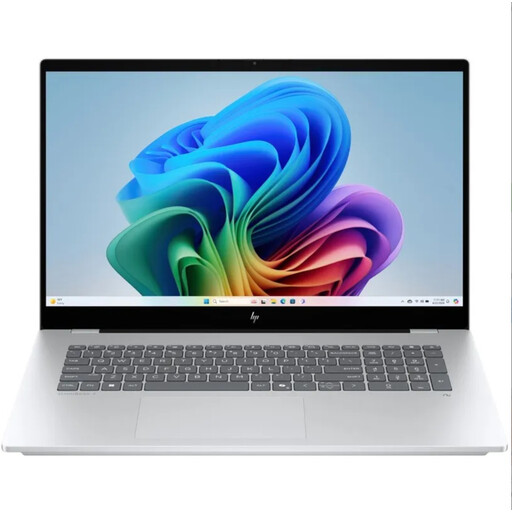 No image available
The larger built-in screen may suit you if you mainly work in one place with two document windows open.
17.3-inch Full HD IPS touchscreen, 16 GB memory and Windows 11.
In Windows, you can drag windows to the edge of the screen to snap them into place. In supported desktop versions of Word, you can open both files and select View Side by Side from the View menu; Microsoft Support describes this as a Word feature.
No, several operating systems let you arrange windows side by side. Apple Support explains how to do this on a Mac, and Google Chromebook Help describes split-screen windows on Chromebooks. The main thing is to check that the document app and features your group uses are available; Google says Snap Groups requires ChromeOS M128 or later.
If you don’t use an external monitor, a larger built-in screen is a good place to start. However, screen size alone doesn’t tell you whether both documents will be comfortable to read at your preferred text size. Test the window layout on the exact model, and weigh screen space against weight if you often take the laptop with you.
Check the software listing for the exact model and ask which app and file format your volunteer group uses. A listing such as Office Trial means a trial version; don’t assume that it includes a full licence.
According to the Dutch government, purchases made remotely from a business usually come with a 14-day cooling-off period. Before ordering, check the information about the cooling-off period and the applicable terms; a purchase from a private seller isn’t automatically covered by the same rules.