Choose a laptop with enough built-in screen space if several people need to view details around the table at the same time. A smaller model is worth considering if you often carry your laptop between locations. Then check the exact screen configuration, the ports you need for your photos and the software requirements. A creator-focused configuration is mainly relevant if you’ll be doing intensive photo editing as well as viewing images.
Who is this laptop choice relevant to?
Teams reviewing photos together
You discuss field photos with colleagues around one table and want to view details from several seats. Assess the screen under the lighting you usually use. For reliable colour assessment, the Netherlands Institute for Digital Photography recommends using a calibrated screen.
People visiting field locations
You take your laptop between locations and want to show and transfer photos without an awkward set-up. Compare portability and the connections that suit your camera and the equipment you use around the table.
Photo editors after fieldwork
You don’t just view the photos; you edit them too. Check that the software you use is compatible with the laptop’s memory, storage and exact screen configuration.
What should you prioritise when choosing?
Start by deciding whether you’ll mainly view photos together around a table or often carry the laptop with you. Then consider whether you’ll also edit photos and what equipment you want to connect.
For colour assessment, the Netherlands Institute for Digital Photography recommends using a calibrated screen. A stated colour gamut alone does not confirm that colour reproduction is reliable.
| What to consider |
What to look for when buying |
Who is this important for? |
| Easy viewing for everyone |
Compare the screen size and exact panel configuration. View your own photos from the seats you plan to use and under your usual lighting. |
When discussing details with colleagues around one table, I want to be able to read the image from different seats; around 36% of consumers prioritise shared visibility. |
| Taking it between locations |
Try the size and weight with the power supply and accessories you need. Compare battery life only with the test activity on which the stated figure is based. |
When showing photos at several field locations, portability matters more to me than the largest built-in screen; around 29% of consumers prioritise transport between locations. |
| Photo editing |
Make a note of the photo software and edits you use, then compare their system requirements with the exact laptop configuration. |
If I also edit photos after fieldwork, I first want to know whether my software is compatible with the configuration; around 21% of consumers prioritise photo editing. |
| Connecting photos and equipment |
Check the memory card type, the connection for any external screen and the ports on the specific configuration you’re considering. |
When I want to transfer files from my camera or connect equipment around the table, I look for suitable connections; around 14% of consumers prioritise compatibility with existing equipment. |
What buying mistakes can you avoid?
-
Assuming HDR peak brightness proves that standard photos will be easy to view
An HDR peak value applies to the specified HDR display mode. On its own, it doesn’t tell you how photos will look from several seats under the lighting around your table.
View your own images in a similar set-up and check the exact screen variant.
-
Assuming every configuration in a product range has the same specifications
ASUS lists several configurations of the ProArt P16 H7606. Dell warns that choosing certain options can change other specifications.
Before choosing, compare the full model details and screen, memory and connection options with your requirements.
Choosing the wrong configuration could mean you need to change or replace it later.
-
Relying only on the manufacturer’s or an extended warranty
For a consumer purchase in the Netherlands, statutory rights against the seller are separate from any extended warranty, according to the Dutch government.
Compare what an extended warranty adds, and check the applicable terms of sale separately if you’re buying for business use.
Brands to compare
Apple
Apple offers MacBook Pro configurations with 14-inch and 16-inch screens. For the 14-inch M5, Apple Support lists an SDXC slot and HDMI among the connections.
- The official specifications describe the screens, connections and basis for the battery life test.
- The 14-inch configuration provides less built-in viewing space for a group. Check that your photo software works on macOS.
ASUS
The ProArt P16 H7606 is a 16-inch creator range worth comparing if you’ll edit images as well as view photos.
- ASUS lists OLED screens and several graphics configurations in the range.
- Resolution, coating and graphics card vary by configuration. Manufacturer specifications can’t tell you how the screen will look around your table.
Dell
The Dell Pro Max 16 Plus MB16250 is a configurable business Windows range worth comparing if you’re considering a 16-inch workstation.
- Dell offers configuration options for the product range.
- Dell warns that your chosen option may change other specifications. Check the final screen and port configuration.
Lenovo
The ThinkPad T16 Gen 4 (Intel) is a 16-inch business range worth comparing if you use existing Windows workflows and peripherals.
- Lenovo’s PSREF dated 8 May 2025 lists HDMI, USB-A and Thunderbolt 4 among the connections available in the range.
- The specifications describe options across a product range; check that the configuration you choose has the connections and screen set-up you need.
Joybuy laptops for sharing photos around the table
The Joybuy products below are selected for viewing photos together around a table. Check the screen size and exact panel configuration for each model.
 Image unavailable
ASUS TUF Gaming 16 FX610JM-TU005W
The 16-inch configuration is designed for people who want to view photos together around a table; check that the screen variant suits the space where you’ll be working.
Intel Core i7-14650HX, RTX 5060, 16 GB RAM and 1 TB SSD.
View at Joybuy
 Image unavailable
ASUS ROG Strix G16 G614PP-S5032W
This configuration is included for situations where people share a table. Before choosing, check the screen size and panel configuration of the exact model.
View at Joybuy
Image unavailable
ASUS TUF Gaming F16 FX610JM-TU120W
This configuration is included for viewing photos together. Before deciding whether the built-in screen suits your table set-up, check the exact screen size and panel variant.
View at Joybuy
 Image unavailable
MSI Stealth 16 AI+ B3WF-011NL Copilot+ PC
This configuration could suit you if you view photos together and edit them too; check that it meets the requirements of the software you use.
16-inch QHD+ OLED screen, 240 Hz, Intel Core Ultra 9 386H, GeForce RTX 5060, 32 GB DDR5, 1 TB SSD, Wi-Fi 7 and Windows 11 Home.
View at Joybuy
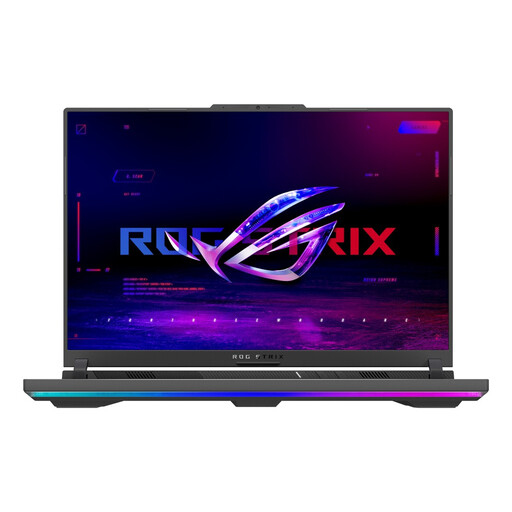 Image unavailable
ASUS ROG Strix G16 G614PW-RV006W
This configuration is included for viewing photos together. Check the screen size and panel variant of the exact model, and make sure the configuration suits your editing software if you’ll be editing photos too.
16-inch screen, Ryzen 9 8940HX, RTX 5080, 16 GB RAM and 1 TB SSD.
View at Joybuy
Frequently asked questions
Do you need a powerful graphics card straight away for viewing photos together?
Not just for viewing photos. Start with the screen and viewing set-up; compare graphics configurations only against the requirements of the edits and software you actually use. ASUS offers several graphics configurations in the ProArt P16 H7606 range.
How do you prepare a laptop for reliable colour assessment?
Make sure the lighting is suitable and calibrate the screen if colour accuracy matters. According to the Netherlands Institute for Digital Photography, calibration is needed to rely on the colours shown; a stated colour gamut alone does not confirm this.
What should you check if you want to view photos directly from a memory card?
Match the card type to the card slot on the exact laptop model. Apple lists an SDXC slot on the 14-inch MacBook Pro with M5; for other card types, check whether you’ll need a compatible card reader.
Can you share survey photos showing identifiable people with others without checking first?
Don’t assume that you can. The Dutch Data Protection Authority states that photos showing identifiable people are personal data, so the GDPR applies. The legal basis and security measures required depend on the purpose and the specific way the images are processed; limit access to people who are allowed to view them.


