What should you look for when choosing?
Start with your main task: reviewing designs calls for a comfortable screen, while taking an active part in meetings and editing models bring other checks into the picture.
| What to consider |
What should you look for? |
Who is this important for? |
| Readability and workspace |
Check the screen size and resolution, and see whether you can have drawings and your call open side by side. The Consumentenbond recommends 16 GB for using several programmes at once. |
If I want to view comments and drawings at the same time, I focus on readability and room for windows. Around 36% of consumers say readability is their top buying priority. |
| Calls and microphone |
Decide whether you’ll only be listening or speaking too. If needed, check the microphone, camera, headset connection and meeting app settings. Microsoft describes audio settings for Teams. |
When I discuss a design, I want to be heard clearly without filtering out voices that participants need to hear. Around 29% of consumers put calls first. |
| Design software |
Check the exact software version, operating system and requirements for your models. Autodesk lists the Windows requirements for Revit 2026 and covers using it on an Apple computer with Parallels separately. |
If I edit CAD or BIM models, I want to know in advance whether my software will run on the configuration. Around 21% of consumers say software compatibility is their top priority. |
| Portability or screen space |
Compare the screen size and weight of the specific configuration, and check which ports you need for an external screen. Apple publishes screen and port details for each MacBook Air configuration. |
If I take my laptop between meetings and workspaces, portability matters more to me than a large built-in screen. Around 14% of consumers say portability is their top priority. |
Joybuy laptops for viewing and discussing designs
These models are suited to viewing home designs, using multiple windows and, where specified, taking part in video calls. If you also want to edit models, check the requirements of your own design software.
 No image available
ASUS Vivobook 18 M1807HA-S16512W
The large screen may suit viewing drawings and keeping several windows open.
18.4-inch WUXGA screen with a 16:10 aspect ratio; 16 GB DDR5 memory; 512 GB SSD; Ryzen 7 260.
The power adapter isn’t included; you’ll need a compatible USB-C Power Delivery charger.
View at Joybuy
 No image available
ASUS Vivobook S16 S3607QA-SH109W
This 16-inch model is an option if you want a spacious screen for viewing home designs.
16-inch WUXGA OLED screen; 16 GB LPDDR5X memory; 512 GB SSD; Snapdragon X processor; Windows 11 Home.
View at Joybuy
 No image available
Lenovo ThinkBook 16 G8 IAL 21SK00EBMH
This configuration may suit viewing drawings and keeping several programmes open.
16-inch WUXGA IPS screen with anti-glare coating; 16 GB DDR5 memory; Intel Core Ultra 5 135H; Intel Arc Graphics; 512 GB SSD; Windows 11 Pro.
View at Joybuy
 No image available
Apple MacBook Air 15-inch M5, 16 GB, 512 GB
This 15-inch model is an option if you want a larger built-in screen and your files and apps run on macOS.
15.3-inch Liquid Retina screen; 16 GB memory; 512 GB storage; 12MP camera and microphone array.
The power adapter isn’t included; you’ll need a compatible USB-C adapter of 35 W or higher. Check your design software’s requirements separately.
View at Joybuy
 No image available
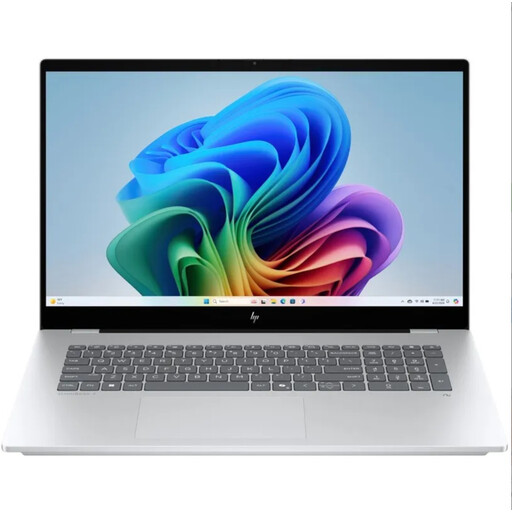
HP OmniBook 7 NG AI PC 17-dc0070nd
The 17.3-inch screen may suit anyone who wants to view home designs on a large built-in display.
17.3-inch Full HD IPS touchscreen; 16 GB memory; 400 nits brightness; built-in webcam and microphone.
View at Joybuy
Frequently asked questions
Do I need a workstation to view home designs?
Not necessarily. Viewing files has different requirements from editing CAD or BIM models. For the latter, check the requirements for your exact programme and version.
How should I set up the audio if people are talking in the background?
If you’re speaking on Teams, you can reduce background noise in the audio settings. Voice isolation may filter other voices out of your microphone signal, so only use it if those voices don’t need to be heard by the other people on the call. Microsoft also explains how to test a microphone in Windows via Settings, System, Sound and Input.
Can I use Revit 2026 on a MacBook Air without any extra steps?
No. Autodesk publishes the Windows system requirements for Revit 2026 and covers using it on an Apple computer with Parallels separately. Check that option and the requirements for your version before choosing a Mac for this purpose.
Is the legal guarantee on a laptop bought in the Netherlands always exactly two years?
No. According to the Dutch government, the Netherlands has no fixed legal guarantee period: you’re entitled to a product that works properly for the length of time you can reasonably expect it to. If a product is faulty, contact the retailer; the manufacturer’s guarantee is in addition to this.
Do I have a cooling-off period when I buy online?
According to the Dutch government, distance purchases are often covered by a 14-day cooling-off period, with some exceptions. Before placing your order, check the retailer’s information about cancelling your purchase and any return costs.


