Start by choosing the text enlargement you need, then try it in a document of your own. On a smaller screen, enlarged text can leave you with less room to work, while a larger screen gives you more space but is generally less compact to carry. Windows, macOS and ChromeOS all offer magnification options. Then choose based on your writing software, offline use, keyboard and need for local storage. A quoted battery life for activities such as video playback won’t tell you how many hours you’ll be able to write for.
Who is this buying guide for?
Writers who need larger text
If you enlarge text, you’ll want to be able to see enough of your document at once at your chosen magnification level. Microsoft Support and Apple Support explain the built-in options for enlarging text or on-screen content.
Travellers who want to pack light
If you write in different places, you’ll need to weigh up screen space against the laptop’s size and weight, as well as the rest of your luggage. For example, Apple UK lists different screen sizes and weights for the MacBook Air with M5.
Writers who don’t always have internet access
If you want to open and edit documents while travelling, it helps to have writing software and files set up for offline use in advance. Google Docs Help explains how to set up offline access.
What should you look for?
Start with magnification and a writing document of your own. Then compare screen space, portability, offline working and the storage you need.
| What to consider |
What should you check? |
Who should pay particular attention? |
| Readability when enlarged |
Open a document of your own and try the text size, display scaling or zoom level you want to use. Check how much room you have left to work. |
If I enlarge the text, I want to be able to see enough of my journal and the controls. Around 36% of consumers rank readability as their top priority. |
| Portability |
Compare the weight of the exact model and see whether your document is comfortable to use on screen at your preferred magnification. |
If I often move between destinations, I want to know how much space and weight the laptop and charging accessories will take up in my bag. Around 29% of consumers prioritise portability. |
| Typing and working offline |
Try the physical keyboard and check whether your writing software can open and edit a document without internet access, then sync it later. |
If I write longer pieces while travelling, I want to type comfortably and carry on without an internet connection. Google Docs Help explains how to set up offline access in advance. Around 21% of consumers prioritise uninterrupted writing. |
| Storage for photos |
Estimate how many photos and documents you want to store locally, then check the storage capacity of the exact configuration. |
If I want to keep travel photos on my laptop alongside my journal, local storage will affect my choice. Consumentenbond recommends 256 GB as a starting point for everyday office work, and 512 GB or more if you often use large photo or video files. Around 14% of consumers prioritise local photo storage. |
Common pitfalls
-
Comparing screen sizes alone
A larger screen doesn’t automatically mean you’ll have more room for your document when you enlarge the text.
Open a sample of your own travel journal and set your preferred text size or scaling before choosing a screen size.
-
Assuming a video playback battery life is the same as writing time
The activity and settings used for the quoted battery life may not match how you use your laptop while travelling.
Check what the battery life figure is based on, and plan charging options to suit the way you’ll use your laptop.
-
Assuming the charger is included
According to Acer, the NX.JRREH.018 Acer configuration is supplied without a charger. Check what’s in the box for the exact configuration and what charging power it requires.
You may need to buy a suitable adapter separately for this Acer configuration.
-
Assuming every model has the same product-line features
Screen, memory and battery specifications can vary by configuration. A general description of a product range won’t necessarily apply to the laptop you’re looking at.
Compare the manufacturer’s full model number with the specifications on the product detail page.
Brands to compare
Apple
The MacBook Air with M5 is an option if you want macOS and a choice of a more compact or larger screen.
- Apple UK lists the 13.6-inch model at 1.23 kg and the 15.3-inch model at 1.51 kg.
- The quoted battery life is based on specified activities, not specifically on writing a travel journal. Also check whether your chosen configuration comes with a suitable adapter.
Acer
The Aspire Go 15 is a Windows range to compare if you’re looking for a larger screen. The specifications quoted here apply to configuration NX.JRREH.018.
- Acer lists a 15.6-inch Full HD screen, 16 GB of memory and a 512 GB SSD for NX.JRREH.018.
- Acer warns that product range features can vary by model or region. Check the full configuration: NX.JRREH.018 is supplied without a charger.
Lenovo
The IdeaPad Slim 5 15ARP10 range is worth comparing if you’re looking for a larger Windows screen and ports for your travel files.
- Lenovo lists features for this range including USB-C with charging support and a microSD card reader.
- Lenovo PSREF covers several configurations with different processors, memory and battery specifications. Check the full model number before applying specifications to a particular laptop.
Laptops at Joybuy
This selection focuses on laptops with screens of around 15 inches for writing a travel journal with enlarged text. Try your preferred magnification in your own writing software, and check the configuration and included accessories.
 No image available
Acer Aspire Go 15 AG15-72P-58MP
A 15.6-inch model to compare if you’d like more screen space while writing.
Core 5 120U, 16 GB of memory, 512 GB SSD and QWERTY keyboard.
View at Joybuy
 No image available
Microsoft Surface Laptop 7 15-inch
A 15-inch laptop to consider if you’re looking for a larger screen for enlarged text and writing.
Snapdragon X Elite, 16 GB of memory and 512 GB of storage.
View at Joybuy
 No image available
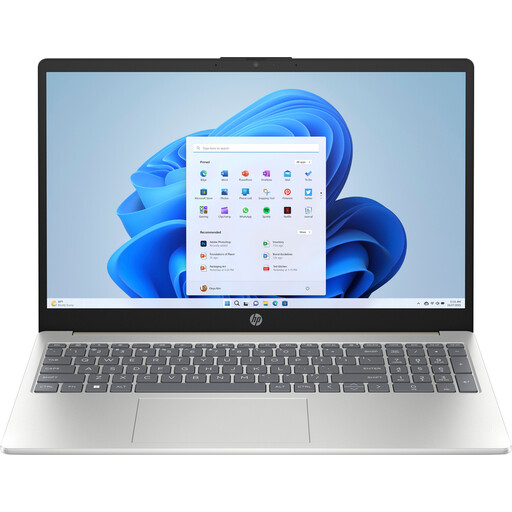
HP Laptop 15-fd1253ndx
A 15-inch model may suit you if you want more screen space. Try your preferred magnification and the keyboard with a document of your own.
Intel Core 5 120U, 8 GB DDR5, 512 GB and Windows 11 Home.
According to the product information, a power adapter is not included. Check which adapter is compatible with this configuration.
View at Joybuy
 No image available
Apple MacBook Air 15-inch M5 16GB 512GB
A macOS option with a 15.3-inch screen if you’d like more screen space and want to use macOS magnification options.
16 GB of memory, 512 GB SSD and QWERTY keyboard.
According to the product information, a power adapter is not included. Check the stated USB-C adapter requirements.
View at Joybuy
 No image available
Lenovo IdeaPad Slim 5 15ARP10
A 15.3-inch model to compare if you’re looking for screen space and want to store travel files locally.
Ryzen 5 7535HS, 16 GB of memory, 512 GB SSD and QWERTY keyboard.
According to the product information, the power adapter is not included. Check the required 45–65 W USB-C Power Delivery adapter.
View at Joybuy
Frequently asked questions
Can you make text larger without buying a bigger screen?
Yes. Windows has settings for text size, display scaling and Magnifier; macOS and ChromeOS also offer magnification options. Try your own writing software, as the available workspace also depends on the screen and app.
Can you carry on writing while travelling without Wi-Fi?
Yes, if your writing software and document are set up for offline use in advance. Google Docs Help explains how to enable offline access while you still have an internet connection. Before you travel, test whether you can open and edit a document of your own, then sync it later.
Does a laptop always come with a charger?
No. Check what’s included with the exact configuration and what charging power it requires. For example, Acer states that configuration NX.JRREH.018 is supplied without a charger.
What’s the difference between a 13-inch and a 15-inch laptop for a travel journal?
A larger screen gives you more room for your document, while a more compact model is easier to carry. Apple UK lists the MacBook Air with M5 with a 13.6-inch screen and a weight of 1.23 kg, or a 15.3-inch screen and a weight of 1.51 kg. Try your preferred text enlargement on the screen size you’re considering.
How much storage do you need for a travel journal and photos?
It depends on how many photos and other files you want to store locally. Consumentenbond recommends 256 GB as a starting point for everyday office work, and 512 GB or more if you often use large photo or video files. Compare this with your own files and the exact configuration.


