What should you look for when choosing?
First, check that your apps and files work while you’re on the move. Then compare what suits the space, keyboard and charging options available on your journeys.
| What to consider |
What to look for when buying |
Who is this most important for? |
| Battery life |
Check the conditions used for the stated battery life. A figure based on video playback or internet use won’t necessarily tell you how long a study session will last. |
If there isn’t a free plug socket, I want to be able to work on battery power during my journey. Around 28% of consumers say battery life is their top priority. |
| Typing comfort and size |
Check the dimensions and keyboard layout, and whether the laptop will sit securely in your usual seat. |
I want to be able to type flashcards in a small train seat without the laptop taking up too much room. Around 22% of consumers prioritise typing comfort and size. |
| Offline access |
Test your flashcard app without an internet connection and check that changes sync once you reconnect. |
If the Wi-Fi drops, I want to keep using my flashcards and the resources I need. Around 22% of consumers make offline study their top priority. |
| Software compatibility |
Compare your course requirements with the operating system and the exact laptop configuration. |
If my course requires specific software, it needs to work on my laptop too. Around 17% of consumers base their choice mainly on software compatibility. |
| Purchase price |
Choose a configuration that suits your study tasks and check which software or accessories you’ll need. |
I don’t want to spend more than I need to for my own studies. Around 11% of consumers put a low purchase price first. |
Joybuy laptops for studying on the go
This Joybuy selection includes compact Windows laptops and a MacBook Air for making flashcards on the go. Check that your study apps work with the operating system and that the configuration includes the charger you need.
 No image available
HP OmniBook 7 AeroNGAI 13-bg1051nd NL
A compact Windows laptop for typing flashcards on the go. Check that the study programmes you need work on this configuration.
Product information lists a 13,3-inch IPS screen, Windows 11, AMD Ryzen AI 5, 16 GB of memory, a 512 GB SSD and a 43 Wh battery. The stated weight is 1,46 kg.
Information about the included charger is contradictory, so check what’s in the box before relying on it being included.
Joybuy
 No image available
HP OmniBook 3 14-hy0058ndx
A Windows laptop with an anti-glare screen. Check your course’s software requirements and whether its size suits your train seat.
This configuration lists a 14-inch IPS screen with 1920 × 1200 resolution and a 16:10 aspect ratio, AMD Ryzen 5 7520U, Windows 11 Home, 8 GB of memory and a 512 GB SSD. The stated weight is approximately 1,42 kg and the battery capacity is 41 Wh.
The charger must be purchased separately.
Joybuy
 No image available
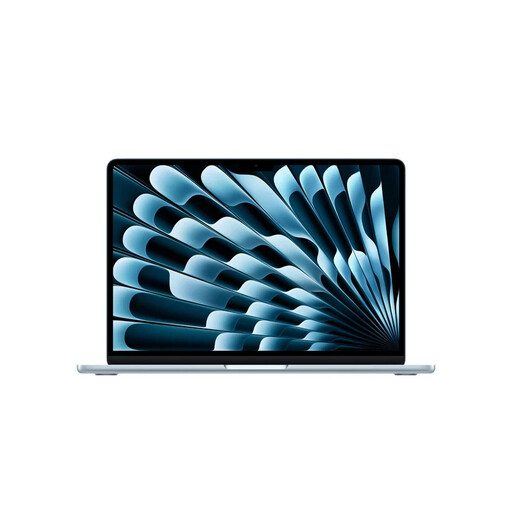
Apple MacBook Air 13-inch M5, 16 GB/512 GB, Sky Blue, QWERTY
A compact macOS option if the apps and files you need for your studies work on this configuration.
Product information lists an M5 chip, a 13,6-inch Liquid Retina screen, 16 GB of memory, 512 GB of storage and two Thunderbolt 4 ports. The stated weight is 1,23 kg.
Joybuy
 No image available
ASUS Zenbook A14 UX3407QA-QD479W
This lightweight Windows laptop may suit you if you’re looking for a compact option. Check in advance that any required programmes and peripherals work with Windows on Snapdragon.
This configuration lists a 14-inch WUXGA OLED screen, Snapdragon X, Windows 11 Home, 16 GB of memory, a 512 GB SSD and a Dutch QWERTY keyboard. The stated weight is approximately 0,98 kg.
The 65W USB-C Power Delivery charger isn’t included. Compatibility with older or specialist software and peripherals may vary.
Joybuy
 No image available
Lenovo Yoga Slim 7 14Q8Y11 Copilot+ PC
A compact Windows laptop for typing flashcards on the go. Check that the study programmes you need work with Windows 11 Home on ARM.
This configuration lists a 14-inch WUXGA OLED screen, Snapdragon X2P-42-100, 16 GB of memory, a 512 GB SSD and three USB4 Type-C ports. The stated battery capacity is 70 Wh and the weight is 1,17 kg.
Joybuy
Frequently asked questions
Can I edit my flashcards on the go without an internet connection?
It depends on the app and how you prepare. Google Chromebook Help says some Drive files can be used offline on a Chromebook, while some apps won’t work without a connection. Before you set off, test your own flashcard system without an internet connection.
Can I rely on Wi-Fi or a plug socket on the train?
No, not on every train journey. NS says free Wi-Fi is available on almost all Intercity trains and warns that charging on the way isn’t always possible. Check your route and charge your laptop in advance; make files available offline if needed.
How do I check how long a Chromebook will receive updates?
Before buying, check the end-of-update date for the specific model. Google Chromebook Help explains where to find it on the device: go to Settings, About ChromeOS and Additional details, then check the update schedule.
What rights do I have in the Netherlands if I’m unhappy with a laptop bought online or it breaks too soon?
According to ACM ConsuWijzer, online consumer purchases generally come with a statutory 14-day cooling-off period after delivery. In addition, if a laptop doesn’t provide what you could reasonably expect under normal use, the seller must put it right under the statutory guarantee. In the Netherlands, this doesn’t simply mean that every laptop has a fixed two-year guarantee period.


