First, choose a laptop that supports your school’s programmes and working environment. Then consider how much built-in screen space you need at home and how often you’ll take it with you. A larger screen can be useful at a permanent workstation, while a more compact model is easier to carry around. If you work with pupil data, follow your school’s security and storage policies.
Who is this guide for?
Teacher with lots of teaching materials
If you organise and edit lesson plans, presentations and documents at home, extra screen space can make it easier to switch between files and windows. Lenovo Netherlands lists lesson preparation, marking and managing digital learning environments among the tasks teachers commonly do.
Teacher who uses school-specific software
If your school requires particular programmes, accounts or a secure environment, first check that they work on the laptop. Microsoft Support explains how to access Microsoft 365 on a Chromebook via the web, but access to school features also depends on how your school has set things up.
Teacher who works at home and at school
If you use the same laptop in different places, weigh its size against the screen space you’d like at home. Lenovo Netherlands describes lesson preparation and managing digital learning environments as part of teachers’ day-to-day work.
What should you look for?
Start with the software and working environment your school requires. Then compare screen space and portability for your own workspace.
| What to consider |
What to look for |
Who this matters most to |
| Screen space and visibility |
Compare screen size and resolution; check whether you can connect an external monitor. |
If I organise lesson plans and windows side by side at home, I want a clear overview without having to switch between them all the time. Around 36% of consumers say screen space is their top priority. |
| School software |
Ask which programmes, accounts and school environment are required; check that they work on the exact configuration. |
If my school uses specific programmes, I want to be sure I can use them before I buy. Around 29% of consumers say compatibility with school software is their top priority. |
| Pupil data |
Check your school’s rules on devices, sign-in, file storage and backups. |
If I work with pupil data at home, I want to follow the process approved by my school. Around 21% of consumers say data protection is their top priority. |
| Portability |
Compare the size and weight of the configuration; check that its ports suit your monitor and peripherals. |
If I regularly take my laptop between home and school, a manageable size matters more to me than having the largest possible built-in screen. Around 14% of consumers say portability is their top priority. |
Buying pitfalls
-
Choosing an operating system without checking your school apps
Being able to access Microsoft 365 in a browser on a Chromebook doesn’t automatically mean that every school system or feature will be available. Your school account settings may affect what you can use.
Before choosing, check which apps and account permissions you need, and ask your school to confirm if necessary.
If a required programme doesn’t work, you may need access to another device.
-
Focusing only on storage when teaching materials include pupil data
More local storage doesn’t determine who can access files, and it doesn’t replace agreed storage or backup arrangements.
Follow your school’s rules on access, storage and recovery. The Dutch Data Protection Authority advises working in your organisation’s secure environment wherever possible.
-
Assuming a charger or the right ports are included
Box contents and available ports can vary by configuration; according to HP, the HP ProBook 4 G1iR D5CY9AT#ABH has a charger that is sold separately.
Check what’s included in the box and compare the ports on the exact laptop with your monitor and peripherals.
For the HP configuration reviewed, you’ll need to allow for a separate charger. With other ports, you may need a suitable adapter.
-
Confusing the manufacturer’s warranty with your full legal protection
ACM ConsuWijzer distinguishes between a commercial warranty and your legal right to a product that meets expectations.
Check what any additional service covers, and contact the seller about your rights if something goes wrong.
Brands worth comparing
HP
The ProBook configuration reviewed is a Windows option with a larger built-in screen for a home workstation.
- HP lists a 16-inch WUXGA screen, 16 GB RAM and a 512 GB SSD for the ProBook 4 G1iR D5CY9AT#ABH.
- According to HP, the charger is sold separately for this configuration; check the box contents for the exact model.
Lenovo
The ThinkPad E14 is a more compact business Windows laptop to compare.
- Lenovo lists a 14-inch WUXGA screen, 16 GB RAM and a 512 GB SSD for model 21T9001TMH.
- The configuration reviewed has an English (EU) keyboard; check that the layout suits the way you work.
Apple
The MacBook Air is a compact macOS option if the school apps you need work on macOS.
- Apple lists 16 GB memory, 512 GB storage and two Thunderbolt 4 ports for the 13-inch M5 configuration reviewed.
- Check software compatibility and whether your existing peripherals can connect directly.
Acer
The Chromebook Plus 514 is a ChromeOS option for a browser-based workflow supported by your school.
- Acer lists a 14-inch WUXGA screen, 16 GB memory and a 512 GB SSD for CB514-5H-53HQ, part number NX.JKAEH.002.
- These specifications don’t confirm that every school system or desktop software feature will work in ChromeOS.
Laptop options at Joybuy
This selection focuses on Windows laptops with large built-in screens for organising teaching materials at home. Check that the school software and security requirements suit your needs for each configuration.
 No image available
HP OmniBook 3 16-by0058ndx
This 16-inch configuration is worth comparing if you’d like a larger built-in screen for teaching materials at home.
16-inch IPS screen with 1920 × 1200 resolution; AMD Ryzen 5 7520U; 8 GB memory; 512 GB SSD; Windows 11 Home.
According to the product information, a charger is not included. Check that Windows 11 Home is suitable for the school software you need.
View at Joybuy
 No image available
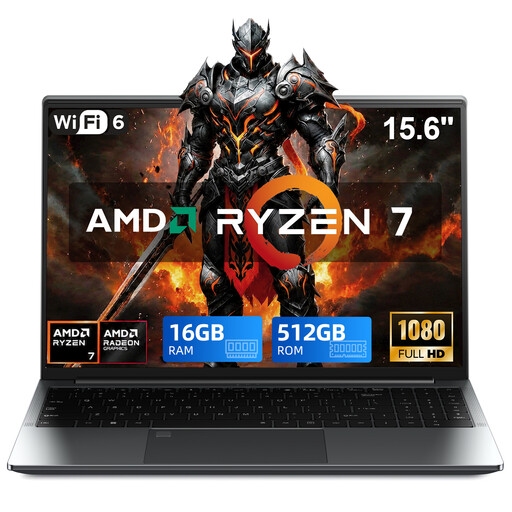
VANWIN GRT156R75825U
This configuration is worth comparing if you’re looking for a larger screen and a Windows setup for teaching materials.
AMD Ryzen 7 5825U; 15.6-inch Full HD touchscreen; 16 GB DDR4 memory; 512 GB SSD; Windows 11 Pro. The product description lists a 360° hinge.
Check that the school apps and account settings you need work with this configuration.
View at Joybuy
 No image available
Blackview AceBook 10
The 18.5-inch screen is worth comparing for a permanent home workstation where built-in screen space is important.
18.5-inch LCD screen; Intel Pentium Silver N6000; 16 GB DDR4 memory; 512 GB SSD; Windows 11 Pro.
Check that the size suits the space where you plan to use the laptop and that the school software works on this configuration.
View at Joybuy
 No image available
Lenovo V15 G5 IRL
This 15.6-inch Windows configuration is worth comparing for organising documents and lesson plans at home.
15.6-inch Full HD anti-glare screen; Intel Core i5-13420H; 16 GB DDR5 memory; 512 GB SSD; Wi-Fi 6; Windows 11 Pro.
Check that the school software and ports suit your workspace.
View at Joybuy
 No image available
HP OmniBook Ultra Next Gen AI 16-bk0002nd
This 16-inch configuration is worth comparing if you need plenty of built-in screen space for documents and windows at home.
16-inch 3K OLED touchscreen; 64 GB memory; 2 TB SSD; Windows 11 Pro.
Check that the school software and security settings are suitable for this configuration.
View at Joybuy
Frequently asked questions
Is a Chromebook enough for Word, PowerPoint and Teams?
Microsoft Support says these Microsoft 365 apps can be accessed on a Chromebook via the web. Whether your school account, the features you need and other school systems will work depends on how your school has set things up; check before you buy.
How can I store teaching materials securely at home?
Follow your school’s storage and backup policies. The Dutch Data Protection Authority advises working in your organisation’s secure environment wherever possible; Kennisnet’s education security framework treats backup and recovery as the organisation’s responsibility.
Can I store pupil data on a personal laptop?
First check which devices, storage locations and security measures your school allows for this data. The Dutch Data Protection Authority stresses that personal data must be protected appropriately; choosing a laptop alone doesn’t determine whether your working practices are permitted.
What warranty and cancellation period apply to online purchases as a consumer in the Netherlands?
According to ACM ConsuWijzer, in addition to any commercial warranty, you’re entitled to a product that meets what you can reasonably expect; there is no single fixed statutory warranty period for every laptop. Online purchases generally come with a cancellation period of up to 14 days after delivery, subject to legal exceptions.


