
Vandaag of morgen in huis

Kwaliteit gegarandeerd

Welkomstaanbiedingen ontgrendelen: GRATIS bezorging | Tot 80% korting | Gratis 30 dagen JoyPlus-proefperiode
Download de app
Buying a laptop or tablet seems straightforward, until you have to choose between a 2-in-1 laptop, an AI laptop, an Android tablet or a drawing tablet. Marketing terms such as Copilot+ PC, OLED and “professional performance” only mean something when you consider how you’ll use the device.
The most common buying mistakes come down to three pitfalls:
For a laptop for study and work, 16 GB of RAM and a 512 GB SSD are practical starting points. With 8 GB of RAM, you can browse, work with documents and stream content comfortably, but you’ll have less room to run lots of programmes at once. Check whether the memory can be upgraded, too. That isn’t possible on several slim laptops, including models with onboard LPDDR memory.
An AI laptop often includes an NPU for running AI calculations locally. According to HP, certain Ryzen AI models deliver up to 50 TOPS, while Microsoft quotes up to 45 TOPS for Surface models. These are manufacturers’ specifications; how well they work in practice depends on Windows, updates and compatible software.
If you’re considering a Snapdragon laptop running Windows, it’s worth checking that your most important programmes are compatible beforehand. Older drivers, specialist business software and certain peripherals may work differently than they do on a traditional Windows laptop with an Intel or AMD processor.
A 13- or 14-inch model is usually easier to carry around. A 16- or 17-inch laptop gives you more room to work, but takes up more space in your bag.
Look out for these features:
If you want to draw directly on the screen, you’ll need a touchscreen laptop or a standalone drawing tablet. A graphics tablet such as a Wacom Intuos doesn’t have a built-in screen: you draw on its surface and view the result on your computer.
A lightweight laptop is handy for students, rail commuters and people working from home who regularly change where they work. As well as checking the weight, look at the ports. USB-C can handle data, video and charging, but not every USB-C port supports all these functions.
So, check the following:
If a model has non-upgradeable memory, it’s worth choosing the right RAM configuration from the outset. For creative work, a larger active drawing area may matter more than an especially compact design.
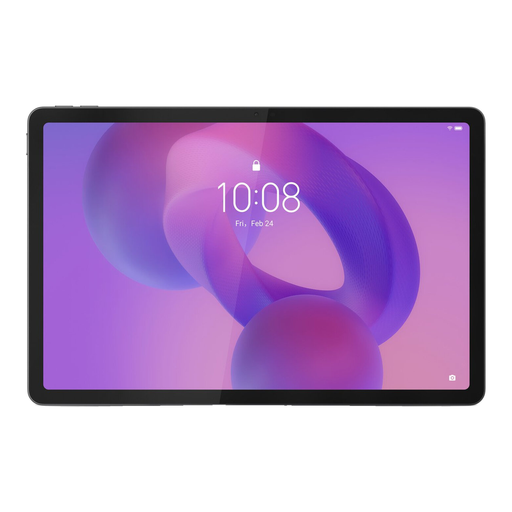
Why it suits this type of user: With 8 GB of RAM, 256 GB of storage and a Tab Pen included, this tablet is a practical choice for note-taking, streaming, studying and light creative work.
The pen is explicitly listed in the product information. However, check what’s in the box and the charging requirements beforehand, as accessories may vary between offers.
11-inch IPS screen with 2560 × 1600 pixels, 256 GB of storage and Android 15, according to the product listing.
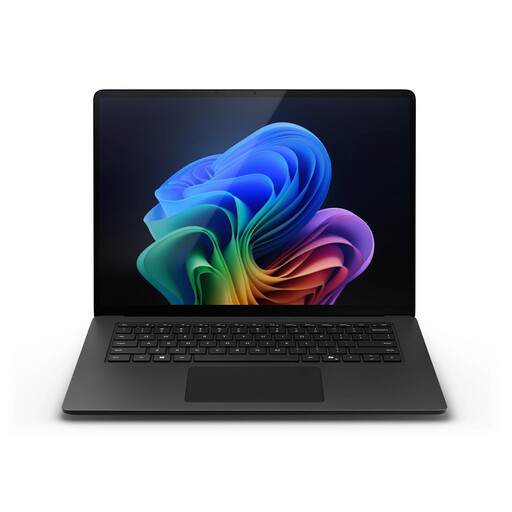
Why it suits this type of user: This model combines a large touchscreen with Windows 11 Pro, 16 GB of memory and Wi-Fi 7, making it suitable for work, business applications and multitasking.
The screen size, resolution and weight are clearly listed. Be sure to check that any specific Windows programmes you use are compatible with the Snapdragon platform.
15-inch PixelSense Flow touchscreen, 3:2 aspect ratio, 120 Hz and Snapdragon X Elite with an NPU of up to 45 TOPS, according to Microsoft.
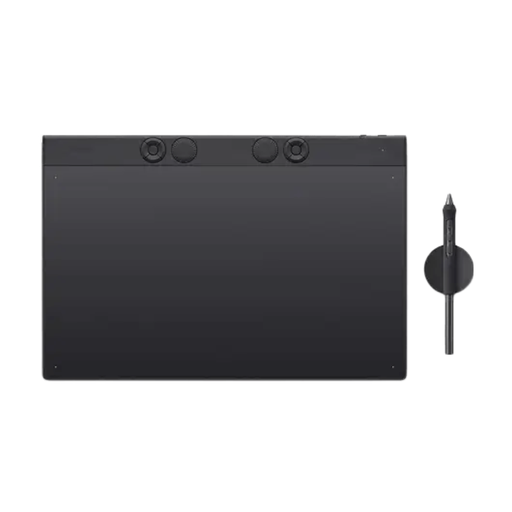
Why it suits this type of user: Illustrators and graphic designers who already work on a computer get a large active area and programmable controls.
This is clearly a pen tablet without a built-in screen. You’ll know in advance that you need a computer and won’t be drawing directly on the tablet’s display.
Active area of 349 × 195 mm, 8,192 pressure levels, USB-C and Bluetooth, according to the product information.

Why it suits this type of user: This Android tablet is designed for drawing and taking notes on the go, without having to carry a laptop around all the time.
It’s a standalone model with Android 14, storage and a pen included. So you don’t automatically need to buy a separate computer or screen.
11.4-inch IPS touchscreen, 8 GB of RAM, 128 GB of storage, microSD support and a stated battery life of up to 10 hours.
We’ve put together a complete, up-to-date list of products that meet these strict selection criteria and the applicable European safety regulations.
It can be, especially if you type regularly and sometimes want to use touchscreen controls. Check the weight, keyboard layout, screen brightness and whether a stylus is included. A convertible with a 360-degree hinge is flexible, but often heavier than a standard tablet.
How long it lasts depends on software updates, battery wear, storage and how you use the device. If you multitask heavily, it’s best to choose enough RAM and storage from the outset, as the memory in many models can’t be upgraded. Check the stated update and warranty information, too.
Remember to allow for a separate USB-C charger, stylus, protective case, docking station, external storage and any software subscriptions. A drawing tablet may also require a computer with suitable drawing software. So, always check which accessories are included and what connections are available before you order.
