
Analysts who work with several windows side by side
If you view tables, charts and explanations at the same time, consider both screen space and compatibility with your software.


Start with the software you use to view your results, and the monitor and peripherals available at the desk. A compact model is handy if you often move between desks; a larger screen gives you more room for tables, while the ports, keyboard layout and exact configuration determine how much extra equipment you’ll need. If you use Power BI Desktop, check Windows compatibility specifically: macOS isn’t a straightforward alternative.
If you view tables, charts and explanations at the same time, consider both screen space and compatibility with your software.
If you regularly move your laptop, it helps to choose one that works with the monitors and input devices available at different desks. Arboportaal explains that employees who work at a screen for more than 2 hours a day may use a separate monitor or keyboard with a laptop.
If survey responses contain personal data, your organisation must ensure access is appropriate to the data and the risks. The Dutch Data Protection Authority stresses that unauthorised people must not be allowed access to personal data.
| What to consider | What to look for | Who is this important for? |
|---|---|---|
| Screen space | Compare screen size and resolution; also check that your files and software are compatible with the configuration. | If I want to view tables and explanations side by side, the space on the built-in screen matters. Around 31% of consumers prioritise workspace and having several windows open. |
| Desk set-up | Check whether the desk has a monitor, keyboard and mouse, and whether you can connect and position them separately. | If you work for long periods at different desks, you’ll want a laptop that works with a suitable desk set-up. Around 31% of consumers focus mainly on the layout of the shared workspace. |
| Software and connections | List the exact analysis applications you use and check compatibility, along with the ports on your laptop, monitor and dock. | If my analysis software or desk equipment requires a particular connection or operating system, I check they’re compatible before buying. Around 23% of consumers choose primarily on the basis of software and workspace compatibility. |
| Data access | Establish whether responses can be linked to individuals and follow your organisation’s security policy. | If you view identifiable survey responses, you’ll want to ensure that only authorised people can access them. Around 15% of consumers prioritise the protection of personal data. |
A large laptop screen doesn’t tell you whether a monitor, keyboard and other equipment can be connected or positioned comfortably at a shared desk.
First check what’s available at the desk, then compare the ports on the exact laptop configuration.
Memory alone doesn’t tell you whether your analysis applications will work. Microsoft offers Power BI Desktop as a Windows app; check compatibility with other operating system or processor configurations for each application.
Make a list of the exact programmes you need and check the operating system and processor architecture requirements before buying.
The Dell configuration reviewed doesn’t list a charger as included. The Lenovo and Acer configurations reviewed list English keyboard layouts.
Check what’s included and the keyboard layout for the exact configuration, not just the product range.
A sign-in feature doesn’t prove that access to survey data and its subsequent processing are appropriately protected.
Establish whether the responses contain personal data and follow your organisation’s access and security policies.
The ThinkPad E14 Gen 7 configuration 21SXCTO1WWNL5 is a 14-inch Windows option for anyone who often takes their laptop with them.
The TravelMate P2 range includes the 14- and 16-inch business configurations reviewed here, catering for different needs in terms of portability and screen space.
The Dell Pro 14 PC14250 is a business Windows range with a 14-inch screen and configurable business support.
The MacBook Air with M5 is a macOS option if your applications work with it and you can connect your desk set-up via Thunderbolt or USB-C.
The ProBook 4 G1q is a 14-inch business option for anyone who can check whether their applications are compatible with this specific Windows on Arm configuration.
This selection includes laptops with 15- to 16-inch screens, for anyone who wants to view results on the built-in display. For each configuration, check that the software, connections and specifications suit your workspace.
 No image available
The 16-inch screen could suit you if you prefer to view survey results on a larger built-in display.
AMD Ryzen 5 7520U, 8 GB RAM, 512 GB SSD, 2K IPS screen and Windows 11 Home. The memory isn’t expandable; a charger isn’t included.
 No image available
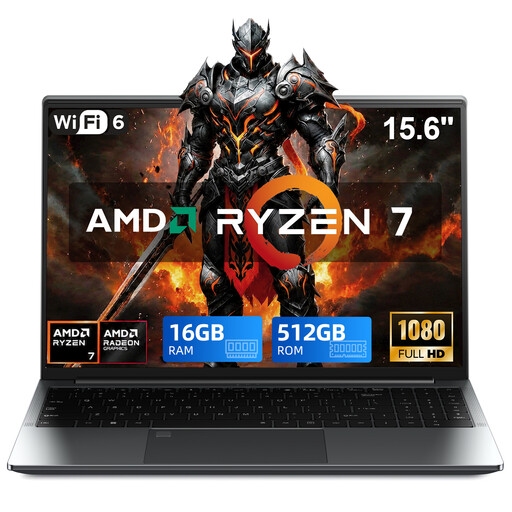
A Windows laptop with a 15.6-inch screen could suit you if you want to view results on its built-in display.
AMD Ryzen 7 5825U, 16 GB DDR4, 512 GB SSD and Windows 11 Pro. Check that your exact analysis applications work with this configuration.
 No image available
The 15-inch model could suit you if you want to view survey results on a large built-in screen.
Snapdragon X Elite, 16 GB memory and a 512 GB SSD. Check that the software you need works with this specific configuration.
 No image available
The 16-inch touchscreen and 2-in-1 design could suit you if you want to view results on the built-in display and use your laptop in different modes.
32 GB RAM and a 512 GB SSD. Check that your software and desk equipment work with this configuration.
 No image available
The 16-inch screen could suit you if you want to view results on a large built-in display.
Intel Core Ultra 7 155U, 16 GB memory, 512 GB SSD and Windows 11 Pro. Check that the programmes and connections you need suit your shared workspace.
Microsoft offers Power BI Desktop as a Windows app, available from the Windows Store or as an installer. If you need this desktop application, don’t rely solely on similar laptop specifications when considering a macOS model; also check the requirements for your software version.
Check whether the desk is adjustable and whether you can use a separate screen or keyboard. Arboportaal describes this option for employees who work at a screen for more than 2 hours a day; it isn’t a general minimum requirement for everyone buying a laptop.
There’s no blanket ban on using a shared desk, but if responses contain personal data, the organisation responsible must protect the processing appropriately and prevent unauthorised access. The measures required depend on the data and risks; laptop specifications alone don’t prove that security is adequate.
Check whether a charger is included with the exact configuration and whether you’ll need an adapter or dock. The Dell configuration reviewed doesn’t list a charger as included; also check what connections your monitor and peripherals require.
For applicable distance sales to consumers in the Netherlands, the Dutch government says a 14-day cooling-off period applies in many cases. Exceptions may apply; don’t assume this applies to purchases made by a business.