
Student who often moves between places
Works at small tables and often carries their laptop around. Size, weight and a comfortable keyboard are important considerations.


Start by choosing a size that fits on a café table and is comfortable to carry in your bag. Then check the keyboard, screen and what the battery can deliver during your study sessions. A Chromebook may suit note-taking in web apps and files you make available offline in advance, but it cannot run the desktop versions of Windows and Mac software. Battery life claims are not a guarantee of how long it will last for you, and a larger screen needs more space.
Works at small tables and often carries their laptop around. Size, weight and a comfortable keyboard are important considerations.
Wants to keep writing when there’s no power socket available. Compare battery figures based on the test conditions, rather than treating them as a guarantee of your own usage time.
Checks in advance that the required course software and preferred offline workflow are compatible with the operating system.
A good fit if: you need Windows desktop software or want to work with files stored locally; 14 inches is a practical starting point if you carry your laptop around often.
Bear in mind: the screen, weight, memory and ports vary by configuration. Check the keyboard layout too.
A good fit if: your course software runs on macOS and you’re looking for a compact laptop for writing on the go.
Bear in mind: compare the specific generation, storage and ports. Apple quotes battery life under test conditions; your usage may differ.
A good fit if: you mainly work in web apps or Google Docs and can make the files you need available offline in advance.
Bear in mind: Microsoft confirms that the Windows and Mac desktop versions of Microsoft 365 cannot be installed on a Chromebook. Not every app works offline.
| What to consider | What should you check? | Who is this for? |
|---|---|---|
| Portability | Compare the screen size, dimensions and weight of the exact configuration. | If I often move between study spaces, I want a laptop that fits on a small table and is comfortable to carry in my bag; around 25% of consumers prioritise portability. |
| Working without a power socket | Compare battery tests based on the same usage and check which charger comes with the configuration. | When I can’t charge my laptop during a café session, I want to keep editing my notes; around 25% of consumers prioritise uninterrupted battery use. |
| Typing and reading comfort | Check the keyboard layout and controls; compare the screen size and finish. | If I type for a long time and read notes, I want a comfortable keyboard layout and a screen that suits my workspace; around 19% of consumers prioritise typing and reading comfort. |
| Software and offline files | Check your course requirements and test in advance that the files you need are available offline. | When I can’t rely on a stable Wi-Fi connection, I want to be sure my course apps and notes will work; around 19% of consumers prioritise software and offline compatibility. |
| Cost and lifespan | Compare the full configuration, the software you need and the update support for the specific model. | If I mainly edit text, I don’t want to choose capacity or software I don’t need; around 12% of consumers prioritise total cost. |
A battery test uses specific test conditions. Your screen brightness, apps and connection may be different.
Compare battery tests that measure the same activity, and consider how long your own study sessions last.
Microsoft 365 web apps are available, but the Windows and Mac desktop versions cannot be installed on a Chromebook.
Check your course requirements and test in advance how to use the files you need offline.
Memory, screen and storage can vary by configuration; specifications for one variant do not automatically apply to another.
Compare the full model number and the specifications of the configuration you’re considering.
The MacBook Air is an option if you use macOS software and want a compact laptop for writing.
The Chromebook CM14 Flip is designed for browser-based work, while the Vivobook Go 15 is a Windows range with a larger screen.
The IdeaPad Slim 3 is an example of a 14-inch Windows range for taking notes and running several programmes.
The Chromebook Plus Spin 514 is a 14-inch convertible for anyone who wants a touchscreen as well as a keyboard.
This selection includes compact laptops for editing notes in a café, with Windows and macOS configurations.
 No image available
The 14-inch configuration is a compact option for editing notes on the go.
AMD Ryzen 5 7520U, 8 GB RAM, 512 GB SSD and Windows 11 Home. The charger is not included and must be purchased separately.
 No image available
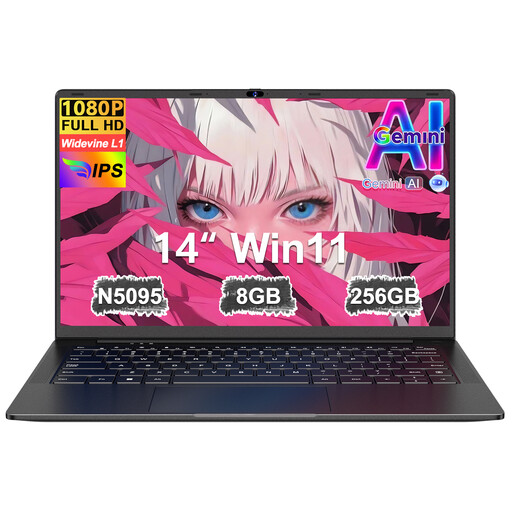
The 14-inch size is well suited to editing notes at a small table.
The product name lists an FHD screen, 8 GB RAM, 256 GB SSD and storage expansion up to 1 TB.
 No image available
This 13-inch MacBook Air is a compact macOS option for editing notes on the go.
16 GB memory, 512 GB storage and a QWERTY keyboard.
 No image available
The 13-inch size is suited to editing notes in a compact workspace.
A18 Pro, 8 GB memory, 512 GB storage and macOS. This configuration has a QWERTY keyboard.
 No image available
This 14-inch laptop with Windows 11 Home is an option for working on notes and documents on the go.
Snapdragon X, WUXGA OLED screen, 16 GB RAM, 512 GB SSD and Dutch QWERTY keyboard. A power adapter is not included; charging requires a compatible 65 W USB-C Power Delivery charger.
Some Google Drive files, including Docs, can be used offline if you make them available in advance. Google Chromebook Help explains this offline feature. Not every app or file works offline, so check the files you need beforehand.
No. Microsoft says you can use Microsoft 365 web apps, including Word, on a Chromebook, but you can’t install the Windows and Mac desktop versions.
VeiligInternetten recommends using a VPN on a public Wi-Fi network. You could also check whether a mobile hotspot would work for you.
For online consumer purchases, you generally have 14 days to change your mind from the date of delivery, subject to legal exceptions. ACM ConsuWijzer also explains that the seller is responsible for providing an appropriate free solution if a product breaks too soon during normal use and the legal guarantee applies. There is no single fixed legal guarantee period of two years for every laptop.