
Vandaag of morgen in huis

Kwaliteit gegarandeerd

Welkomstaanbiedingen ontgrendelen: GRATIS bezorging | Tot 80% korting | Gratis 30 dagen JoyPlus-proefperiode
Download de app
A laptop sleeve may seem like a simple purchase, but the wrong size, a weak fastening or too little storage space can cause daily frustration. Students take their laptops to lectures, professionals travel between the office and home, and home workers want to store their device safely when it is not in use. Travellers often also need a laptop bag with extra compartments and a shoulder strap.
The product description does not always tell the whole story. Pay particular attention to verifiable specifications rather than terms such as “durable”, “waterproof” or “shock-resistant”.
A 13-inch laptop sleeve or 14-inch laptop sleeve will not automatically fit every laptop with that screen size. The casing can vary between brands and models. Therefore, check the width, depth and thickness of your laptop and compare them with the sleeve’s internal dimensions.
A 15.6-inch laptop sleeve offers more space, but may be too loose for a thinner model. Too much movement reduces protection against knocks and can cause the laptop to shift while being carried.
A water-repellent laptop sleeve can help protect against light splashes or brief contact with moisture. This does not mean that the sleeve is suitable for heavy rain, immersion or prolonged exposure to water. Check whether the product information describes it as water-repellent, moisture-resistant or fully waterproof. In bad weather, you may also want to use an additional backpack rain cover.
A slim sleeve is convenient in a backpack or work bag, but usually protects against scratches and minor knocks. If you often carry your laptop alongside books, chargers and other items, a model with thicker padding or a hard outer structure may be more suitable.
Also, do not overfill a laptop sleeve with a zip. Pressure from accessories or heavy objects can put strain on both the laptop and the zip.
Use this checklist before ordering:
If you are unsure, internal dimensions are more useful than simply seeing “suitable for 14 inches”. For example, the Case Logic QNS113 lists an internal laptop compartment measuring 33 × 3,8 × 23,9 cm for laptops up to 13.3 inches.
Look at the construction rather than relying on general marketing claims:
According to the product information for Case Logic Reflect models, they protect against scratches and light knocks. This is not the same as protection against falls from a height or heavy pressure.
A laptop sleeve with a zip closes all the way around and generally keeps the laptop more securely in place than an open slip pocket. However, check that the zip moves smoothly and closes fully. A model with a handle or shoulder strap is more practical if you want to carry the sleeve on its own.
A compact sleeve is sufficient for carrying just your laptop. If you also take a charger, mouse, cables and documents, look for a laptop bag with separate compartments. More space does mean that the bag may be heavier and larger.
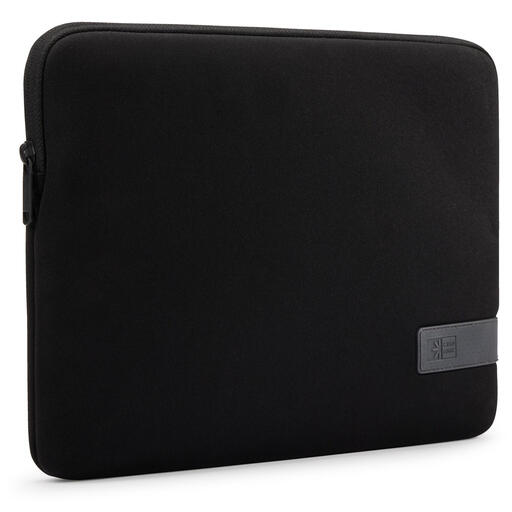
Why it suits this profile: This compact Case Logic laptop sleeve is designed for laptops up to 13 inches and can be used on its own or inside a backpack.
The maximum screen size and sleeve type are clearly stated. The zip prevents the laptop from sliding out of an open compartment during transport.
Polyester, compact design, zip and a weight of 230 grams according to the product specifications.
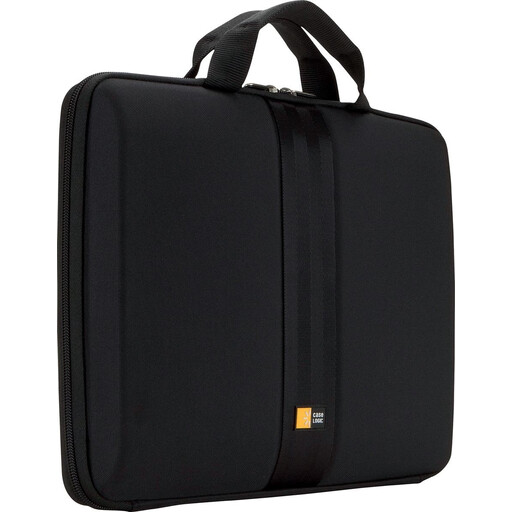
Why it suits this profile: The hard EVA structure and thick lining are well suited to users who regularly carry a 13- to 13.3-inch laptop.
The hard case means you are not relying solely on a thin fabric layer. The internal dimensions help you check the fit.
EVA foam, handle, zip and a stated laptop compartment measuring 33 × 3,8 × 23,9 cm.
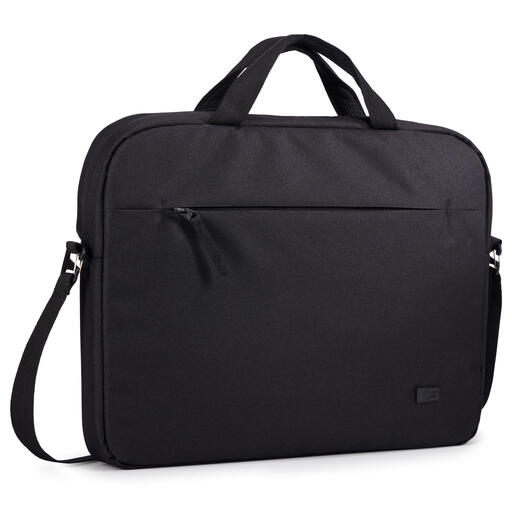
Why it suits this profile: The combination of a carrying loop, shoulder strap and integrated compartments is practical for anyone carrying a 14-inch laptop with small accessories.
This is more than just a thin laptop compartment: the accessory pockets help prevent chargers from pressing loosely against the laptop. Here too, water-resistant does not mean waterproof.
14-inch size, 100% recycled polyester according to the product information, shoulder strap and handle.
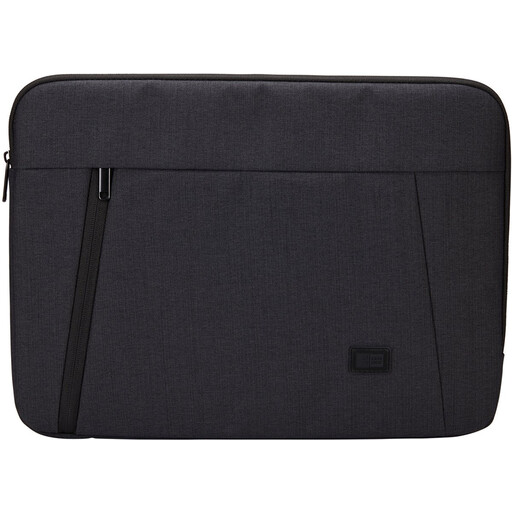
Why it suits this profile: This sleeve is designed for work and study with a 15.6-inch laptop and offers a spacious main compartment for everyday essentials.
The padded laptop compartment and separate main compartment provide more structure than an ultra-thin sleeve. According to the product information, the water-resistant finish is not fully waterproof.
Suitable for up to 15.6 inches, polyester, zip, padded compartment and protection against light knocks.
The right size, a suitable level of protection and a carrying method that fits your routine will ultimately matter more than the colour or brand name. Use the product specifications as a checklist before ordering. European consumers have the right to the statutory guarantee of conformity for faulty products; the precise solution depends on the circumstances and the seller.
We have put together a complete, up-to-date list of products that fully meet these strict selection criteria and the applicable European safety regulations.
Measure the outside of the closed laptop: width, depth and thickness. Compare these measurements with the laptop sleeve’s internal dimensions. Use the screen size only as an initial indication.
A water-repellent sleeve is designed for limited exposure to moisture. According to the product information for several of the models mentioned, it is not fully waterproof. In heavy rain, an additional waterproof bag or protective cover is advisable.
Its lifespan depends on daily use, load and maintenance. Do not keep sharp objects in the laptop compartment, do not overfill the zip, and clean polyester or nylon with a soft, damp cloth. Regularly check the seams, lining and fastening for signs of wear.
