For writing a sewing pattern guide with nested headings, a standard laptop will do, provided your document software supports headings and a table of contents. A comfortable keyboard and enough screen space matter more than a dedicated graphics card. If you also want to draw patterns digitally, choose your drawing software first and check that it works with the laptop’s operating system and processor architecture. For a specific model, also check the exact configuration, the included adapter and the applicable product information.
Who is this buying guide for?
Writer of sewing pattern guides
You mainly create a well-organised document with chapters, subheadings and a table of contents. Microsoft Support explains how Word uses headings for navigation and a table of contents; Google Docs also creates a document outline from headings.
Creator of illustrated guides
You write while referring to photos, diagrams or other sources. Screen space and the ports on the exact laptop configuration may be important, for example if you want to connect an external monitor.
Digital pattern drafter
You want to create or edit sewing patterns as well as write the guide. The Seamly2D project lists Windows, macOS and Linux as available platforms; check the requirements of the software you plan to use.
What should you look for when choosing?
Writing and structuring
Best for: you mainly write text with chapters, subheadings and a table of contents.
Trade-off: focus on document software, the keyboard and screen readability. These tasks alone do not require a dedicated graphics card.
Writing with images and reference material
Best for: you regularly look at photos, diagrams or other reference material while writing.
Trade-off: a larger built-in screen can give you more room to work, while size and weight also matter if you take your laptop with you.
Drawing patterns digitally
Best for: you want to create or edit patterns using drawing software.
Trade-off: this is different from writing a guide; first check that the software supports your operating system and processor architecture.
| What to consider |
What to look for |
Who this matters to |
| Headings and table of contents |
Check that the document software is available for your operating system and has the features you need. |
If you want to navigate quickly between nested headings and create a table of contents, this should be your first consideration. Around 36% of consumers give heading structure top priority. |
| Screen space and ports |
Compare screen size and resolution; check the ports on the full model number if you want to use an external monitor. |
If you work with photos, diagrams and reference material alongside your text, you’ll want to see everything clearly. Around 29% of consumers prioritise working with images and reference material. |
| Portability and charging |
Check the weight and charging requirements of the exact configuration, and whether the required adapter is included. |
If you take your laptop between workspaces, portability and charging will affect your choice. Around 21% of consumers prioritise portability. |
| Pattern-drawing software |
Choose the application first, then check that it supports your operating system and processor architecture. |
If you want to draw patterns digitally rather than just write about them, check software compatibility first. Around 14% of consumers give digital pattern drawing top priority. |
Common buying pitfalls
-
Choosing a gaming or graphics laptop just for nested headings
Headings, navigation and automatic tables of contents are features of the document software. Drawing patterns digitally is a separate use case.
Before choosing, decide whether you’ll only be writing the guide or designing the patterns too.
-
Assuming a product range’s specifications apply to every configuration
Screen, memory and ports can vary by model or region.
Compare the full model or product number with the specifications for the configuration you want to buy.
-
Assuming the laptop comes with the required adapter and word-processing software
What’s in the box and which software is included can vary between offers.
Before buying, check the box contents, charging requirements and software licence for the exact model.
Brands to consider
Acer
An Aspire Go 15 configuration could be a useful comparison if you’re looking for a larger built-in screen.
- For the AG15-31P, NX.KRPEH.00E, Acer lists a matte 15.6-inch Full HD IPS screen, 8 GB of memory and a 512 GB SSD.
- For this specific configuration, Acer lists a maximum of 8 GB of memory and a weight of around 1.75 kg; these figures don’t automatically apply to other Aspire Go models.
HP
The OmniBook X Flip 14 is worth considering if you’re specifically looking at a 2-in-1 form factor.
- For the 14-kc0600ndx, HP lists a 14-inch 2K touchscreen, 16 GB of RAM and a 512 GB SSD.
- A touchscreen isn’t necessary just to add headings to a document; also check whether the adapter is included with the configuration you choose.
Apple
The MacBook Air with M5 is a macOS option if you’ve checked that your applications work on it.
- For the 13-inch M5 configuration, Apple lists a 13.6-inch screen, starting at 16 GB of memory and 512 GB of storage.
- Ports and charging requirements differ from those of some Windows models. Instructions for the Word Navigation pane on Windows don’t apply to Mac in exactly the same way.
Lenovo
The IdeaPad Slim 3 14IRH10 is a useful reference if you’re considering a 14-inch Windows laptop with the option of an external monitor.
- Lenovo lists HDMI and USB-C with DisplayPort support among the ports available on the range.
- Memory configurations can vary; check the options using the full model number.
ASUS
The Vivobook 15 (X1504) is a range of laptops for home use, with product-specific support available from ASUS.
- ASUS provides product support and warranty status information for each device.
- The range’s features don’t automatically confirm the performance or specifications of every X1504 configuration; compare the full configuration number.
Joybuy laptops for writing and working with images
These laptops are suited to writing, working with documents and viewing images. Check software compatibility, ports and included accessories for each configuration.
 No image available
HP OmniBook 3 14-hy0058ndx
A 14-inch screen with extra vertical space could work well for documents with headings and subheadings.
14-inch IPS screen, 1920 × 1200 pixels, 16:10 aspect ratio and anti-glare finish. Listed with Windows 11 Home. Power adapter not included.
View at Joybuy
 No image available
Auusda T156A
The 15.6-inch screen could suit you if you write while also viewing images or reference material.
15.6-inch Full HD IPS screen. The product name lists 16 GB of DDR4 memory, a 512 GB SSD, a 3050E processor and a backlit keyboard. USB-C and HDMI are listed.
View at Joybuy
 No image available
Microsoft Surface Laptop 7 15-inch
The screen’s aspect ratio may be worth considering if you want to compare models with extra vertical space for document work.
15-inch touchscreen with 2496 × 1664 pixels and a 3:2 aspect ratio. Listed with Snapdragon X Elite, 16 GB of memory, 512 GB of storage, Windows 11 Pro and USB4.
View at Joybuy
 No image available
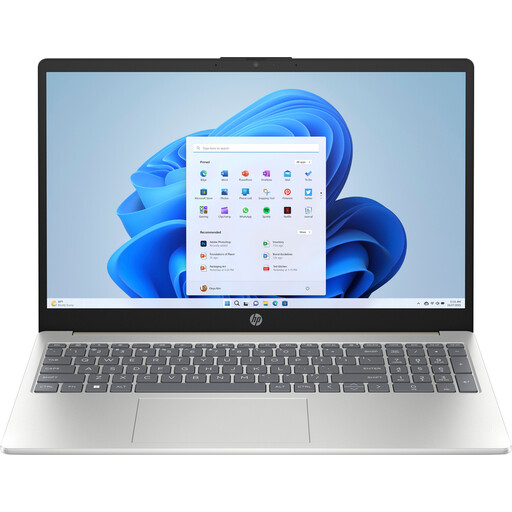
HP Laptop 15-fd1253ndx
An anti-glare 15.6-inch screen could suit document work where you also view images.
15.6-inch Full HD anti-glare screen, 8 GB of DDR5 memory and a 512 GB SSD. Listed with Intel Core 5 120U, Windows 11 Home, USB-C, USB-A and HDMI.
View at Joybuy
 No image available
MSI Modern 14 F1MG-867NL
A 14-inch model could be a good fit if you’re looking for a more compact size for working with documents and taking your laptop with you.
14-inch Full HD screen, 16 GB of DDR4 memory and a 512 GB SSD. Listed with Intel Core 7 150U, Windows 11 Home, a weight of 1.40 kg, USB-C with DisplayPort and HDMI.
View at Joybuy
Frequently asked questions
Do I need a laptop with a dedicated graphics card to create nested headings?
No. The heading, navigation and table of contents features described are part of the document software and don’t require a dedicated graphics card. If you also want to draw patterns, check the requirements of your chosen drawing software.
Why aren’t my subheadings appearing in the Word table of contents?
Check that the text is formatted as a heading, then update the table of contents. Microsoft Support also notes that the Navigation pane described for Word on Windows doesn’t show headings in tables or text boxes.
Do I need to buy Word separately?
Check which document software and licence are included with the exact laptop you’re buying. Microsoft describes Office 2024 as a one-off purchase available separately; a laptop’s specifications don’t mean that this licence is included.
What cooling-off period and warranty apply to an online purchase in the Netherlands?
According to ACM ConsuWijzer, a cooling-off period of up to 14 days after delivery generally applies to eligible distance purchases by consumers. The statutory guarantee is separate from a manufacturer’s warranty or an extended warranty; if a product doesn’t meet the terms of the contract, the seller is responsible for providing a statutory remedy.
What product information should I check for a laptop sold in the Netherlands?
For the exact configuration, check the applicable product requirements and whether the required CE marking applies. The European Union and the Dutch government outline the rules for products covered by the relevant EU legislation; a product page in Dutch doesn’t by itself prove that an individual device meets all applicable requirements.


