
Vandaag of morgen in huis

Kwaliteit gegarandeerd

Welkomstaanbiedingen ontgrendelen: GRATIS bezorging | Tot 80% korting | Gratis 30 dagen JoyPlus-proefperiode
Download de app
A laptop security lock is particularly useful in places where devices are left unattended: a hot desk, lecture theatre, reception desk, meeting room or home office. A cable secures the laptop to a fixed object, such as a desk or table. This makes it harder to take away quickly, but only if the lock is compatible with your laptop’s security slot.
Many disappointing purchases are not caused by the cable itself, but by an incompatible slot, an awkward locking mechanism or a combination lock with a code that is quickly forgotten. Below, you’ll find what to look out for before buying a Kensington laptop lock or another notebook security lock.
Not every laptop uses the same security slot. A standard slot is not automatically compatible with a NanoSaver connection. So check the manual, the laptop’s technical specifications or the marking next to the slot.
A keyless laptop lock is only practical when it is genuinely compatible. Forcing a lock head into place can damage the laptop and is generally not covered as normal use.
With slim laptops and 2-in-1 models, a wide or protruding lock head can cause the device to sit at an angle. This is inconvenient when typing and can put pressure on the casing or security slot.
A flat lock head is therefore an important consideration for an ultra-thin laptop. Don’t just look at the cable material; consider the shape and dimensions of the lock head too.
A laptop cable lock is a physical security measure, not a guarantee against theft. The cable must be attached to a fixed and sturdy object. A loose table leg or easily movable piece of furniture offers little protection.
The combination lock also deserves attention. With a laptop lock featuring a combination, you need to be able to remember and set the code correctly. In an organisation, a key lock may be more convenient for managing keys.
Look out for these commonly used connections:
The product name alone is not enough. Compare the lock type with the specifications of your laptop or monitor.
A length of around 1.8 metres will generally give you enough reach to secure the laptop to a desk leg or another attachment point. The cable should be long enough without trailing loosely on the floor. A metal or stainless-steel cable is a verifiable material specification; the manufacturer may also make its own claims about resistance to cutting.
According to Kensington’s own information, certain cables and lock heads are tested for factors including tensile and torsional strength, service life and corrosion resistance. These are manufacturer claims and do not guarantee that every attempted theft will be prevented.
A combination lock is convenient for students, homeworkers and hot desks because you don’t need to carry a key. A resettable 4-digit code provides 10,000 possible combinations according to the product specification. Make sure you store the code securely; without registration or a recovery option, access to the lock may be lost.
A key lock is better suited to a permanent workstation or office laptop security, particularly when several employees need access to a managed set of keys. Also check how many keys are included.
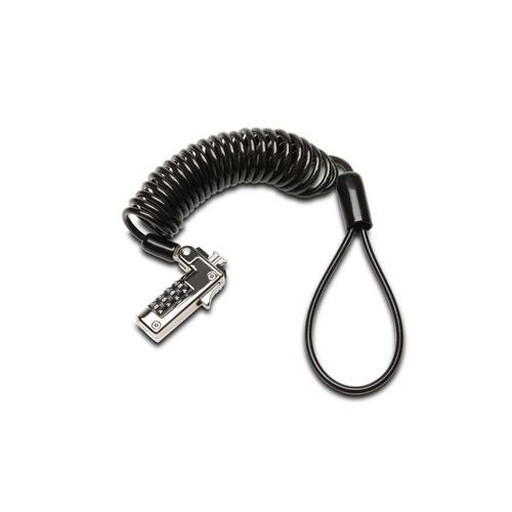
Why it suits this profile: This model uses a combination and, according to the product information, is intended for notebooks with a standard slot. That makes it a straightforward choice for home use, studying or a hot desk.
You don’t need to carry a key. However, check beforehand that your laptop really does have a standard security slot.
Combination lock, 1.8-metre cable according to the product description, and designed for notebooks.
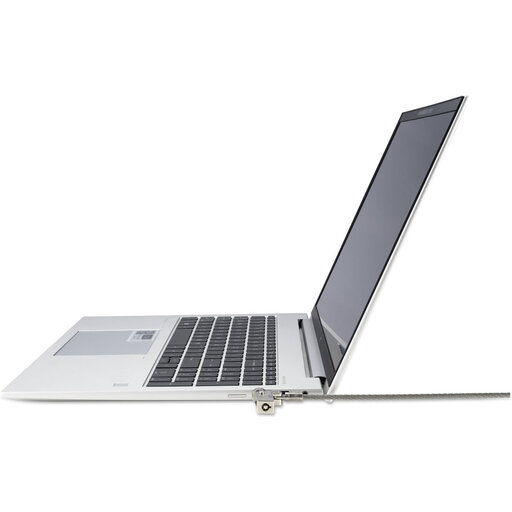
Why it suits this profile: This NanoSaver laptop lock with key is designed for slim laptops and organisations where stability and access to ports are important.
The slim lock head is designed to keep the laptop flat and stable while leaving the ports clear.
NanoSaver 2.0 connection, 1.83-metre stainless-steel cable and two keys included according to the specifications.
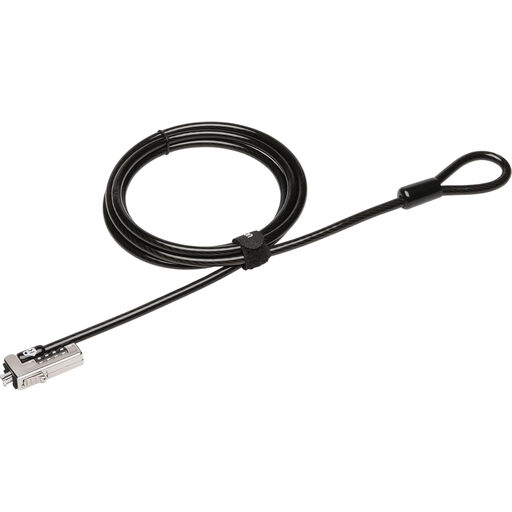
Why it suits this profile: For an office, school or shared workspace, a keyless NanoSaver solution is practical when several users need to secure their laptops independently.
The combination lock eliminates key management. The 6.5 mm-thick cable and NanoSaver lock head suit the described use case, provided the laptop has the correct slot.
4-digit combination, 1.8-metre cable and a weight of 219 grams according to the product information.
If you are securing multiple laptops or monitors, it is sensible to identify one connection type in advance. This prevents an office, school or organisation from needing different locks for similar devices.
We’ve put together a complete, up-to-date list of products that fully meet these strict selection criteria and the applicable European safety regulations.
No. The type of security slot varies from one laptop to another. Check whether you have a standard connection or a NanoSaver slot. The product name and images are useful for an initial check, but your laptop’s specifications are the deciding factor.
The main difference is how they are used and managed. A combination lock means you cannot lose a key, while a key-operated model may be practical for a permanent workstation with centrally managed keys. Both solutions only work effectively when the cable is attached to a fixed object and the lock head is fitted correctly.
Its service life depends on use, storage and exposure to moisture or corrosion. Don’t bend the cable sharply, force the lock head or use the lock if any components are damaged. Manufacturers may provide their own service-life or durability test results; treat these as the brand’s product specifications, not as a guarantee against every form of theft.
