First, choose a laptop that runs your preferred writing software, then look for a screen and keyboard you’ll find comfortable to use. Set up offline access before you leave, and don’t count on there being a plug socket on every train. According to its software provider, Final Draft doesn’t work on Chromebooks.
Who is a laptop for writing scripts on the train for?
Frequent-travelling scriptwriter
Writes regularly on train journeys and wants a manageable size, a comfortable keyboard and a workflow that doesn’t depend on facilities on board. NS says that almost all Intercity trains have Wi-Fi; charging facilities vary by train type.
Final Draft user
Wants a laptop that works with the supported desktop software and needs to be able to open the script before setting off. Final Draft says its desktop software doesn’t work on Chromebooks.
Google Docs writer
Wants to use documents across devices and can set up offline access in advance. Google Help explains how to make files available offline in Google Docs.
What should you look for in a laptop for writing plays on the train?
Compact Windows laptop
Choose this option: if you want to use Final Draft on a supported Windows computer or stick with your Windows workflow.
The trade-off: a small screen is easier to carry, but leaves less room for your script and notes. Check the exact configuration and battery information.
13-inch MacBook Air
Choose this option: if you want to use macOS, for example with a supported version of Final Draft, and a compact screen matters to you.
The trade-off: Apple’s quoted battery life is based on specific tasks, such as streaming video or browsing the internet wirelessly. It won’t tell you how long you’ll be able to write on a train journey.
Chromebook with Google Docs
Choose this option: if you write in Google Docs and make the files you need available offline before setting off.
The trade-off: Final Draft says its desktop software doesn’t work on Chromebooks, so first check whether a browser-based solution suits your writing workflow.
| What to consider |
What should you look for? |
Who is this important for? |
| Portability and workspace |
Compare the weight of the exact model and check whether the screen size gives you enough room. The Consumentenbond describes 13 to 14 inches as compact, but less comfortable for a full day’s work. |
If I change trains often, I want to carry my laptop easily without having too little space for my script. Around 25% of consumers prioritise portability. |
| Writing software |
Check the requirements for your software version and how you’ll share scripts with others. Final Draft lists supported Windows and macOS systems, but not Chromebooks. |
I want to know before buying whether my chosen programme will work on the laptop. Around 25% of consumers put software compatibility first. |
| Typing comfort |
Try the keyboard layout and key response for yourself. Also consider whether the screen is comfortable to read from your seat. |
If I spend a long time working on scenes and rewriting them, I want to type and read in comfort. Around 20% of consumers put typing comfort first. |
| Working without Wi-Fi or a plug socket |
Make your script available offline in advance and test that it opens. Compare battery information only when the test tasks are the same; a maximum figure for video playback doesn’t guarantee writing time. |
I want to keep writing if there’s no internet connection or power. Around 15% of consumers prioritise being able to work offline independently. |
| Configuration and accessories |
Check which software and charging accessories you need and whether they’re included with the exact model. Choose memory and storage to suit everything you use the laptop for, not just the product range. |
I don’t want to choose features or extras that my writing workflow doesn’t need. Around 15% of consumers prioritise getting the configuration right for their needs. |
Common pitfalls when choosing a laptop for train journeys
-
Assuming a battery-life figure guarantees writing time
Manufacturers quote battery life for specific tasks. Apple, for example, distinguishes between streaming video and browsing the internet wirelessly. Those maximum figures don’t tell you how long your scriptwriting session will last on a train journey. NS also says that charging points depend on the type of train.
Compare battery figures based on the task used in the test, and set off with plenty of charge.
A flat battery can interrupt your writing session if there isn’t a charging point available.
-
Choosing a Chromebook without checking the software requirements
Final Draft says its desktop software doesn’t work on Chromebooks. You can use Google Docs offline once you’ve made the files you need available in advance.
First decide which programme and file format you’ll use to write and collaborate, then choose an operating system.
If your chosen programme doesn’t work, you may need another device or a different writing setup.
-
Not checking what’s included with the exact model
The MacBook Air model viewed on Joybuy doesn’t list a charger; for the HP model mentioned, the recommended adapter is sold separately. This won’t necessarily apply to other models.
Check the product page to see what’s included with that exact model and whether you already have a suitable charger.
Brands to consider for writing scripts on the go
Apple
The 13-inch MacBook Air M5 is a macOS option for anyone looking for a compact device for writing scripts, including with a supported version of Final Draft.
- Apple specifies 16 GB of memory and 512 GB of storage for the 13-inch base model.
- Battery life varies by test task; the quoted figures don’t directly predict writing time on a train. Also check the keyboard layout and charging accessories included with the specific model.
Lenovo
Lenovo positions the ThinkPad X13 Gen 6 AMD range for mobile users looking for a compact Windows laptop.
- For the range, Lenovo lists a 13.3-inch screen, a weight of less than 1 kg and a replaceable battery.
- The range includes several options. Check which battery, ports and other features are included in your chosen configuration.
Acer
The Swift Go 14 OLED SFG14-63 (NX.KTSEH.007) we checked is a Windows option with a 14-inch screen for anyone who wants more room for documents.
- Acer lists 16 GB RAM, a 512 GB SSD and a weight of approximately 1.32 kg for this model.
- Acer quotes battery life of up to 12.50 hours and a glossy OLED screen. The quoted battery life isn’t a measure of writing time; also consider whether reflections might be a problem from your seat.
HP
According to the manufacturer’s specifications, the HP OmniBook 7 Aero 13-bg1694ndx is a 13.3-inch Windows option weighing less than 1 kg.
- HP lists 32 GB RAM and a 1 TB SSD for this model.
- The recommended charger is sold separately. Consider whether this configuration and any extras you need suit the way you write scripts.
Joybuy products for writing scripts on the go
This selection includes compact Windows laptops and MacBook models for writing on the go. Before setting off, check that your script is available offline and that your chosen software works on the exact configuration.
 No image available
HP OmniBook 7 AeroNGAI 13-bg1051nd NL Copilot+ 13,3-inch AMD Ryzen AI 5
A compact Windows laptop to take with you; check the software requirements for your chosen writing programme.
13.3-inch IPS screen, 1.46 kg and backlit keyboard, according to the product description.
Joybuy
 No image available
HP OmniBook 5 Flip 14-fp0075nd C5VM5EA#ABH
A Windows laptop for anyone who wants a 14-inch screen for reading and editing scripts.
14-inch 16:10 screen and backlit QWERTY keyboard, according to the product description. Check that laptop mode suits the way you write.
Joybuy
 No image available
Apple MacBook Air 13-inch M5 16GB 512GB Midnight (2026) QWERTY
A compact macOS option for travelling; check whether your version of Final Draft or other writing software is supported.
13.6-inch screen, 1.23 kg and backlit keyboard, according to the product description. The product name lists 16 GB and 512 GB.
Joybuy
 No image available
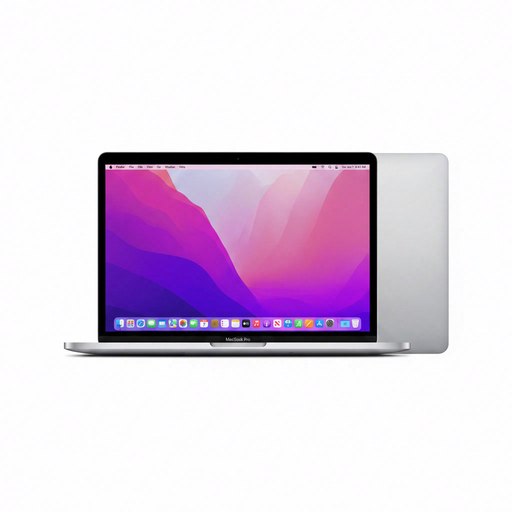
Apple MacBook Pro 13-inch M2 24GB 256GB Space Gray (2022) QWERTY
A macOS laptop for anyone writing scripts with software that works on their chosen macOS configuration.
13.3-inch screen, 1.4 kg and backlit keyboard, according to the product description. The product name lists 24 GB and 256 GB.
Joybuy
 No image available
ASUS Zenbook A14 UX3407QA-QD479W 14-inch Copilot+ PC Snapdragon X
A lightweight 14-inch Windows laptop for anyone who wants screen space and portability. Please note: for Final Draft on Windows, the software provider lists Intel or AMD processors; this model has Snapdragon X.
Approximately 0.98 kg, 14-inch OLED screen with a 16:10 aspect ratio, 16 GB RAM and 512 GB SSD, according to the product description. The product name specifies Dutch QWERTY.
Joybuy
Frequently asked questions about writing scripts on the train
Can I edit my script on the train without Wi-Fi?
Yes, if you prepare your workflow in advance. Google Help explains how to make files available offline in Google Docs. Final Draft says you need an internet connection for first use and sign-in, but not to use the software after that.
Do all trains in the Netherlands have Wi-Fi and a plug socket?
No, don’t assume they do. NS says free Wi-Fi is available on almost all Intercity trains; plug sockets and USB charging points depend on the type of train.
Can I install Final Draft on a Chromebook?
According to the Final Draft FAQ we consulted, its desktop software doesn’t work on Chromebooks. When buying, also check the requirements for the specific software version you want to use.
Do I need an extended warranty to be entitled to a repair in the Netherlands?
No. Your statutory rights exist alongside any retailer’s or manufacturer’s warranty. ACM ConsuWijzer explains that the retailer is responsible for providing an appropriate free solution if a product breaks sooner than you could reasonably expect under normal use; the applicable period depends on the circumstances.
Can I work on my script in a quiet carriage?
NS says the quiet zone is suitable for reading or working, as long as you keep the noise down. If you want to discuss a scene quietly, NS recommends the work and rest zone instead.


