First, choose a laptop with an operating system that supports your screenwriting software. Then consider the keyboard, screen space and connections for your workspace. You don’t necessarily need a powerful graphics laptop for writing and revising; extra features are mainly useful if you’ll use them for other tasks too.
Who should consider this choice?
Writer with a specific screenwriting programme
You know which programme you need to open your script, so first check that the laptop meets its system requirements. This is especially important if you share files with others as part of an established workflow. Check the software requirements, such as those for Final Draft.
Regular home writer
You often type and revise at a desk, and want to position your screen and keyboard comfortably. The Dutch Arboportaal also outlines specific considerations for employees who spend long periods working at a screen.
Collaborative screenwriter
You share drafts or write with others. Assess collaboration, offline use and backups separately: WriterDuet describes its collaboration and offline features, while VeiligInternetten explains how to keep a separate copy.
What should you look for in a laptop for screenwriting?
Windows laptop
A good fit if: your screenwriting software supports Windows and you want a choice of screen sizes and configurations.
Bear in mind: the current Final Draft 13 product page lists Windows 11 or later, while a support page lists Windows 10 or later. Check the requirements for your software and version.
MacBook
A good fit if: you want to use macOS and your screenwriting software supports it; Final Draft 13 lists macOS 12 or later.
Bear in mind: Apple lists two Thunderbolt 4 ports and MagSafe for the MacBook Air M5. Check that they work with your display and peripherals.
Chromebook or Linux laptop
A good fit if: your chosen writing software works on the platform; Fade In offers a desktop version for Linux, while WriterDuet can be used in a browser.
Bear in mind: Final Draft doesn’t list support for Chromebooks or Linux. Don’t assume an alternative will offer the same software or workflow.
| Consideration |
What should you check? |
Who is this important for? |
| Software compatibility |
Check the operating system, software version and processor for the exact laptop configuration. The Final Draft 13 product page lists Windows 11 or later, while its support page lists Windows 10 or later; both list Intel or AMD. |
I want to make sure I can use my usual writing programme and file workflow before choosing a screen size. Around 36% of consumers say compatibility with screenwriting software is their main purchasing concern. |
| Typing and reading |
Try the keyboard layout and check readability. Check the ports if you plan to use an external display, keyboard or mouse. A larger built-in screen also takes up more desk space. |
For long writing sessions, I want to be able to type and reread text comfortably at my desk. Around 29% of consumers prioritise their everyday writing setup. |
| Total cost |
Compare the exact configuration with your other tasks and check whether the power supply, adapters and any software are included. HP states that the charger for the OmniBook X Flip 14-kc0600ndx is sold separately. |
I want a configuration that suits my writing and other tasks, without paying for features I don’t need. Around 21% of consumers prioritise the total cost. |
| Collaboration and keeping versions |
Check your software’s features and terms, test working offline, and set up a separate backup too. WriterDuet describes its collaboration and offline features; VeiligInternetten covers automatic and manual backups. |
If I share drafts or write with others, I also want to know how to restore an earlier version. Around 14% of consumers give collaboration or version retention top priority. |
Pitfalls to avoid
-
Choosing a Chromebook because a writing app also has a website
A browser-based option for one application doesn’t mean other desktop software will work. Final Draft doesn’t list support for Chromebooks.
Before you choose, check which programme and file workflow you need, and whether they work with the laptop’s operating system.
Switching could mean needing different software or another way to share files.
-
Comparing only the laptop configuration
Requirements or software features may depend on the model or plan you choose. HP states that the charger for the OmniBook X Flip 14-kc0600ndx is sold separately.
Check what’s included with your chosen model and what else you’ll need at home, such as a power supply, adapters or software.
-
Mistaking synchronisation for a separate backup
Collaborating or synchronising files isn’t the same as having a separate copy you can use to restore a script or an earlier revision.
Check how your writing programme restores earlier versions, and regularly create a separate automatic or manual backup too, for example in the cloud or on external storage.
Brands to consider
Lenovo
The IdeaPad Slim 3 model 82XQ00SHMH is a Windows 11 option with an anti-glare 15.6-inch screen, suited to anyone who mainly writes on their laptop display.
- For this model, Lenovo lists 16 GB of soldered memory, a 512 GB SSD and an English (Euro) keyboard.
- Check that the keyboard layout suits you; don’t assume the memory can be upgraded.
Apple
The MacBook Air M5 range is worth considering if you want macOS and a choice of 13- or 15-inch screen.
- For the 13-inch base model, Apple specifies 16 GB of memory, a 512 GB SSD and two Thunderbolt 4 ports.
- Check that the ports suit your peripherals. Apple gives battery life as an ‘up to’ figure for specified test tasks, so don’t treat it as guaranteed writing time.
HP
The OmniBook X Flip 14-kc0600ndx is a Windows 11 convertible for anyone who will genuinely use the touchscreen or flip it into another mode.
- For this model, HP lists 16 GB of RAM, a 512 GB SSD and a 14-inch touchscreen with 1920 × 1200 pixels.
- The Dutch HP product page says the charger is sold separately. Whether the flip design is useful depends on how you plan to use it.
Dell
The Dell 14 is a 14-inch Windows range to consider if you’re looking for a mid-sized screen.
- Dell lists DC14255 as a Dell 14 model with AMD Ryzen processors.
- Dell warns that images may show selected configurations that differ from the one offered. Check the specifications of the exact model.
Joybuy product picks
These picks are intended for writing and revising on the laptop’s built-in screen. For each model, check that the software, keyboard layout and configuration suit your work.
 Image unavailable
Auusda T161N laptop, i3 1000NG4
The built-in screen and backlit keyboard are useful if you write at a desk and reread your work on the laptop display.
16-inch FHD IPS screen, 1920 × 1200 pixels; 16 GB DDR4 RAM; 1 TB SSD; backlit keyboard.
View at Joybuy
 Image unavailable
Auusda T156A laptop, 16 GB RAM and 512 GB SSD
This model could suit you if you want a 15.6-inch built-in screen and backlit keyboard for writing and revising.
15.6-inch FHD IPS screen; 16 GB DDR4 RAM; 512 GB SSD; 3050E processor; backlit keyboard.
View at Joybuy
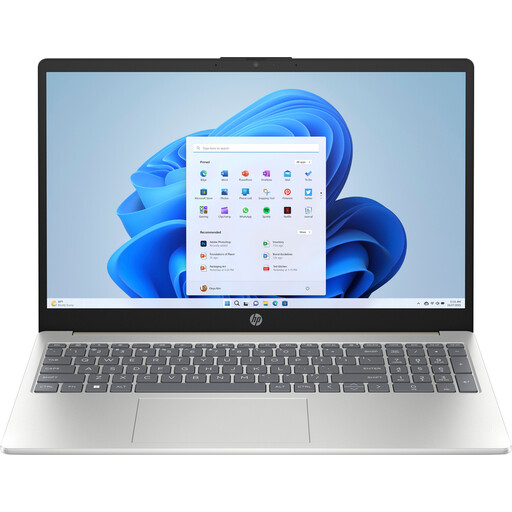 Image unavailable
HP Laptop 15-fd1253ndx
The listed model runs Windows 11 Home; check that your screenwriting software meets the system requirements.
Intel Core 5 120U; 8 GB DDR5; 512 GB storage; 15.6-inch matte IPS Full HD screen; integrated numeric keypad.
View at Joybuy
 Image unavailable
HP OmniBook Ultra Next Gen AI 16-bk0001nd
This model could suit you if you’ll also use the larger touchscreen for tasks beyond writing.
Windows 11 Pro; 32 GB RAM; 1 TB SSD; 16-inch 3K OLED touchscreen, 120 Hz; backlit keyboard.
View at Joybuy
 Image unavailable
HP OmniBook Ultra Next Gen AI 16-bk0004nd
This model could suit you if you need plenty of memory and storage for tasks beyond screenwriting; consider that need separately from your writing software.
Windows 11 Pro; 128 GB RAM; 2 TB SSD; 16-inch 3K OLED touchscreen, 120 Hz; backlit keyboard.
View at Joybuy
Frequently asked questions
Can I use Final Draft 13 on a Chromebook?
According to Final Draft, you can’t: the manufacturer doesn’t list support for Chromebooks or Linux. Before buying, check whether another writing programme suits your software and file workflow.
Do I need a separate keyboard for writing screenplays at home every day?
A separate keyboard can help you set up your workspace independently. For employees who work at a screen for more than 2 hours a day, the Dutch Arboportaal describes rules requiring the screen and keyboard to be separate, and a laptop setup to be adjustable. This requirement for employees doesn’t automatically apply to every self-employed person or hobbyist.
How can I avoid losing script versions?
Back up your work regularly, either automatically or manually, for example in the cloud or on external storage. Also check how your writing programme synchronises files and restores an earlier version.
Should I buy an extended warranty for my laptop?
You don’t need an extended warranty to have your statutory rights: according to the Dutch government, these apply when you buy a product in the Netherlands. If you’re considering a paid extension, compare the terms to see what additional rights it actually offers.
Do privacy rules apply to my script files?
Writing a script doesn’t automatically make you subject to GDPR requirements. If you process personal data as an organisation, you must protect it appropriately, according to the Dutch Data Protection Authority. If so, also consider the risks of storing files locally and sharing them online.


