What should you look for when choosing?
First, check that your IDE, debugger and any containers work with the operating system. Then compare memory, storage and screen with your complete workflow, and decide how portable you need your laptop to be.
| What to consider |
What should you check? |
Who is this important for? |
| Developing and debugging at the same time |
Compare the memory and SSD capacity of the exact configuration with the requirements of your IDE, runtime, browser and any test environment. |
If I write code while using tests, a debugger and a browser, I want to know whether the configuration can handle my complete setup. Around 36% of consumers give simultaneous development work the highest priority. |
| Software compatibility |
Make a note of the exact IDE, debugger and any container requirements, then check these against the supported operating system and installation requirements. |
If my project requires specific software, I want to make sure it works on the laptop first. Around 29% of consumers prioritise compatibility with development software. |
| Screen space and portability |
Compare the screen size and resolution with your preferred window layout. Also check the weight and the connection you’ll need for an external monitor. |
If I often work without an external monitor, I want to be able to see code and a debugger clearly without carrying more than I need. Around 21% of consumers consider screen space and portability their main priorities. |
| Total cost and aftercare |
Check what’s in the box, whether you’ll need a separate power supply and which terms and conditions apply to your purchase. |
If I want to avoid unexpected extra costs and unclear service arrangements, I look beyond the laptop configuration alone. Around 14% of consumers prioritise total cost and aftercare. |
Joybuy laptops for programming and debugging
This selection includes Windows laptops for local programming and debugging, from compact models to configurations with more built-in screen space. Compare the specifications of each configuration with your software and way of working.
 No image available
HP OmniBook 7 Aero 13-bg1051nd, 16 GB, 512 GB SSD
A compact Windows configuration to consider if you develop locally and take your laptop with you.
The product description lists Windows 11 Home, 16 GB RAM, a 512 GB SSD, a 13.3-inch IPS screen with 1920 × 1080 pixels and a weight of 1.46 kg.
View at Joybuy
 No image available
ASUS ROG Strix G18 G814PM-S9012W, 16 GB, 1 TB SSD
A Windows laptop with a large built-in screen to consider if you want to view code and a debugger side by side.
The title lists Windows 11 Home, 16 GB memory and a 1 TB SSD. The product description lists an 18-inch screen with a resolution of 2560 × 1600 pixels and states that the charger must be purchased separately.
View at Joybuy
 No image available
HP OmniBook 3 AI PC 14-ht0013nd, 8 GB, 512 GB SSD
This Windows configuration is worth comparing if you need a 14-inch screen and the listed connection; check that the memory can support your complete development setup.
The product description lists Windows 11 Home, 8 GB RAM, a 512 GB SSD and a 14-inch IPS screen with 1920 × 1200 pixels. It also lists an HDMI output.
View at Joybuy
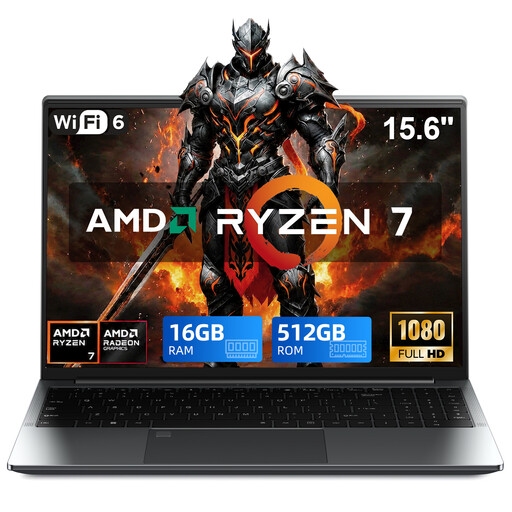 No image available
VANWIN GRT156R75825U, 16 GB DDR4, 512 GB SSD
A Windows laptop to compare if you’re looking for the listed memory and storage configuration for local programming.
The title lists Windows 11 Pro, 16 GB DDR4 and a 512 GB SSD.
View at Joybuy
 No image available
ASUS ProArt P14 H7407BA-SM078X, 128 GB RAM, 1 TB SSD
A Windows laptop to compare if you use several local development applications and the listed configuration suits your workflow.
The title lists Windows 11 Pro, 128 GB RAM and a 1 TB SSD. The product description lists a 14-inch 3K OLED screen and a weight of 1.48 kg; a charger is not included.
View at Joybuy
Frequently asked questions
Do you need 16 GB RAM to debug a tournament planner?
No, there’s no universal memory requirement for this task. Visual Studio Code recommends 1 GB RAM for the editor itself; this doesn’t automatically include the operating system, runtime, browser and other tools open at the same time. Compare the requirements of your complete workflow with the exact configuration.
Can you use Visual Studio 2022 on a MacBook Air in the same way as Visual Studio Code?
No. Microsoft lists the Windows operating systems supported by Visual Studio 2022, while Visual Studio Code also lists supported macOS versions. Check which of the two programmes you need.
What should you check if you want to connect an external monitor?
Check the video output on the exact laptop configuration, as well as the input and cable for your monitor. Lenovo lists HDMI and USB-C with DisplayPort among the connections for the ThinkPad E14 Gen 7 (AMD) product range, but configurations may vary by model.
Are containers essential for this project?
Not based on the programming task alone. If your workflow requires Docker Desktop on Windows, check the requirements for your chosen Windows version and back-end; Docker Docs distinguishes between supported installation options.
What are your rights when buying a laptop online in the Netherlands?
ACM ConsuWijzer says that online consumer purchases are generally subject to a 14-day cooling-off period, which ends 14 days after delivery. Your statutory guarantee is separate from any manufacturer’s or seller’s warranty offered: if a product doesn’t meet the expectations you were entitled to have, the seller is responsible for providing a suitable solution. Check the terms and any exceptions that apply to your order.


