
Practising while out and about
If you often take your laptop out of your bag for a quick session, weight and size are key considerations. Apple lists the 13-inch MacBook Air with M5 as weighing 1.23 kg.


For online practice questions, a laptop that’s easy to carry and comfortable to read on is often a good starting point. Check whether you’ll have an internet connection at your usual stops, too. Choose an operating system only after checking the requirements of your practice platform: you won’t necessarily need extra processing power for basic browser use.
If you often take your laptop out of your bag for a quick session, weight and size are key considerations. Apple lists the 13-inch MacBook Air with M5 as weighing 1.23 kg.
It’s worth checking in advance whether you’ll be able to access practice questions and save your progress where you usually take a break. ANWB says its theory platform is accessible on a laptop; check access for the practice service you use.
If you use required software in addition to practice questions, the application’s requirements will determine which operating system is right for you. Google Chromebook Help explains that Chromebooks use web apps rather than standard computer programs.
First, check that your practice platform works with the operating system you’re considering. Then compare portability, the screen and access at the places you usually stop.
| What to consider | What should you check? | Who is this important for? |
|---|---|---|
| Carrying and setting it up | Compare the weight and screen size of the exact configuration. | If you often take your laptop out of your bag and want to get started quickly, portability matters. Around 33% of consumers say portability is their main concern when buying. |
| Access while out and about | Try your practice platform on the network you’ll use there and check whether offline access is available. | If you practise in different places, you’ll want to avoid a session being cut short because you can’t get online. Around 27% of consumers prioritise access in different locations. |
| Screen and entering answers | Check the screen size and finish, and make sure the keyboard suits the way you answer questions. | If you need to read questions clearly and type your answers, the screen and input method matter more than a compact size alone. Around 20% of consumers prioritise readability and input. |
| Software and updates | Check the app or browser requirements; for ChromeOS, also check the update schedule for the exact model. | If a provider requires you to use a specific application, you’ll want to make sure it works on your laptop. Around 20% of consumers say software compatibility is their main concern when buying. |
ChromeOS uses web apps rather than standard computer programs. This means desktop software you’re required to use won’t necessarily work on a Chromebook.
Check your practice service’s requirements and test whether you can sign in and enter answers using the operating system you’re considering.
If you need specific desktop software, you may also need access to another compatible device.
Manufacturers quote battery life based on their own testing conditions. Apple, for example, distinguishes between streaming video and wireless internet use; these figures don’t tell you how long your practice sessions will last.
Check what the battery test is based on, and plan to charge your laptop if you won’t have easy access to a socket.
A Lenovo IdeaPad Slim 3 14AHP10 isn’t the same configuration as the IdeaPad Slim 3 82XN008RMH. The model numbers and specifications differ.
Before buying, compare the full model number, configuration and included accessories.
The IdeaPad Slim 3 is a Windows range with configurations for general use; assess each model’s specifications individually.
The Chromebook Plus 514 is a ChromeOS option if your practice platform works with a suitable web app.
The 13-inch MacBook Air with M5 is a compact option if you want to use macOS.
The Vivobook S 14 OLED S5406SA is a Windows option if you’re looking for a more fully equipped laptop for practice questions and other tasks.
These laptops are suited to practice questions and other light browser-based or text tasks between appointments. Before buying, check that the configuration meets your practice platform’s requirements and see what’s included with the laptop.
 No image available
An option if you want to view practice questions and type answers on a laptop that’s also described as a 2-in-1.
Intel Core 5 120U, 8 GB RAM, 512 GB SSD, 14-inch 2K touchscreen and Windows 11 Home.
A compatible USB-C charger isn’t included and must be purchased separately.
 No image available
A Windows laptop to consider if you want a 14-inch screen and a keyboard for online questions and typing.
AMD Ryzen 5 7520U, 8 GB RAM, 512 GB SSD and Windows 11 Home.
The laptop is supplied without a charger; one must be purchased separately.
 No image available
An option to consider if you’re looking for a laptop for web browsing and everyday tasks, and want to compare the exact specifications.
Ryzen 7 8840HS, 16 GB memory, 1 TB PCIe SSD and QWERTY keyboard.
A compatible charger must be purchased separately.
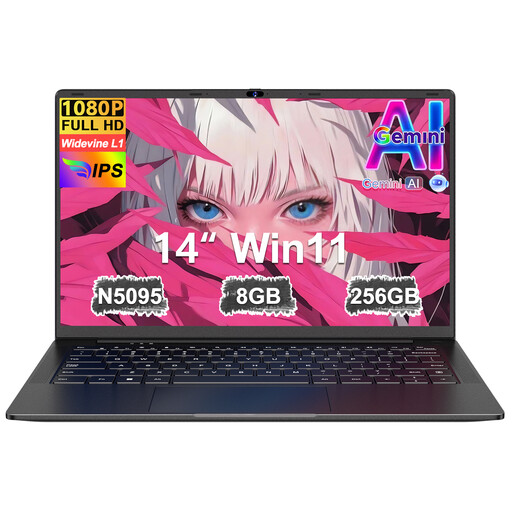 No image available
A 14-inch laptop to consider if you want to view practice questions and type answers.
8 GB RAM, 256 GB SSD and N5095 processor.
 No image available
A compact option to consider if you want to use macOS for practice questions and everyday tasks.
13-inch screen, A18 Pro, 8 GB memory, 256 GB storage and QWERTY keyboard.
Not necessarily. On 14 August 2026, the Consumers’ Association cited 8 GB RAM and a basic processor as a starting point for browsing the internet and using simple office software. Check separately whether your practice platform has any additional requirements.
That depends on the provider and the specific application. Google says that some files and apps can be used offline on a Chromebook, but that doesn’t prove an online practice exam will work offline. Test the feature before relying on it.
Google Chromebook Help directs you to Settings, About ChromeOS, Additional details and Update schedule. Check the information for the exact model; app support may change after its final update.
Check with the provider to find out which browser, app or operating system you need, then try the service on the device you’re considering. This is particularly important if the provider requires a specific desktop app or you’re thinking about buying a Chromebook.
No. Don’t do this while driving the vehicle. The Dutch government says you must not hold and use an electronic device while driving, but you may do so when stationary. Plan your practice session for a safe stop.