Who is this guide for?

Collector with custom registration fields

You want to record details such as your own ID, findspot and description for each piece, then find them again later. The Cultural Heritage Agency of the Netherlands recommends giving objects a unique number, so start with the structure of your records rather than a fast processor.

Collector who takes photographs

You link images or documents to objects and want to review photos alongside their details. Consider the screen, how you transfer images and the storage included in the exact laptop configuration.

Collector who records items on location

Sometimes you record items without an internet connection or take your laptop with you to view the pieces. Check that your chosen software works offline and find out how to back up and restore both your catalogue and photos.

What should you look for?

Local registration on Windows

A good fit if: you want to work without an internet connection or start with a local spreadsheet or database file.

Keep in mind: your catalogue and photos need separate backups. Also check the full product code and the software included.

Mac with compatible software

A good fit if: you want a Mac and your chosen catalogue software runs on macOS. Microsoft documents Excel tables for Mac; LibreOffice lists support for Apple Silicon.

Keep in mind: the 13-inch MacBook Air reviewed has two Thunderbolt 4/USB-C ports and no built-in SD card reader listed. Check how you’ll transfer photos from your camera.

Browser-based catalogue

A good fit if: collaboration and photo attachments matter, and you have an internet connection while entering information. Airtable Support documents attachment fields for its web, Mac and Windows apps.

Keep in mind: according to its own documentation, Airtable does not support offline access; attachments are not automatically included in a CSV export.

Consideration What to look for Who is it most important for?
Custom fields and registration Test your preferred columns in your chosen software; check that it works with the operating system. If you want to record and retrieve details specific to each piece of pottery, a useful record structure comes first. Around 36% of consumers prioritise custom fields and structure.
Viewing and storing photos Check the screen, storage capacity and the port or card reader you’ll use to transfer images. If you want to review and store photos alongside descriptions, focus on the screen and transfer options. Around 29% of consumers put photo work first.
Offline access and backups Check that your chosen software lets you edit offline, and test that you can restore your catalogue file and photos. If you want to enter information without a connection and keep your work recoverable, offline access and a complete copy are essential. Around 21% of consumers make this their top priority.
Portability and connections Compare the weight, screen size and ports of the exact configuration with your workspace and camera. If you take your laptop with you or want to connect a camera directly, size and connections matter. Around 14% of consumers prioritise these factors.

Common buying mistakes

  • Assuming laptop storage is a complete photo backup

    A copy on the same laptop won’t protect your collection if you lose that laptop. Attachments are not automatically included in an Airtable CSV export.

    Decide where your catalogue and photos will be stored, then test that you can restore both.

    You may need extra storage, such as an external drive, for a separate backup.

  • Assuming specifications apply to every model in a range

    Configurations can vary within the same laptop range. A card reader, memory capacity or bundled software won’t necessarily be included with every model.

    Compare the full model code with the specifications for that exact configuration.

    You may need an adapter, a different configuration or a software licence, so check before you decide.

  • Choosing a browser-based catalogue for offline work

    Local storage on your laptop doesn’t automatically make an online service available offline. Airtable states that offline access is not supported.

    Check the offline features of your chosen software or decide on a local workflow in advance.

  • Confusing an extended warranty with your statutory rights

    According to the Dutch government, the seller must offer a solution if a product is faulty. An additional warranty is only an extra if its terms provide additional cover.

    Read what extra cover the warranty product offers before paying for it.

    An optional warranty product comes at an extra cost.

Brands to consider

Acer

The Aspire Go 15 NX.KRPEH.00E is an example of a Windows configuration for recording information on a larger screen.

  • For this configuration, Acer lists a matte 15.6-inch IPS screen and a 512 GB SSD.
  • Acer gives 8 GB as the maximum memory for this configuration; this doesn’t apply to other Aspire configurations.

Lenovo

The IdeaPad Slim 3 15IRH10 configuration 83K100HDMH is a Windows option to compare for screen space and a built-in SD card reader.

  • For this configuration, Lenovo specifies a matte 15.3-inch screen with a resolution of 1920 × 1200 pixels, 16 GB of memory, a 512 GB SSD and an SD card reader.
  • Lenovo lists an Office trial with this configuration. Check which software and licence are included with the model you’re considering.

Apple

The 13-inch MacBook Air with M5 is a macOS option if your chosen registration software works on it and you’re looking for a portable laptop.

  • For the base configuration, Apple lists 16 GB of unified memory, a 512 GB SSD and two Thunderbolt 4/USB-C ports.
  • A built-in SD card reader isn’t listed in the specifications mentioned, so check how you’ll transfer photos.

HP

The HP 15-fd1000 series includes several Windows configurations. Compare them by product code and the screen and memory specifications you want.

  • HP describes several processor and memory options within the series.
  • HP warns that configurations vary by country and model; a series description doesn’t confirm the specifications of an individual model.

Joybuy laptops for catalogue work

These Joybuy products are suited to catalogue work and storing or viewing files and photos. Compare the screen, storage, memory configuration and keyboard layout for each model, and check that it works with your preferred software.

HP OmniBook 3 14-hy0058ndx laptop in Glacier Silver/Canvas Gray

HP OmniBook 3 14-hy0058ndx

A 14-inch model for viewing and storing catalogue details and photos on a laptop.

14-inch IPS screen, 1920 × 1200, AMD Ryzen 5 7520U, 8 GB RAM, 512 GB SSD and Windows 11 Home.

View at Joybuy

Acer Aspire Go 15 AG15-72P-56BJ with AZERTY keyboard

Acer Aspire Go 15 AG15-72P-56BJ

The 15.6-inch screen may suit you if you’d like more room to work while recording information. Check that the AZERTY layout works for you.

FHD screen, Intel Core 5 120U, 16 GB RAM, 512 GB SSD, Wi-Fi 6 and Windows 11 Home. AZERTY keyboard.

View at Joybuy
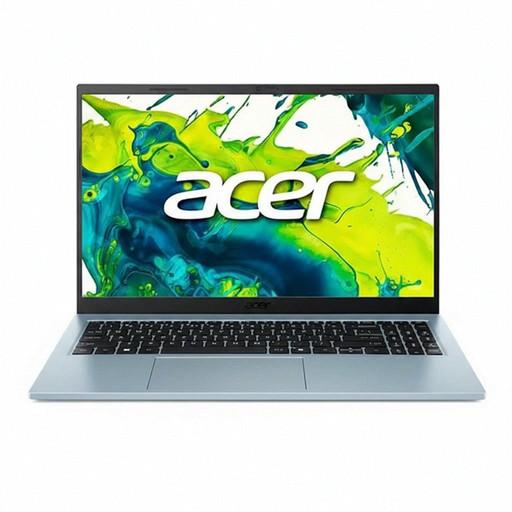
Acer Aspire Go 15 AG15-72P-599F in Snow Blue with QWERTY keyboard

Acer Aspire Go 15 AG15-72P-599F

The 15.6-inch screen gives you room to view catalogue details and images. Check that the QWERTY keyboard works for you.

Core 5 120U, 8 GB RAM, 512 GB SSD, Snow Blue and QWERTY keyboard.

View at Joybuy

Acer Aspire Go 15 AG15-72P-58MP in Snow Blue with QWERTY keyboard

Acer Aspire Go 15 AG15-72P-58MP

The 15.6-inch screen may suit you if you’d like extra room to view details and photos while recording information.

Core 5 120U, 16 GB RAM, 512 GB SSD, Snow Blue and QWERTY keyboard.

View at Joybuy

Auusda T173A laptop with a 17.3-inch screen

Auusda T173A

The 17.3-inch screen may suit you if you’d like to view catalogue details and images on a larger display.

17.3-inch screen, 3250C processor, fingerprint unlock, 8 GB DDR4 RAM and 512 GB SSD.

View at Joybuy

Frequently asked questions

Do I need to buy database software straight away to create custom fields?

No, you can start by creating your own columns in a spreadsheet. If you later need forms or queries, LibreOffice Base documents these database features. Try out your fields with a few pieces first.

Can I add new pieces to Airtable without an internet connection?

No, Airtable states that offline access is not supported. A CSV export can include data, but attachments need to be exported separately. For offline entry, choose a suitable local workflow.

How can I make sure my photos are included in my backup?

Include both your catalogue file and photo folders in your backup, and test that you can restore them. Microsoft Support explains how File History copies libraries to an external drive or network location; you can add folders in other locations if needed.

Does my preferred office software come with the laptop automatically?

It varies by model. Lenovo lists an Office trial for the IdeaPad Slim 3 15IRH10 configuration 83K100HDMH. Check which software and licence come with the full model code.

What warranty rights do I have when buying a laptop in the Netherlands?

According to the Dutch government, you’re entitled to a product that works as it should, and the seller must resolve any problem with it. The Netherlands has no fixed statutory warranty period; if you’re considering an additional warranty, check what extra cover its terms provide.
