What should you look for when choosing?
Standard compact laptop
Choose this if: you mainly highlight text and type comments, need a keyboard and often take your laptop with you.
Bear in mind: you can’t write directly with a pen on a laptop screen folded back into tablet mode. Also check that your research software works with the operating system you choose.
2-in-1 with a compatible pen
Choose this if: handwritten margin notes are an important part of how you work. Lenovo describes the Yoga 7i 2-in-1 Gen 10 as having a touchscreen, 360° design and digital pen.
Bear in mind: check the exact configuration and whether the pen is included and compatible. The stated 70 Wh for one configuration is battery capacity, not a battery-life measurement; the OLED screen mentioned is glossy.
More reading space and ports
Choose this if: you often view a paper alongside your notes or connect peripherals. A Dutch configuration of the ASUS Zenbook 14 OLED lists a 14-inch 16:10 screen; ASUS lists USB-A, USB-C and HDMI among the ports available across the range.
Bear in mind: the ASUS screen mentioned is glossy, and 75 Wh alone doesn’t predict how long the battery will last. Check the screen and ports on the specific model.
Your choice depends on how you annotate, how long you need to work away from a socket and how much screen space you need on the move. Compare the exact configuration and try out your workflow with the PDF app you plan to use.
| What to consider | What should you check? | Who should give this more weight? |
|---|
| Time away from a power socket |
Check the test conditions behind the quoted hours; capacity in Wh is not a measure of battery life. |
If I want to read for a long time on the move, I don’t want my session to be interrupted unexpectedly. Around 36% of consumers say time away from a power socket is their main purchase concern. |
| How you annotate |
Try highlighting, saving comments and reopening them; check pen compatibility if you want to write by hand. |
If I want to write directly in the margins, I want to know whether the pen works with the configuration I’ve chosen. Around 29% of consumers prioritise handwritten annotations. |
| Portability |
Check the weight of the exact configuration and whether the required power adapter is included. |
If I often carry my laptop between workspaces, I want to factor in the weight and necessary accessories in advance. Around 21% of consumers say portability is their main purchase concern. |
| Reading space and keeping your annotations |
Compare screen size and aspect ratio; check how the PDF app saves and exports files. |
If I want to view a paper alongside my notes and find annotations later, I look at screen space and export options. Around 14% of consumers put reading space and keeping annotations at the top of their list. |
Joybuy products
This selection from Joybuy includes standard laptops and 2-in-1 models for reading and annotating papers on the move. For each configuration, check the screen specifications, pen compatibility and whether a power adapter is included.
 Image unavailable
Lenovo Yoga 9 16N1X11 83N70020MH 16-inch 2-in-1, NVIDIA RTX Spark N1X, 32GB RAM, 1TB SSD, Blue, QWERTY
Suited to anyone who wants a 2-in-1 design for switching between reading and typing; check whether the exact configuration includes the compatible pen you want.
The product name lists a 16-inch screen, NVIDIA RTX Spark N1X, NVIDIA Blackwell RTX GPU, 32GB RAM, 1TB SSD and a QWERTY keyboard.
View at Joybuy
 Image unavailable
HP OmniBook 3 14-hy0058ndx, 14-inch, Ryzen 5 7520U, 8GB RAM, 512GB SSD, Windows 11 Home, QWERTY
Suited to anyone looking for a standard 14-inch laptop for reading papers on the move and adding typed comments.
The product name lists a Ryzen 5 7520U, 8GB RAM, 512GB SSD, Windows 11 Home and a QWERTY keyboard.
According to the product information, the charger is not included.
View at Joybuy
 Image unavailable
Apple MacBook Air 15-inch M5, 16GB, 512GB, Starlight, QWERTY
Suited to anyone who wants a 15-inch screen for reading and mainly types.
The product name lists an M5 chip, 16GB of memory, 512GB of storage and a QWERTY keyboard.
According to the product information, the power adapter is not included.
View at Joybuy
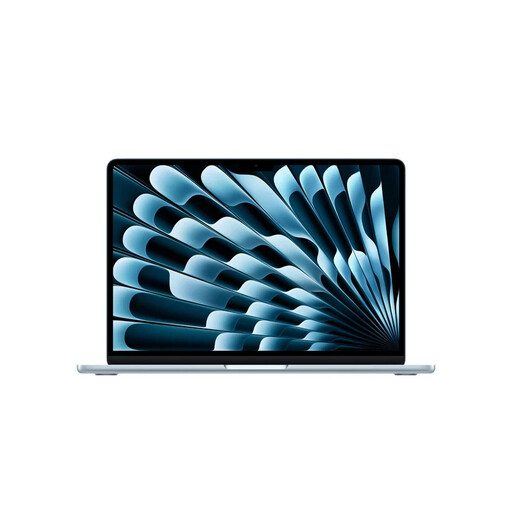 Image unavailable
Apple MacBook Air 13-inch M5, 16GB, 512GB, Sky Blue, QWERTY
Suited to anyone looking for a 13-inch laptop for papers on the move and mainly making typed annotations.
The product name lists an M5 chip, 16GB of memory, 512GB of storage and a QWERTY keyboard.
According to the product information, the power adapter is not included.
View at Joybuy
 Image unavailable
Lenovo IdeaPad Slim 5 15ARP10, 15.3-inch, Ryzen 5 7535HS, 16GB RAM, 512GB SSD, Cloud Grey, QWERTY
Suited to anyone who wants a 15.3-inch laptop for reading papers and doesn’t prioritise handwritten annotations.
The product name lists a Ryzen 5 7535HS, 16GB RAM, 512GB SSD and a QWERTY keyboard.
According to the product information, the charger is not included.
View at Joybuy
Frequently asked questions
Do I need to buy a laptop with a pen to annotate a PDF?
No. Preview on Mac supports highlights and notes, and Zotero has its own PDF reader with annotation tools. Choose a 2-in-1 if you want to write directly by hand, and check which pen is compatible with the exact configuration.
How do I prepare a paper to work offline?
Save the file locally and, before you leave, test in your chosen desktop app whether you can add a highlight, save it and find it again after reopening the file. Adobe explains how to use PDF software offline; don’t assume an online editor will work in the same way or that a paper is already available locally.
Will my Zotero annotations still be visible if I open the PDF in another app?
Not automatically: Zotero says annotations from its built-in reader are saved in the Zotero database, not directly in the original PDF. If needed, export a PDF with the annotations embedded and check it in the other app.
Can I use the quoted battery life to estimate how long I can work on PDFs?
Only use those figures alongside the test conditions. Apple lists up to 15 hours of wireless web browsing and 18 hours of video streaming for the MacBook Air M5; these aren’t measurements of PDF annotation. If possible, test your own app, brightness settings and locally saved files.
Can I return a laptop bought online in the Netherlands within 14 days?
According to ACM ConsuWijzer, a standard online consumer purchase generally comes with a 14-day cooling-off period from delivery. Check the applicable exceptions and conditions for trying out and returning the product.


